
Clockwork for Omarchy
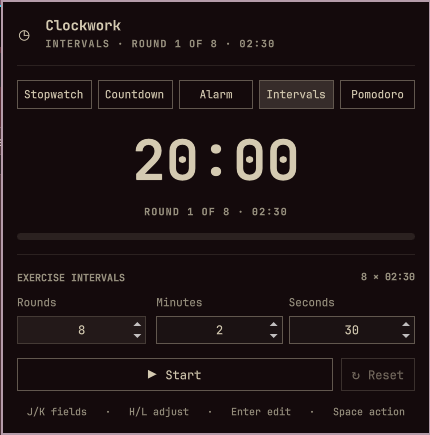
A compact Omarchy Quattro bar widget with five modes:
- Stopwatch: a regular count-up timer.
- Countdown: minutes and seconds, with an optional full-screen break view and editable message.
- Alarm: set a one-shot alarm for the next occurrence of a clock time, in either 24-hour time or a 12-hour AM/PM form.
- Intervals:
Xexercise rounds with a minutes-and-seconds duration. - Pomodoro: alternate configurable focus and short-break phases, followed by a long break after the final focus cycle. The bar switches to a green coffee indicator during breaks, and the panel tracks completed focus sessions.
What's new in 0.7.0
- Alarm time can use 24-hour time or a 12-hour AM/PM form.
- Alarm clock, bell, and phone sounds can be selected in the Alarm panel. An alarm repeats its selected sound for at most three minutes, while its bar item pulses until reset.
The timer keeps running when its panel is closed. Exercise intervals play one
direct PipeWire ping at each round boundary and a three-ping sequence at
completion, while Omarchy notifications show the corresponding round state.
An alarm repeats its selected sound for up to three minutes, then remains
visibly ringing until it is reset or acknowledged with R. Pomodoro uses the
same single ping between phases and three-ping completion; its sound can be
disabled. Breaks start automatically after focus, while the next focus phase
waits for you to resume it.
While an alarm awaits acknowledgement, Clockwork also pulses an urgent-color background in the bar so the state remains visible even after its sound stops.
Install
omarchy plugin add https://github.com/pjgeutjens/omarchy-clockwork.git --enable
Update an installed copy with:
omarchy plugin update io.github.pjgeutjens.clockwork
Local development
Validate the plugin from this repository:
./scripts/validate.sh
Install a local working copy:
plugin_id=io.github.pjgeutjens.clockwork
plugin_dir="$HOME/.config/omarchy/plugins/$plugin_id"
mkdir -p "$plugin_dir"
rsync -a --delete \
  --exclude .git \
  --exclude .agents \
  --exclude .codex \
  ./ "$plugin_dir/"
omarchy-shell shell rescanPlugins
omarchy plugin enable "$plugin_id"
The widget defaults to the right section of the bar. Move it with:
omarchy bar move io.github.pjgeutjens.clockwork --section right
The popup follows the widget's bar position. To place both the widget and its popup in the center, use:
omarchy bar move io.github.pjgeutjens.clockwork --section center
Left-click opens the panel. Middle-click starts or pauses the active timer; right-click resets it.
Inside the panel, keyboard navigation has two states:
- In browse mode,
1through5selects Stopwatch, Countdown, Alarm, Intervals, or Pomodoro.J/K, Up/Down, or Tab/Shift+Tab moves through the current mode's fields and wraps at either end.H/Lor Left/Right moves between the large time segments, adjusts a selected compact number by one, or switches the fullscreen option off/on. Enter edits the selected number or text, or activates a toggle. Mouse hover moves the same visible cursor. - In edit mode, typing replaces the selected value, Up/Down adjusts a number, Enter accepts it, Escape leaves the field, and Tab/Shift+Tab accepts it and moves to the next/previous field. Digits are entered into the field instead of switching modes.
- Space starts or pauses the active timer, or Sets/Unsets an alarm.
Rresets. During a Pomodoro session,Sskips the current phase without counting a skipped focus session. These shortcuts work from browse mode. Stopwatch has no settable fields, so Tab continues to the adjacent bar panel.
While Countdown or Alarm is idle, its major time segments use the larger edit
controls; interval and Pomodoro sub-settings remain compact. In Countdown mode,
enable Fullscreen break view before starting to show the timer and break
message across the current display. The option is off by default. In the
full-screen view, Space pauses or resumes, Esc returns to the panel without
stopping the countdown, and R ends and resets it.
In Alarm mode, enable 12-hour time to enter an hour from 1 through 12 and
choose AM or PM. Alarm sound cycles through the installed freedesktop
alarm clock, bell, and phone sounds. Both preferences are saved per widget;
existing alarm IPC calls continue to use 24-hour hours (0 through 23).
The timer can also be scripted through Omarchy Shell IPC:
timer=io.github.pjgeutjens.clockwork
omarchy-shell "$timer" stopwatch
omarchy-shell "$timer" countdown 5 0
omarchy-shell "$timer" intervals 8 2 30
omarchy-shell "$timer" alarm 7 30 "Wake up"
omarchy-shell "$timer" pomodoro 25 5 4 15
omarchy-shell "$timer" start
omarchy-shell "$timer" pause
omarchy-shell "$timer" skip
omarchy-shell "$timer" reset
omarchy-shell "$timer" status
omarchy-shell "$timer" open
omarchy-shell "$timer" close
omarchy-shell "$timer" toggle
The interval command accepts rounds minutes seconds; the example above sets
eight rounds of 2 minutes 30 seconds. For compatibility, the earlier forms
intervals 8 30 seconds and intervals 8 2 minutes still work.
Saved settings
Changes made in the Pomodoro fields, its sound toggle, and the Alarm settings
are saved to the widget's entry in ~/.config/omarchy/shell.json. They can
also be set from the command line:
omarchy bar set io.github.pjgeutjens.clockwork pomodoroWorkMinutes 25 --json
omarchy bar set io.github.pjgeutjens.clockwork pomodoroShortBreakMinutes 5 --json
omarchy bar set io.github.pjgeutjens.clockwork pomodoroLongBreakMinutes 15 --json
omarchy bar set io.github.pjgeutjens.clockwork pomodoroCycles 4 --json
omarchy bar set io.github.pjgeutjens.clockwork pomodoroSound true --json
omarchy bar set io.github.pjgeutjens.clockwork pomodoroBreakColor '#a6e3a1'
omarchy bar set io.github.pjgeutjens.clockwork alarmUses12Hour true --json
omarchy bar set io.github.pjgeutjens.clockwork alarmSound 'bell.oga'
For compatibility with standalone Pomodoro conventions, Clockwork also reads
workMinutes, shortBreakMinutes, longBreakMinutes,
pomodorosPerCycle, sound, and breakColor when their namespaced Clockwork
counterparts are absent.
Dependencies and permissions
Clockwork requires the Omarchy Quattro shell. It invokes the Omarchy-provided
omarchy-notification-send command for notifications and PipeWire's pw-play
with the freedesktop system sound files for audible alerts. It installs no
packages, starts no daemon, makes no network requests, and requires no secrets
or privileged access.
Remove the local copy
omarchy plugin remove io.github.pjgeutjens.clockwork
Runtime notes
This plugin runs inside the long-lived omarchy-shell process and starts no
daemon of its own. Its timer state survives closing the panel, but resets when
the shell itself restarts.