
ExpressVPN for Omarchy
A compact Omarchy Quattro bar widget for checking and toggling ExpressVPN.
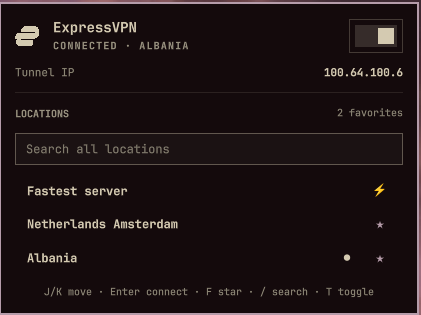
- Left-click opens a status panel with an on/off switch.
- Right-click connects or disconnects immediately.
- Middle-click refreshes the status.
- The bar dot pulses while the connection is changing.
- Search all ExpressVPN locations in the panel and reconnect to one directly.
- Connect through ExpressVPN's Smart Location from the always-visible Fastest server row.
- Star frequently used locations to keep them at the top of the picker.
- See the active tunnel IP in the panel while connected.
- Press
/to focus location search; navigation keys remain available outside it.
The plugin uses the installed expressvpnctl command and stores no account,
activation, or connection credentials.
Requirements
- Omarchy Quattro
- The official ExpressVPN Linux application, activated and providing the
expressvpnctlcommand
Install
omarchy plugin add https://github.com/pjgeutjens/omarchy-expressvpn.git
omarchy plugin enable io.github.pjgeutjens.expressvpn
The widget defaults to the right section of the bar. Move it with:
omarchy bar move io.github.pjgeutjens.expressvpn --section right
Branding
The widget resolves the expressvpn desktop icon installed by the official
ExpressVPN application. This repository does not redistribute ExpressVPN
artwork. ExpressVPN and its logo are trademarks of their respective owner;
this independent plugin is not affiliated with or endorsed by ExpressVPN.
One-time ExpressVPN setup
The ExpressVPN GUI must be running, or background mode must be enabled, for a bar plugin to connect while the GUI is closed:
expressvpnctl background enable
Disconnecting works regardless of whether background mode is enabled.
Update
omarchy plugin update
Remove
omarchy plugin remove io.github.pjgeutjens.expressvpn
Local development
Validate the plugin from this repository:
./scripts/validate.sh
Install a local working copy:
plugin_id=io.github.pjgeutjens.expressvpn
plugin_dir="$HOME/.config/omarchy/plugins/$plugin_id"
mkdir -p "$plugin_dir"
rsync -a --delete \
  --exclude .git \
  --exclude .agents \
  --exclude .codex \
  ./ "$plugin_dir/"
omarchy-shell shell rescanPlugins
omarchy plugin enable "$plugin_id"
It can also be controlled through Omarchy Shell IPC:
vpn=io.github.pjgeutjens.expressvpn
omarchy-shell "$vpn" open
omarchy-shell "$vpn" connect
omarchy-shell "$vpn" connectTo belgium
omarchy-shell "$vpn" disconnect
omarchy-shell "$vpn" toggleVpn
omarchy-shell "$vpn" refresh
omarchy-shell "$vpn" status