
Omapaste
Clipboard manager for Omarchy. Inspired by Paste for Mac.
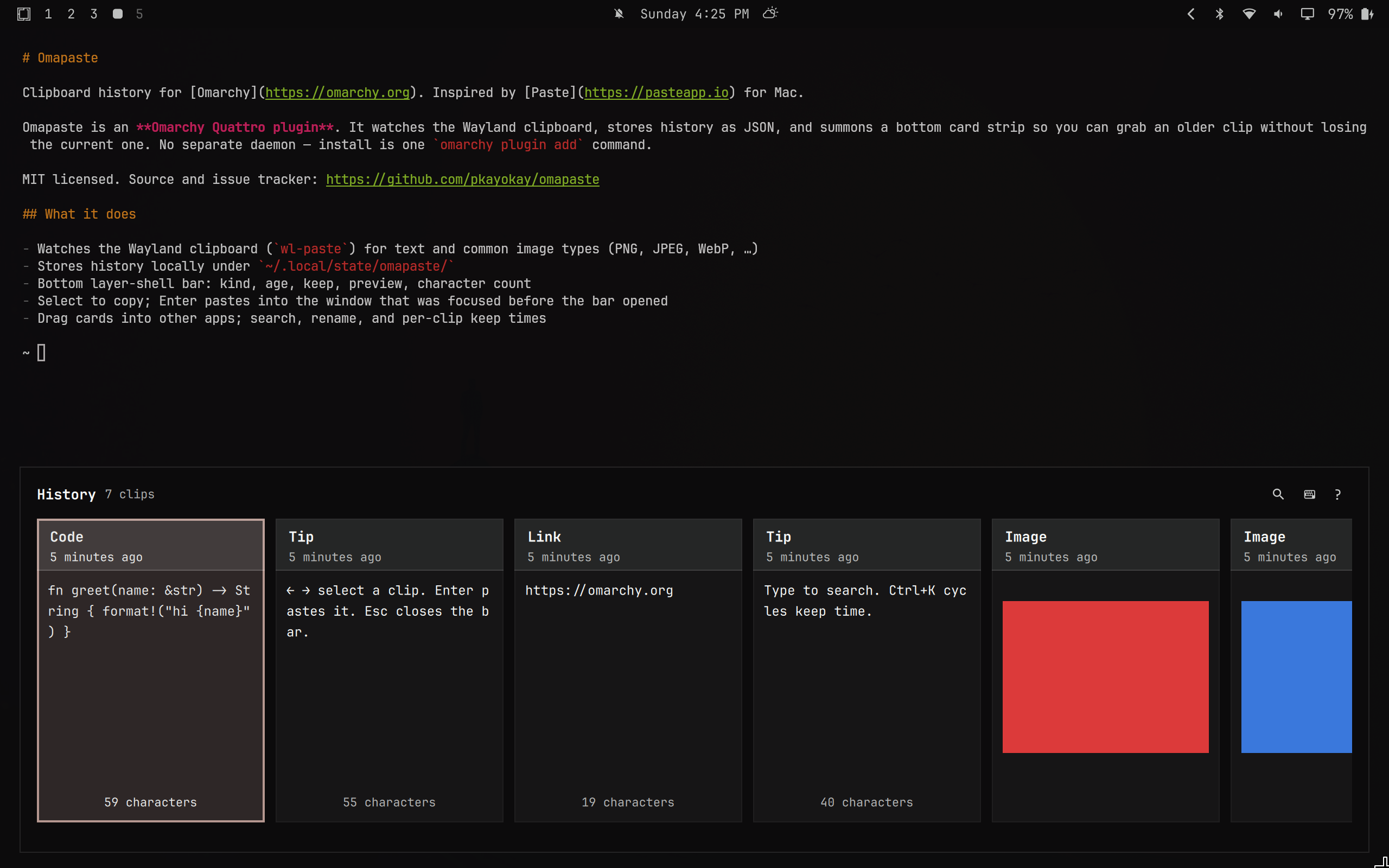
It watches what you copy and summons a bottom card bar so you can grab an older clip without losing the current one.
What it does
- Watches the Wayland clipboard (
wl-paste) for text and common image types (PNG, JPEG, WebP, …) - Stores history locally in SQLite under
~/.local/state/omapaste/ - Bottom layer-shell card strip (most recent first): kind, age, keep, preview, character count
- Selecting a card copies it; Enter (or double-click) pastes into the window that was focused before the bar opened
- Drag a card into another app (text or images; terminals and text fields get a path/URI)
- Double-click a kind label to rename; per-clip keep time (1h / 1d / 7d / forever) and search
- Follows the current Omarchy menu theme tokens
- Skips password-manager / secret MIME types
Install
omarchy plugin add https://github.com/pkayokay/omapaste.git --enable
System packages (usually already on Omarchy): wl-clipboard, wtype, python, and jq.
Optional Hyprland toggle (Super+Shift+V — edit yourself; the plugin never rewrites Hyprland config):
-- ~/.config/hypr/bindings.lua
o.bind("SUPER + SHIFT + V", "Omapaste", "omarchy-shell shell toggle io.github.pkayokay.omapaste '{}'")
Keep Super+Ctrl+V for Omarchy’s built-in clipboard picker.
Full install / update / remove: docs/omarchy-plugin.md. Config: docs/configuration.md.
Usage
Summon via the bind above, or:
omarchy-shell shell summon io.github.pkayokay.omapaste '{}'
| Input | Action |
|---|---|
| Super+Shift+V (if bound) | Toggle the bar |
| ← → | Select a clip (also copies it) |
| Click a card | Select and copy |
| Drag a card | Drop into another app |
| Ctrl+C | Copy the highlighted clip and close |
| Enter or double-click | Paste into the previous window and close |
| Ctrl+1–9 | Paste that card |
| Delete or Backspace | Remove the highlighted clip (Backspace edits search if it has text) |
| Ctrl+K | Cycle keep time (1h → 1d → 7d → forever) |
| Double-click kind label | Rename |
| Type | Search |
| Clear (✕) while searching | Clear the search query |
? (key) |
Shortcut list |
? (header button) |
Open GitHub issues and close |
| Esc | Close shortcuts, then search, then the bar |
Why not the built-in Omarchy clipboard?
Omarchy’s Super+Ctrl+V picker is a vertical list that copies onto the clipboard. Omapaste is the Paste.app-shaped alternative: a bottom card timeline, per-clip retention, drag into apps, and paste-on-Enter into the app you were already in.
Docs
| Doc | Contents |
|---|---|
| docs/omarchy-plugin.md | Install, update, remove, Hyprland bind |
| docs/configuration.md | qml-config.json, data paths |
| CHANGELOG.md | Release notes |
Issues
Bugs, ideas, and patches: github.com/pkayokay/omapaste/issues.
License
MIT