
OmaSoccer
An opinionated multi-club football ticker for your Omarchy bar.
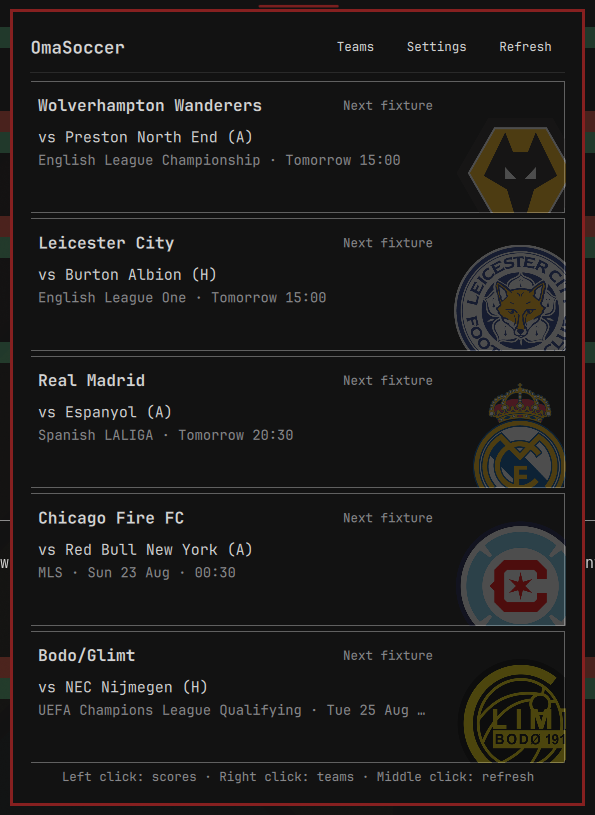
Choose up to five clubs and OmaSoccer quietly wakes around their fixtures, shows live scores in the bar, and sleeps when there is nothing to follow. No account, API key, backend, telemetry, or background daemon is required.

Current scope
- English Premier League through National League, plus Women's Super League
- All four SPFL divisions
- Cymru Premier and Northern Irish Premiership
- La Liga, Bundesliga, Serie A, Ligue 1, Eredivisie, and Primeira Liga
- MLS and the top flights in Argentina, Brazil, Mexico, and Japan
- Global club search across ESPN's wider football catalogue
- Cross-competition club schedules, including domestic and UEFA cups when ESPN publishes them
- Up to five persistent favourite clubs
- Club priority with smart live rotation
- Full, compact, and icon-only bar styles
- Theme-foreground score text with a small accent marker for live matches
- Adaptive polling around kickoff and direct ESPN match links
- Optional agent skill for managing clubs, preferences, and local tweaks
The interface says football. soccer only appears in the provider URL.
Install
omarchy plugin add https://github.com/Popidge/omasoccer.git --enable
OmaSoccer requires Omarchy 4, Python 3, and network access. It installs no packages and requests no privileged access.
Remove
omarchy plugin remove io.github.popidge.omasoccer
OmaSoccer keeps preferences outside the plugin checkout so they survive a
remove and reinstall. To erase them too, remove
~/.local/state/omarchy/settings/omasoccer.json after removing the plugin.
Preferences are stored outside the plugin checkout at:
~/.local/state/omarchy/settings/omasoccer.json
It is a single, hot-reloaded JSON document shared by the picker, settings UI,
and provider helper. Because JSON has no comment syntax, OmaSoccer writes
durable _comment guidance into the document and links a bundled JSON Schema.
Editors and agents can therefore understand and validate it without requiring
the optional skill. Recognised settings and comments survive subsequent UI
writes.
Defaults and configuration
Pick one club and OmaSoccer is ready. Browse the opinionated league list, or search above it for any football club ESPN recognises. Search results are enriched only when selected, keeping requests light while preserving proper club abbreviations, colours, and crests. The default Smart bar shows the highest-priority club when no match is live and rotates only when multiple followed clubs are playing. Open Settings to reorder clubs or choose:
- Bar behaviour: Smart, Cycle all, or Priority only
- Bar style: Full, Compact, or Icon
- Rotation: 5, 8, or 12 seconds
- Refresh: Fast, Balanced, or Gentle
The same file exposes a restrained advanced section for direct editing:
showDetails: fetch scorer/stat rows while the panel is openresultRetention:day(default) ornextbadgeOpacity:0to hide watermarks, otherwise0.0–0.6
Every supported value and default is described inline and in
config.schema.json. Invalid values are safely clamped
or reset to their defaults when loaded.
For the next fixture, Full mode shows WOL v PNE - Tomorrow 15:00; Compact
shows WOL - Sat 15:00 (or just the kickoff time on match day). Both modes
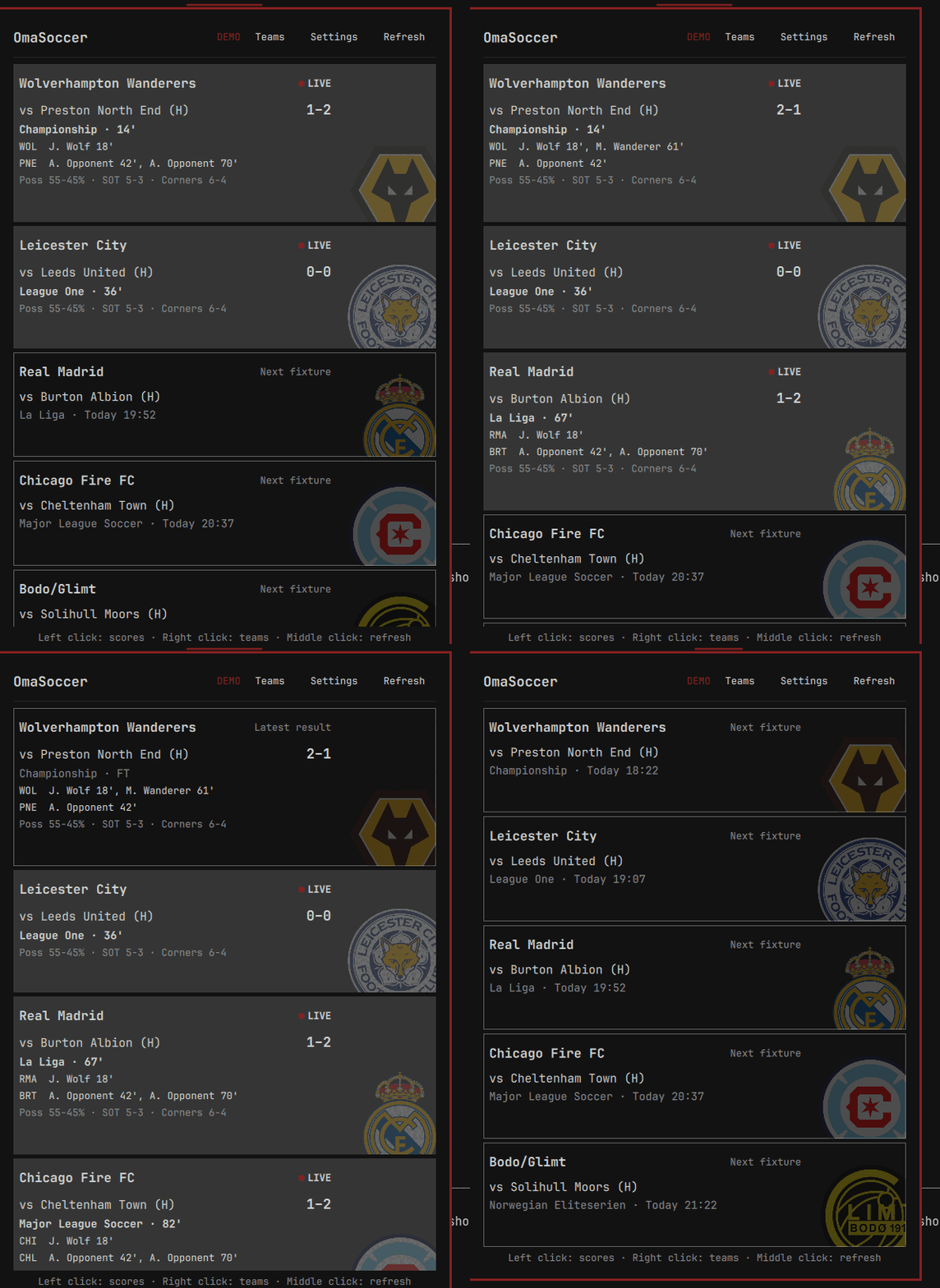
show live and completed matches as WOL 2-1 PNE - 67', - HT, or - FT.
Live scores retain the bar theme's foreground colour while a separate accent
dot carries the live state.
Polling is adaptive rather than fixed. Balanced mode sleeps for up to six hours when the next fixture is distant, wakes ten minutes before kickoff, checks every 30–60 seconds around the match window, and every 20–45 seconds while a followed club is live. Fast and Gentle shift those intervals for responsiveness or fewer requests.
After full time, the result remains the selected card until the next local calendar day. OmaSoccer then switches to the club's next fixture. While the panel is open, live and same-day result cards progressively add any scorer, possession, shots-on-target, and corner data ESPN supplies. Missing detail is simply omitted.
The Settings page also includes deterministic Mixed and Live-transition demo
feeds. They never contact ESPN and are visibly marked DEMO; switch the feed
back to Off to resume real scores.
Data source and privacy
OmaSoccer talks directly to ESPN's public website JSON endpoints. Requests and
preferences never pass through an OmaSoccer service. ESPN's interface is
undocumented and may change; provider parsing is isolated in
scripts/football_data.py so UI code does not depend on its response shape.
The network boundary is deliberately narrow: API requests are limited to the
exact site.api.espn.com host, redirects are rejected, and response bodies are
capped at 2 MiB before parsing. Remote text is length-bounded, stripped of
control/markup delimiters, and rendered as plain text. Club crests are accepted
only from ESPN's exact a.espncdn.com/i/teamlogos/soccer/500/ path; match links
only from www.espn.com/soccer/. The same checks are repeated in the QML model
before a resource is loaded or a link is opened.
ESPN names, logos, and match data remain the property of their respective owners. OmaSoccer is unofficial and is not affiliated with or endorsed by ESPN, any league, or any club.
Optional agent skill
If you want your agent to manage OmaSoccer, the repository includes an optional skill covering its settings, team-resolution flow, bar commands, and safe local customisation. It is not installed with the plugin. Opt in with:
~/.config/omarchy/plugins/io.github.popidge.omasoccer/scripts/install-agent-skill
Start a new agent session afterwards. Remove the optional links with:
~/.config/omarchy/plugins/io.github.popidge.omasoccer/scripts/install-agent-skill remove
The installer performs no downloads and uses no elevated permissions. It only
creates omasoccer symlinks in the current user's supported agent-skill
directories, skips any path that is a real file or directory, and removes only
links that still point back to this plugin's bundled skill.
Development
python3 -m unittest discover -s tests -v
node tests/model.test.js
bash tests/live-smoke.sh
omarchy plugin validate "$PWD"
The live smoke test only reads ESPN and needs curl, jq, and network access.
The unit tests use sanitized local fixtures.