
GameDock
Your games, one Omarchy-native launcher.
GameDock is an Omarchy bar plugin that brings games from Steam, Heroic, RetroArch, and RPCS3 into one compact dashboard. Search, filter, sort, favorite, and launch games directly without opening a launcher UI first.
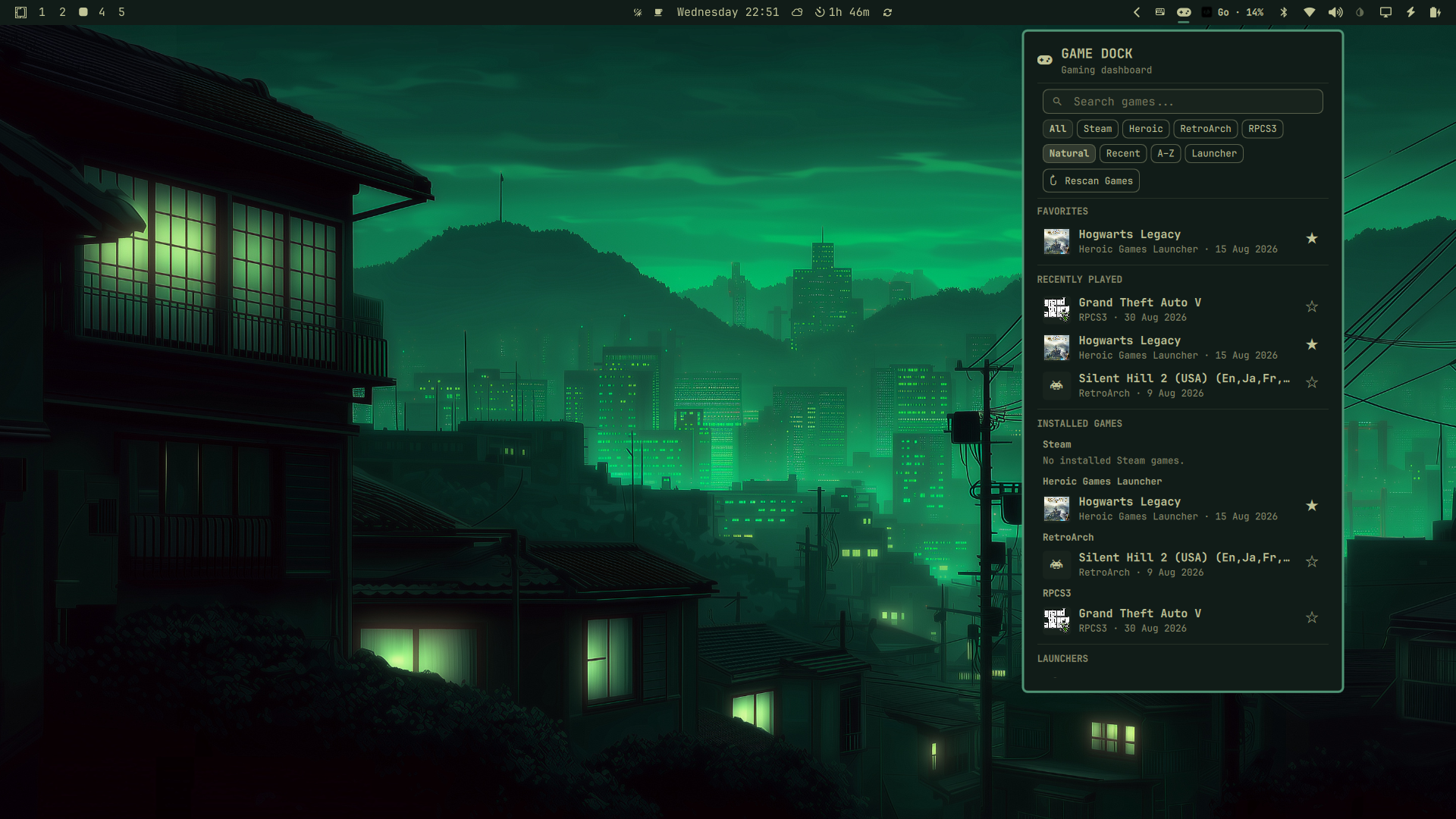
Looks at home in Omarchy
GameDock is designed as an Omarchy-native plugin and follows the existing Omarchy visual and theming system. The same compact panel adapts naturally to different built-in Omarchy themes:
<div align="center"> <img src="docs/images/gamedock-theme-01.png" alt="GameDock in an Omarchy theme" width="32%"> <img src="docs/images/gamedock-theme-02.png" alt="GameDock in a second Omarchy theme" width="32%"> <img src="docs/images/gamedock-theme-03.png" alt="GameDock in a third Omarchy theme" width="32%"> </div>Features
- 🎮 Unified game launcher
- 🔎 Fast in-memory search
- 🎛️ Launcher filtering
- ↕️ Natural, Recent, A–Z, and Launcher sorting
- ⭐ Persistent favorites
- 🕘 Recently played games
- 🖼️ Local and remote artwork with glyph fallback
- ⌨️ Keyboard navigation
- 🖱️ Mouse interaction
- 🪟 Native Omarchy popout integration
- ↻ Manual library rescan (button or
R) - 🔔 Native Omarchy launch and refresh feedback
- 📚 Large-library scrolling
- 🚀 Direct launching through supported launchers
Supported Launchers
| Launcher | Detection | Launching | Artwork |
|---|---|---|---|
| Steam | Installed library metadata | Steam game URI | Local Steam grid artwork when available |
| Heroic | Epic, GOG, and Amazon metadata | Heroic launch URI | Local Heroic icons plus optional HTTPS art_square artwork |
| RetroArch | Playlists and history | Core plus ROM path | Launcher glyph fallback |
| RPCS3 | games.yml |
RPCS3 --no-gui launch |
Local ICON0.PNG when available |
Steam may show an empty library until Steam is logged in. Artwork availability depends on the metadata and local files provided by each launcher.
How It Works
GameDock scans supported launchers into a local cache, presents the results in an Omarchy-native panel, and applies search, launcher filtering, and sorting in memory. Selecting a game launches it through its native launcher or command.
Runtime data is stored outside the repository in the Omarchy state directory.
Install
Install directly through the Omarchy plugin manager:
omarchy plugin add https://github.com/prathamesh913/gamedock.git --enable --yes
To move the widget to another bar section:
omarchy bar move io.github.prathamesh913.gamedock --section right
Uninstallation
Use the Omarchy plugin manager rather than deleting the plugin directory:
omarchy plugin remove io.github.prathamesh913.gamedock --yes
This disables GameDock, removes the installed plugin, and reloads Omarchy's plugin list. Runtime data is preserved:
~/.local/state/omarchy/gamedock/cache.json— scanned game data~/.local/state/omarchy/gamedock/art/— cached artwork~/.local/state/omarchy/settings/gamedock.json— favorite IDs
To remove that data as well, optionally run:
rm -rf ~/.local/state/omarchy/gamedock ~/.local/state/omarchy/settings/gamedock.json
Requirements
- Omarchy with Quickshell plugin support
- Python 3 for launcher scanning
curlis optional and is used only for remote artwork downloads
GameDock does not require network access to browse local data or launch games.
If curl is unavailable, or a remote artwork request fails, GameDock continues
working and uses the launcher glyph fallback.
Usage
| Action | Input |
|---|---|
| Open or close GameDock | Click the GameDock bar icon |
| Refresh launcher data | Middle- or right-click the bar icon |
| Rescan the game library | Click ↻ Rescan Games or press R outside the search field |
| Activate search | Press / or click the search field |
| Edit search | Type in the active search field |
| Navigate games and controls | Arrow keys, h/j/k/l, or mouse |
| Change launcher or sort | Click a chip, or focus it and press Enter/Space |
| Launch a game | Click it, or focus it and press Enter/Space (panel closes) |
| Toggle a favorite | Click the star, or focus it and press Enter/Space |
| Clear search / close | Escape |
| Switch bar panels | Tab / Shift+Tab |
Launching a game or launcher shows a native Omarchy notification
(Launching <title> / Opening <name>). Failures detectable at spawn
time show an error toast instead (Could not launch <title>); failures
after the game process starts are not visible to GameDock.
A manual rescan reuses the normal scanner, shows a Scanning… state, and
reports Game library updated on success or Could not refresh game library on failure while keeping the previous library. Search, launcher
filter, sort mode, and focus are preserved where possible. Pressing R
rescans only when the search field is not focused; typing r still
refines a non-empty search.
Artwork
Local artwork is preferred whenever it is available. Heroic can also provide remote square artwork, which GameDock fetches lazily for visible or nearby games and caches locally at:
~/.local/state/omarchy/gamedock/art/
Cached artwork is reused across shell restarts. Remote artwork URLs must use HTTPS, and invalid downloads are rejected before they are cached. When artwork is missing, unavailable, invalid, or cannot be downloaded, GameDock falls back to the launcher's glyph.
Privacy and Network Behavior
GameDock does not need network access to browse locally cached game data or launch games. Network requests are limited to optional remote artwork supplied by supported launcher metadata. Those artwork URLs must use HTTPS. If remote artwork is unavailable, the rest of GameDock continues to work offline.
Runtime Data
| Path | Purpose |
|---|---|
~/.local/state/omarchy/gamedock/cache.json |
Scanned launcher and game data |
~/.local/state/omarchy/gamedock/art/ |
Validated cached remote artwork |
~/.local/state/omarchy/settings/gamedock.json |
Persistent favorite IDs |
These files are created and maintained automatically. They are not part of the Git repository.
Current Limitations
- Supported launchers are currently Steam, Heroic, RetroArch, and RPCS3.
- Controller navigation is not available yet.
- Only launch failures detectable at spawn time can show an error toast.
- There is no background monitoring or periodic rescanning beyond the existing refresh-interval setting.
- Current testing through 1000 synthetic games did not show a meaningful need for virtualized list rendering; very large real-world libraries may still benefit from it in the future.
Roadmap
Possible future work includes:
- Controller navigation
- Additional launcher integrations
- Automated tests and CI
- Further polish based on real-world usage
Contributing
Issues, fixes, and improvements are welcome. Contributions should preserve
Omarchy-native interaction patterns, avoid modifying Omarchy system files, and
keep GameDock self-contained. Run the validation commands below before
submitting changes, and see docs/GAMEDOCK_PROGRESS.md for architecture and
development history.
Development Validation
qmllint -I $OMARCHY_PATH/shell Panel.qml BarWidget.qml
omarchy plugin validate .
python3 -m py_compile scan.py
License
GameDock is released under the MIT License.
Status
GameDock v1
The current release provides a stable Omarchy-native dashboard for supported launchers, with search, filtering, sorting, favorites, artwork, direct launching, and large-library scrolling.