
OmaLive
Live Activities for long-running commands, scripts, apps, and plugins on Omarchy.
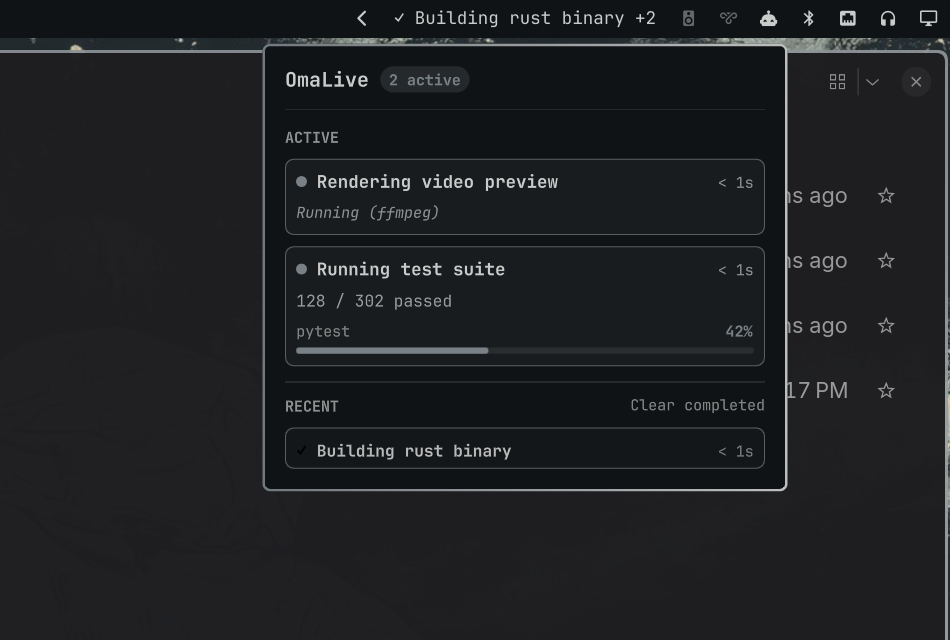
OmaLive gives long-running work one native, temporary lifecycle in the Omarchy bar and panel:
start → appear in bar → update → inspect in panel → finish → brief result → disappear.
When nothing is running, OmaLive consumes zero width in your bar.
What OmaLive does
Long-running terminal tasks (tests, builds, ffmpeg conversions, backups, AI agents) are often scattered across workspaces and tabs. OmaLive provides a unified, event-driven protocol so any process can report its state directly into the Omarchy bar without adding permanent clutter.
Installation
Install using the Omarchy plugin CLI:
omarchy plugin add https://github.com/prudhviy99/omalive.git --enable --yes
Quick Demo (about 20 seconds)
Run the interactive demo script:
~/.config/omarchy/plugins/io.github.prudhviy99.omalive/bin/omalive demo
Command Wrapper (omalive run)
Wrap any command to automatically track its execution, exit status, and completion:
~/.config/omarchy/plugins/io.github.prudhviy99.omalive/bin/omalive \
  run --title "Running test suite" -- pytest -q
After the optional PATH setup below, the shorter omalive run ... form works anywhere.
Shell Integration API (Raw IPC)
You can publish and control activities directly from any shell script or tool using Omarchy shell IPC:
# Start an activity
omarchy-shell omalive upsert '{"id":"build","title":"Compiling project","progress":0.1,"source":"cargo"}'

# Update progress
omarchy-shell omalive upsert '{"id":"build","progress":0.75,"detail":"750/1000 crates"}'

# Complete activity
omarchy-shell omalive finish build success
Use a stable ID for the lifetime of one job. Reusing that ID patches the existing activity, and every update refreshes its TTL. Producers should call finish on completion or remove when abandoning an activity without a result; TTL expiry is only a crash-recovery fallback.
CLI Reference
omalive start --id ID --title TEXT [options]
omalive update --id ID [options]
omalive finish --id ID [--status RESULT]
omalive remove --id ID
omalive status
omalive clear-history
omalive run --title TEXT [--id ID] [--source TEXT] -- COMMAND [ARG...]
omalive demo
omalive help
start and update accept --detail, --progress 0..100, --indeterminate, --status active|paused, --source, --icon, --ttl 5..86400, and --quiet. finish accepts success, error, warning, or cancelled and defaults to success. Run omalive help for the complete usage text.
Optional PATH Setup
To use omalive anywhere in your terminal without specifying the full plugin path:
mkdir -p "$HOME/.local/bin"
ln -s "$HOME/.config/omarchy/plugins/io.github.prudhviy99.omalive/bin/omalive" "$HOME/.local/bin/omalive"
If the link already exists, verify where it points before replacing it.
Automatic Zsh Command Tracking (Optional)
Zsh users can automatically surface commands that run longer than four seconds. This integration is disabled until explicitly sourced:
source "$HOME/.config/omarchy/plugins/io.github.prudhviy99.omalive/shell/omalive.zsh"
Set an integer threshold before sourcing to customize the delay:
export OMALIVE_THRESHOLD_SECONDS=8
source "$HOME/.config/omarchy/plugins/io.github.prudhviy99.omalive/shell/omalive.zsh"
The hook never changes how a command runs or writes command text to disk. It shows a truncated command line in the bar, so leave it disabled if command text may contain secrets.
Architecture & Resource Behavior
- Service singleton (
Service.qml): Single state manager running withinomarchy-shell, hosting theomaliveIPC target. - Bar widget (
BarWidget.qml): Zero-width when idle; displays primary active task or recent completion transient. - Nested panel (
Panel.qml): Interactive popup listing all active tasks and recent history with keyboard navigation (Esc,Tab). - Memory & Limits: Bounded to 32 active items and 20 recent items; payloads capped at 4KB. State is in-memory and resets cleanly with the shell.
Dependencies
bash(4.0+)jqomarchy-shell/quickshell- GNU coreutils (
date,dirname, and related basics)
Security and Privacy
- Omarchy plugins run unsandboxed with the user's permissions.
- OmaLive performs no network calls, uses no background daemons or systemd services, and requests no elevated privileges.
- It never executes activity payloads or shell commands received via IPC.
- IPC-provided labels are rendered as plain display text; markup and resource references are not interpreted.
omalive runexecutes only the explicit command arguments passed after--.- State is strictly session-local in memory.
Limitations
- Activities do not persist across shell restarts.
- OmaLive is event-driven; it does not scrape or poll un-wrapped background processes.
- Automatic tracking is currently available for Zsh; other shells can use
omalive runor raw IPC.
Troubleshooting
Check the status of the OmaLive service:
omarchy-shell omalive ping
omarchy-shell omalive status | jq
View shell logs:
qs log -p "$OMARCHY_PATH/shell" --tail 100
Management
# Update
omarchy plugin update io.github.prudhviy99.omalive --yes

# Disable
omarchy plugin disable io.github.prudhviy99.omalive

# Remove
omarchy plugin remove io.github.prudhviy99.omalive --yes
Development Checks
From the repository root:
omarchy plugin validate .
qmllint -I "$OMARCHY_PATH/shell" Service.qml BarWidget.qml Panel.qml
QT_QPA_PLATFORM=minimal QT_QPA_PLATFORMTHEME= \
  /usr/lib/qt6/bin/qmltestrunner -input tests/tst_activity_model.qml
tests/test_service.sh
tests/test_cli.sh
tests/test_zsh_hook.sh
License
MIT © 2026 Prudhvi Yalamanchili