
OmaScenes
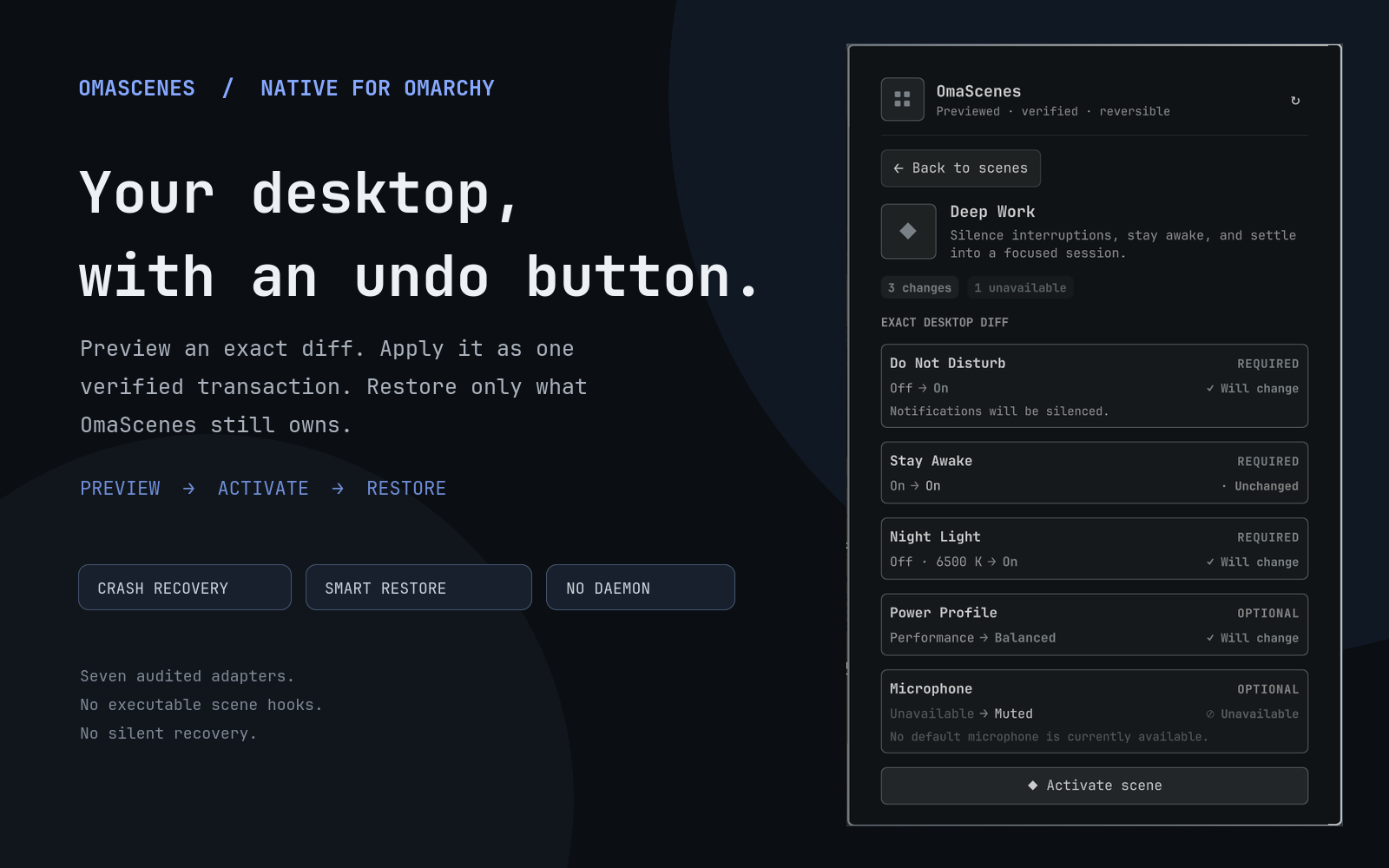
OmaScenes lets you preview, enter, and safely leave an Omarchy desktop mode as one crash-recoverable transaction.
A scene is a temporary group of desktop settings. Interview can silence notifications, keep the machine awake, disable night light, set a sensible output level, and prepare the microphone. Leaving the scene restores what was there before.
inspect → preview exact diff → snapshot → apply → verify
                                      ↘ failure: roll back

active scene → later manual changes → smart restore → verify
OmaScenes is deliberately not a shortcut launcher. It records what it changed, verifies every write, survives shell restarts, and preserves newer choices that it no longer owns.
What it feels like
- Open the compact 2×2 grid icon in the bar.
- Choose a scene. This performs a read-only preview—nothing changes yet.
- Review every
current → targetrow and any unavailable capability. - Acknowledge microphone unmute when required, then activate.
- Use Restore previous settings when finished. Later manual or system changes are reported as preserved changes.
The panel is native Omarchy QML: it follows shell colors, fonts, spacing, borders, horizontal/vertical bars, outside-click behavior, and the standard panel keyboard model. Use J/K or arrow keys to move, Enter/Space to activate, R to refresh, and Escape to go back or close.
Highlights
- Exact preview — every requested setting stays visible, including required, optional, unchanged, risky, and unavailable rows.
- Microphone protection — muted → live requires a fresh UI acknowledgement or CLI
--yes. - Verified transaction — the journal exists before the first mutation; each write is queried again before proceeding.
- Automatic rollback — an apply or verification failure restores possibly changed steps in reverse order.
- Smart restore — values still matching the scene are restored; later drift is preserved.
- Force restore — an advanced, clearly labeled path overwrites drift with original snapshots.
- Explicit recovery — an interrupted apply/restore produces a dominant recovery view; startup never mutates silently.
- Strict local design — no network, daemon, schedule, background polling, account, telemetry, executable scene hook, or privilege escalation.
Installation
Install and enable the repository with Omarchy’s native plugin flow:
omarchy plugin add https://github.com/prudhviy99/omascenes.git --enable --yes
OmaScenes defaults to the right bar section. You can move it with Omarchy’s bar settings or:
omarchy bar move io.github.prudhviy99.omascenes --section right
The QML panel works without a global CLI command. For convenient terminal use, optionally link the bundled engine yourself:
mkdir -p "$HOME/.local/bin"
ln -s "$HOME/.config/omarchy/plugins/io.github.prudhviy99.omascenes/bin/omascenes" \
  "$HOME/.local/bin/omascenes"
Installation never creates this link or runs a hook automatically.
Removal
If a scene is active or recovery is required, restore it from the panel before removing the plugin. The equivalent direct command is:
bash "${XDG_CONFIG_HOME:-$HOME/.config}/omarchy/plugins/io.github.prudhviy99.omascenes/bin/omascenes" restore
Then remove OmaScenes through Omarchy:
omarchy plugin remove io.github.prudhviy99.omascenes
Removal intentionally leaves the private OmaScenes state directory in place so an interrupted recovery record is never silently destroyed.
Built-in scenes
| Scene | Intent | Settings |
|---|---|---|
| Deep Work | Silence interruptions and settle into focus. | DND, stay awake, night light, balanced power, muted microphone |
| Gaming | Favor performance and interruption-free play. | DND, stay awake, night light off, performance power, 55% output, private microphone |
| Interview | Prepare notifications, idle, lighting, and audio for a call. | DND, stay awake, night light off, balanced power, 35% output, audible output, live microphone |
| Presentation | Stay focused and prevent private audio leaks while presenting. | DND, stay awake, night light off, balanced power, muted output and microphone |
| Movie Night | Remove distractions and prepare comfortable playback. | DND, stay awake, night light off, balanced power, 45% output, muted microphone |
| Quiet Travel | Favor battery life and quiet audio. | DND, normal idle, night light, power saver, 20% output, muted output and microphone |
| Battery Saver | Stretch battery while leaving quiet audio available. | Notifications on, normal idle, night light off, power saver, 20% output, muted microphone |
| Wind Down | Warm and quiet the desktop for the evening. | DND, normal idle, night light, power saver, 15% output, muted microphone |
Power and audio settings are optional in the bundled scenes. If their command or endpoint does not exist, preview explains that it will be skipped. If an available optional adapter fails to query, apply, or verify, activation is blocked or rolled back—it is never silently ignored.
Smart restore and force restore
For each applied step the journal records:
- the original snapshot;
- the declarative target;
- the value actually observed after apply;
- the current transaction state and any bounded diagnostic.
Normal restore compares the current value with the observed applied value. If they still match, OmaScenes restores the original. If they differ, something newer changed that setting, so OmaScenes preserves it.
Force restore ignores that ownership check and writes every original snapshot. It is intentionally secondary in the UI because it can overwrite choices made after activation.
Custom scenes
Create this file to completely replace the bundled scene list:
${XDG_CONFIG_HOME:-$HOME/.config}/omascenes/scenes.json
There is no deep merge. The selected file is capped at 64 KiB and rejects unknown fields, duplicate IDs, invalid types, out-of-range volume, and optional keys not present in settings.
{
  "schemaVersion": 1,
  "scenes": [
    {
      "id": "presentation",
      "name": "Presentation",
      "description": "Stay awake, silence notifications, and keep the microphone private.",
      "settings": {
        "doNotDisturb": true,
        "stayAwake": true,
        "nightLight": false,
        "microphoneMuted": true
      },
      "optionalSettings": ["microphoneMuted"]
    }
  ]
}
Allowed settings
| Key | Type and target | Adapter |
|---|---|---|
doNotDisturb |
boolean | Omarchy notifications service |
stayAwake |
boolean | Omarchy idle service |
nightLight |
boolean | Omarchy night-light service + hyprctl for exact temperature restore |
powerProfile |
profile token returned by powerprofilesctl list |
power-profiles-daemon |
outputVolume |
number from 0.0 through 1.0 |
default WirePlumber sink |
outputMuted |
boolean | default WirePlumber sink |
microphoneMuted |
boolean | default WirePlumber source |
Scene JSON cannot contain a command, path, application, hook, environment expansion, or custom adapter.
CLI
omascenes list
omascenes preview interview
omascenes activate interview --yes
omascenes status
omascenes deactivate            # smart restore for an active scene
omascenes deactivate --force    # overwrite drift
omascenes restore               # active or interrupted journal recovery
omascenes doctor
omascenes config-path
list, status, preview, activate, deactivate, restore, doctor, and confirmed abandon accept --json. JSON mode emits exactly one compact response object. config-path intentionally prints only one absolute path.
Exit codes distinguish invalid input (2), preflight/acknowledgement failure (3), conflict/lock busy (4), failed activation with successful rollback (5), and incomplete recovery (6).
IPC
The singleton service exposes non-mutating smoke endpoints and asynchronous acceptance envelopes:
omarchy-shell omascenes ping
omarchy-shell omascenes status
omarchy-shell omascenes preview deep-work
For synchronous automation, invoke the CLI rather than treating IPC acceptance as transaction completion.
Dependencies and capability behavior
| Dependency | Use | Level |
|---|---|---|
Bash, jq, coreutils |
Engine, validation, atomic files | Required baseline |
util-linux flock |
Non-blocking transaction serialization | Required baseline |
omarchy-shell |
DND, idle, night-light IPC | Required baseline |
hyprctl |
Exact night-light temperature restoration | Adapter capability |
powerprofilesctl |
One-shot active power profile | Adapter capability |
wpctl |
Default output/source volume and mute | Adapter capability |
Run omascenes doctor --json for endpoint-aware capability reasons. A machine without a default microphone, for example, reports that adapter as unsupported instead of failing the whole plugin.
Recovery
When the bar shows ⚠ Recovery, open OmaScenes and choose Restore interrupted changes, or run:
omascenes restore
Normal recovery is ownership-aware where a verified applied value exists. An in-flight step without one is conservatively restored because it may have mutated immediately before interruption.
Advanced manual escape hatch:
omascenes abandon --confirm-keep-current
This archives the validated journal at mode 0600, removes the active journal, and does not touch desktop settings. It is intentionally absent from the normal panel.
Privacy and security
Omarchy plugins run unsandboxed. OmaScenes keeps its mutation surface small and auditable: seven fixed adapters, strict scene and journal schemas, argument arrays, private atomic state, bounded subprocess output and diagnostics, and no network or executable user data. Adapter commands are capped at 65,536 combined bytes; the native shell service retains at most 131,072 combined stdout/stderr characters per operation. Do not publish journal or configuration files if they contain device-state information. See SECURITY.md.
Development
The default demo and all automated tests use temporary HOME/XDG trees plus contract fakes; they do not touch the real desktop.
tests/run                 # 57 engine/integration assertions + QML output-bound test
tests/run hardening
bash examples/demo.sh
qmllint Service.qml BarWidget.qml Panel.qml
omarchy plugin validate .
Live mutation is disabled unless OMASCENES_ALLOW_LIVE_TEST=1 is already set.
Known v1 limits
- One active scene; no nesting or concurrent scenes.
- No app launching, window/workspace arrangement, theme, wallpaper, brightness, networking, or schedules.
- Audio ownership follows the default endpoint. A default-device change while active is treated conservatively as drift.
- Night-light temperature can be restored exactly when Omarchy reports a numeric original temperature; Omarchy 4 may report
nullwhile hyprsunset is unavailable/disabled.
MIT © 2026 Prudhvi Yalamanchili