
Parametric EQ for Omarchy
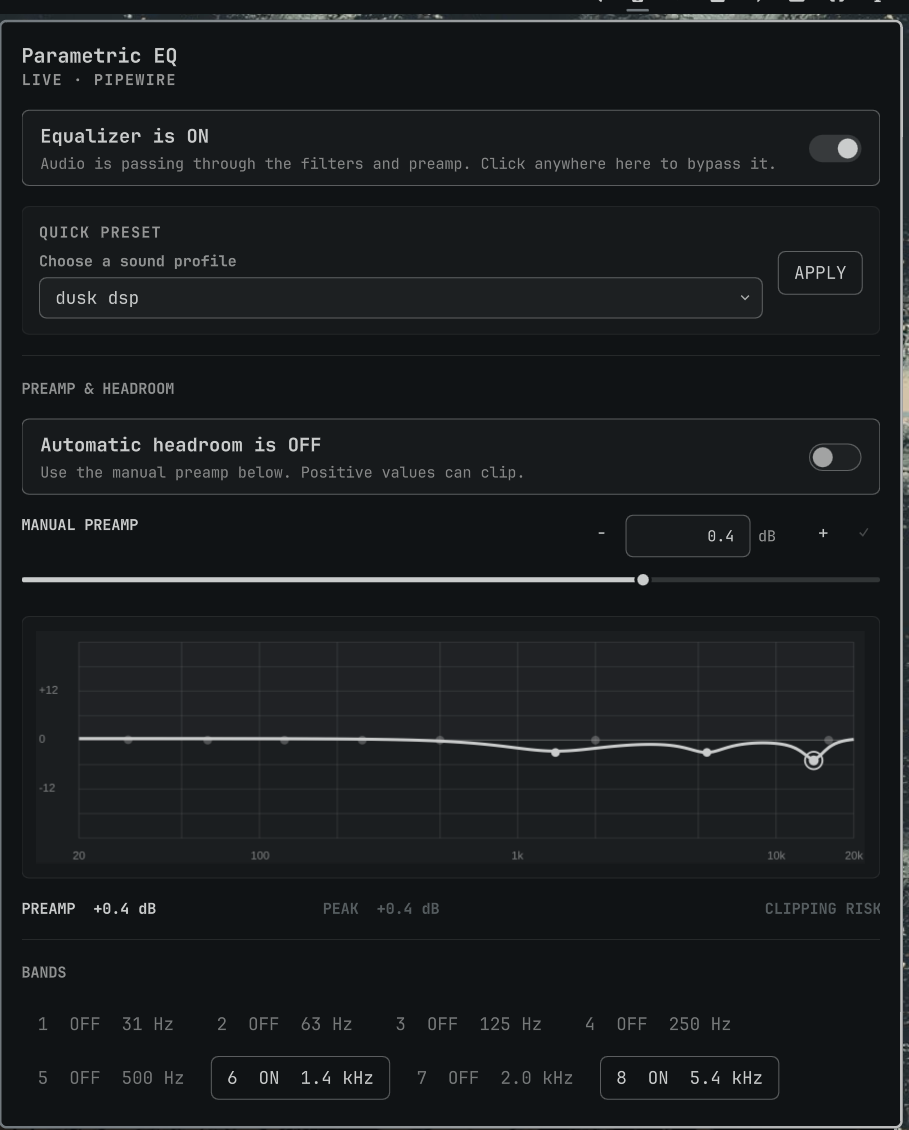
A full parametric PipeWire equalizer for the Omarchy Quattro bar. It combines ten editable bands, seven filter shapes, a live response graph, real preamp control, automatic headroom protection, presets, A/B snapshots, undo, and AutoEQ import in one native Quickshell panel.
Features
- Ten fully parametric bands, expandable to sixteen through AutoEQ import
- Bell, low/high shelf, low/high pass, notch, and band-pass filters
- Exact frequency, gain, and Q entry with auto-save and fine-step controls
- Per-band and master bypass with unambiguous processing state
- Live logarithmic response graph and estimated clipping/headroom warning
- Functional -30 to +12 dB preamp plus automatic headroom compensation
- Built-in and user presets, undo history, and A/B comparison snapshots
- Local import of standard AutoEQ
ParametricEQ.txtfiles - Live numeric updates without restarting the audio graph
Requirements
This plugin targets Omarchy 4 (Quattro) and its Quickshell-based shell. It uses software already included with a stock Omarchy audio setup:
- PipeWire and WirePlumber with the built-in filter-chain module
pw-cli,pw-dump, andpw-metadata- Python 3
systemctl --user
No separate DSP package, elevated access, remote service, or account is required.
Install
omarchy plugin add https://github.com/prudhviy99/omarchy-parametric-eq.git --enable
Click the equalizer icon, then turn the master equalizer on. First activation creates the user-owned PipeWire graph and may briefly interrupt audio while WirePlumber restarts. Frequency, gain, Q, preamp, and bypass changes apply live; changing a filter shape or band topology may require another short restart.
The Omarchy installer only clones and enables the repository. It does not run
an install hook or request elevated privileges. When the widget is disabled or
removed, its unload guard confirms that the plugin is absent from shell.json,
bypasses the EQ, removes the managed audio graph, and restarts WirePlumber.
Ordinary shell restarts and plugin hot reloads leave the graph intact.
Controls
- Click the bar icon to open the panel; middle-click toggles master processing.
- The master and per-band switches explicitly show
ON,OFF, orBYPASSED. - Drag a slider, use
−/+, or type an exact value. - Typed values auto-save after a short pause. Enter or
✓applies immediately, and selecting another band commits the current edit first. - Click a point in the response graph or a numbered band chip to select it.
- Automatic headroom reduces the effective preamp when the modeled response would exceed 0 dB.
AutoEQ import
Enter the local path to a standard AutoEQ ParametricEQ.txt file in the panel.
The importer accepts Preamp: and Filter N: ON PK Fc ... Gain ... Q ...
records, reads at most 1 MB, and supports up to sixteen filters. The file is
never uploaded.
Files and permissions
Plugins run unsandboxed inside omarchy-shell. This plugin has no network code
and only invokes fixed local commands for PipeWire and the WirePlumber user
service. It creates or updates these user-owned paths:
| Path | Purpose |
|---|---|
~/.config/omarchy/plugins/io.github.prudhviy99.parametric-eq/ |
Plugin checkout |
~/.config/omarchy/parametric-eq/ |
EQ state, presets, snapshots, and history |
~/.config/wireplumber/wireplumber.conf.d/60-omarchy-parametric-eq.conf |
Generated filter graph |
The generated WirePlumber fragment is dedicated to this plugin. The controller
uses systemctl --user restart wireplumber.service only when the graph must be
created, removed, or structurally rebuilt. It refuses to replace a symlink,
non-regular file, or fragment without the plugin ownership marker, and restores
the previous managed fragment if a graph rebuild fails.
The state directory is restricted to the current user. State reads are size-bounded, reject symlinks, hard links, and non-regular files, and remain attached to the opened file descriptor if a pathname changes. State writes use atomic descriptor-relative replacement. Output from PipeWire and systemd tools is also read incrementally under a fixed memory limit.
Command line
The panel uses backend/peqctl.py, which can also be called directly from the
installed plugin directory:
backend/peqctl.py status
backend/peqctl.py enable
backend/peqctl.py set-band 3 true bell 120 3.5 1.2
backend/peqctl.py set-auto-preamp true
backend/peqctl.py import-autoeq ~/Downloads/ParametricEQ.txt --name "My headphones"
backend/peqctl.py snapshot save A
backend/peqctl.py snapshot apply A
Update
omarchy plugin update io.github.prudhviy99.parametric-eq
Remove
The standard Omarchy command safely disables the EQ, removes its generated audio graph and plugin checkout, and retains presets and state:
omarchy plugin remove io.github.prudhviy99.parametric-eq
To remove presets and state as well, run the bundled uninstaller while the checkout still exists. The checkout and optional state are moved to the desktop trash:
plugin_dir="$HOME/.config/omarchy/plugins/io.github.prudhviy99.parametric-eq"
"$plugin_dir/scripts/uninstall.sh" --purge
The backend also exposes cleanup for recovery. It verifies fragment ownership,
bypasses processing, removes the graph, and leaves presets intact.
Development and tests
./tests/run.sh
./tests/integration.sh  # Temporarily exercises the real PipeWire graph
./scripts/install.sh    # Local development install
./scripts/install.sh --force
The isolated suite covers state validation, filter coefficients, response and headroom modeling, import safety, live-control behavior, manifest validation, fragment ownership and rollback, unload cleanup, QML linting, and manual-entry focus regressions. The integration test backs up and restores the previous EQ state and generated fragment.
License
MIT © 2026 Prudhvi Yalamanchili