
NVMe Health
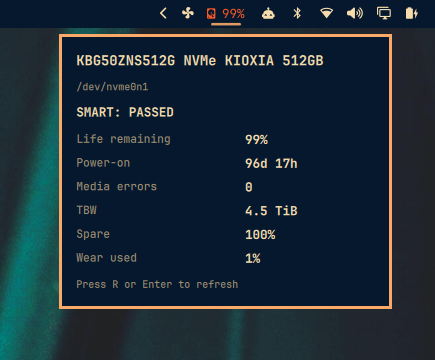
SMART disk health for the Omarchy Quattro bar: remaining life, power-on hours, media errors / reallocated sectors, and TBW.
Reads SMART through UDisks2 (already on Omarchy). No smartctl, no root, no sudoers.
Install
omarchy plugin add https://github.com/qadram/omarchy-nvme-health.git --enable
Or from a local checkout:
PLUGIN_ID=io.github.qadram.nvme-health
PLUGIN_DIR="$HOME/.config/omarchy/plugins/$PLUGIN_ID"
mkdir -p "$PLUGIN_DIR"
cp -a manifest.json BarWidget.qml Panel.qml Model.js status.py "$PLUGIN_DIR/"
chmod +x "$PLUGIN_DIR/status.py"
omarchy plugin validate "$PLUGIN_DIR"
omarchy-shell shell rescanPlugins
omarchy plugin enable "$PLUGIN_ID" --section right
Usage
- Left click: open the details panel
- Middle click (bar) or R / Enter (panel): refresh
- Bar label: remaining life
%, or!when something looks wrong
Configure
omarchy bar move io.github.qadram.nvme-health --section right
Optional settings on the widget entry in ~/.config/omarchy/shell.json:
refreshIntervalSec— 60–3600 (default300)device— e.g./dev/nvme0n1(empty = first NVMe)
Remove
omarchy plugin remove io.github.qadram.nvme-health
License
MIT