
Pane Ratio
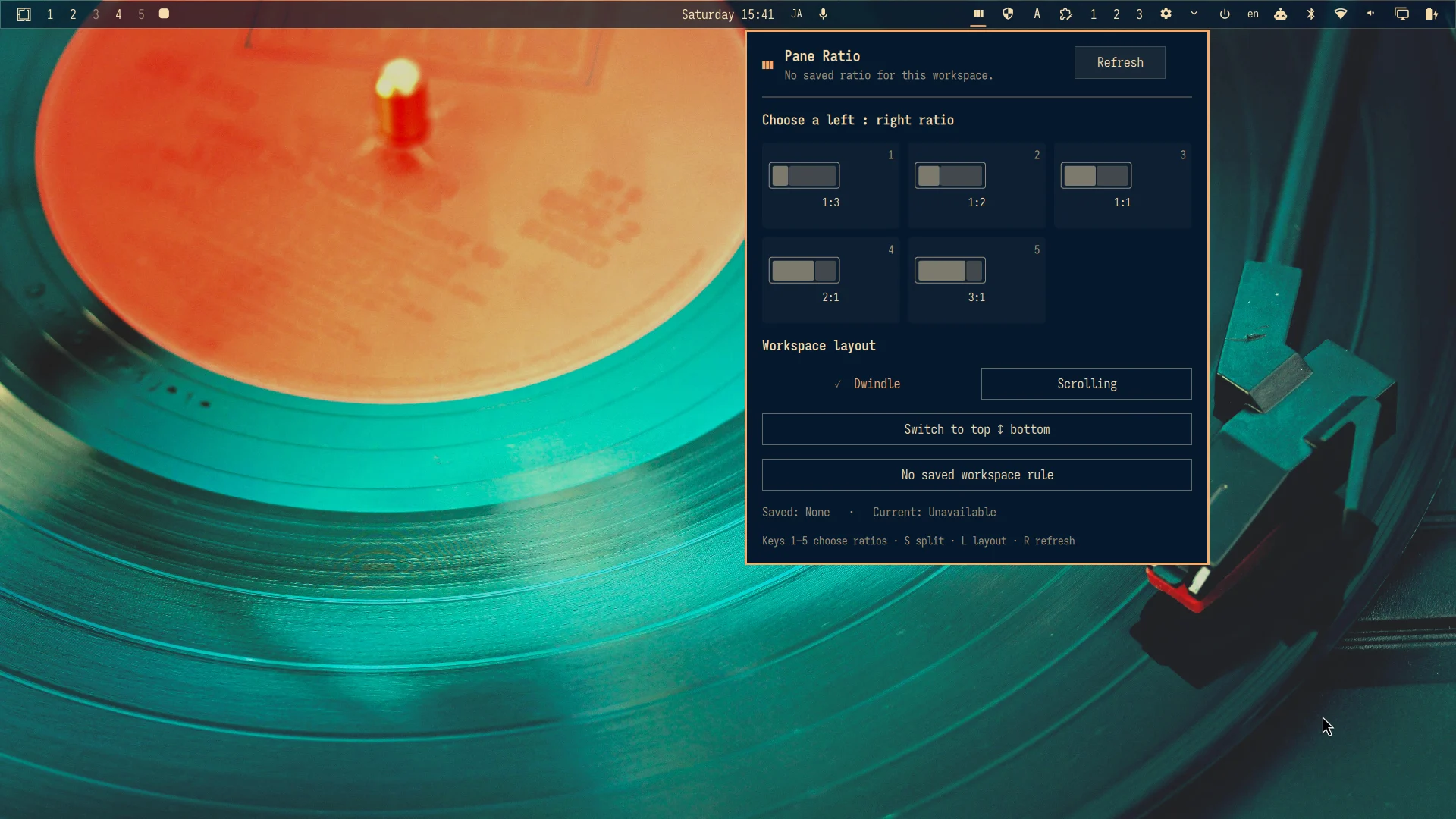
Pane Ratio is an Omarchy bar plugin for choosing Dwindle or Scrolling per workspace, remembering a left-to-right ratio, and applying that ratio whenever Dwindle is safe to adjust.
What it does
- Offers
1:3,1:2,1:1,2:1, and3:1presets from a compact bar panel. - Explicitly switches the current workspace between Dwindle and Scrolling and persists the choice in Omarchy's native workspace-layout state.
- Saves the selected ratio even when the workspace has zero or one tiled window.
- Automatically applies the saved ratio when a second tiled window appears.
- Pauses without changing geometry when three or more tiled windows are present, then resumes after the workspace returns to two.
- Switches a safe two-pane Dwindle split between left/right and top/bottom without rearranging larger trees.
- Detects and highlights the current preset, or shows
Customafter manual resizing. - Ignores floating windows.
- Refuses ambiguous layouts instead of guessing.
- Stores per-workspace intentions under
~/.local/state/omarchy-pane-ratio/; it does not edit Hyprland configuration.
Automatic application deliberately supports exactly two horizontal, ungrouped, non-fullscreen windows on a Dwindle workspace. Scrolling and multi-level Dwindle trees need different semantics and are not silently approximated.
Positive-ID workspaces are tracked by their numeric ID even if their display name changes. Hyprland named workspaces are tracked by their exact name: renaming one leaves the old rule dormant, and deliberately reusing that exact name reactivates its ratio and layout rule. Special and unclassifiable workspaces are read-only in the panel.
Install
omarchy plugin add https://github.com/r404r/omarchy-pane-ratio.git --enable
No setup script or Hyprland reload is required. The backend runs directly from the installed plugin directory.
Requirements
- Omarchy Quattro's plugin runtime.
- Hyprland with the Lua API and
hyprctl. - Python 3; the backend uses only the standard library.
No additional Python package, privileged command, background service, or network access is required.
Remove
omarchy plugin remove io.github.r404r.pane-ratio
Removal needs no sudo and leaves no Hyprland binding or setup block behind. Saved ratio intentions and Omarchy's per-workspace layout choices remain as user state. Remove ~/.local/state/omarchy-pane-ratio/ manually only if you also want to discard the saved ratios.
Use
Click the Pane Ratio icon, then choose a preset. The rule belongs to the current workspace. It can be selected before the second window exists.
Keyboard controls inside the panel:
1–9: choose the preset at that position (the default list uses1–5)D: forget the current workspace ruleS: switch two panes between left/right and top/bottomL: switch the workspace between Dwindle and ScrollingR: refresh- Arrow keys and Enter: navigate and apply
- Escape: close
Waiting means the intention is saved and needs a second tiled window. Paused means the rule is retained but the current topology is unsafe to change. The plugin never changes a three-window tree by approximation.
Upgrading from 0.4 migrates ratio state to schema 2 on first use. Canonical positive-number keys keep working as numeric workspace IDs. Old nonnumeric keys remain inactive until you explicitly save a ratio on the intended named workspace; the panel reports migration_required instead of guessing. Schema 2 is not readable by 0.4, so restore a pre-upgrade copy of intents.json before rolling back to 0.4.
The Dwindle and Scrolling buttons mirror Omarchy's Super+L workspace-layout choice, but are explicit instead of blindly toggling. The choice is written to ~/.local/state/omarchy/workspace-layouts/, the same location Omarchy reloads on startup. A saved ratio pauses in Scrolling and resumes when the workspace returns to Dwindle and has a safe two-pane topology.
The split button mirrors Omarchy's Super+J “Toggle window split” for the plugin's deliberately narrower two-pane case. A top/bottom split pauses a saved left/right ratio; switching back to left/right automatically reapplies that saved ratio. Workspace layout and Dwindle split direction are separate controls.
Custom presets
The five defaults can be replaced without editing the plugin. Create
~/.config/omarchy-pane-ratio/presets.json:
{
  "schemaVersion": 1,
  "presets": ["1:3", "1:2", "1:1", "5:3", "2:1", "3:1"]
}
Use one to nine ratios. Each side must be an integer from 1 through 20. Ratios are reduced to canonical form, so write 1:1 instead of 2:2 when that ratio is already saved. Close and reopen the panel after changing the file; the event service reads it again on its next reconciliation. A saved ratio removed from the preset file is retained but paused until it is restored or forgotten.
Safety model
- Ratio arguments are a fixed allowlist; arbitrary commands and arbitrary Lua are rejected.
- Ratio state and Omarchy-compatible workspace layout rules are bounded, allowlisted, symlink-resistant, and atomically replaced. The ratio-state directory is private (
0700); state and rule files use0600without changing permissions on Omarchy's shared layout directory. hyprctloutput is parsed as bounded JSON with timeouts and schema checks.- Workspace, window addresses, focus, and layout are checked twice before applying.
- The atomic Lua guard rechecks the window set, focus, Dwindle layout, split bias, groups, fullscreen state, and horizontal geometry immediately before dispatch. Pseudotile is not treated as a separate policy flag because Hyprland's Lua window API does not expose it; the same geometry eligibility applies.
- The resulting geometry is read back and verified.
- A lightweight Omarchy QML service reacts to relevant Hyprland events with a 140 ms debounce and one in-flight request. Transient failures retry after 250, 500, and 1000 ms, then stop; there is no polling, privileged command, network access, or user configuration write.
Development
python -m unittest discover -s tests -v
omarchy plugin validate .
qmllint -I "$OMARCHY_PATH/shell" BarWidget.qml Panel.qml PaneRatioProtocol.qml ReconcileScheduler.qml PaneRatioService.qml
License
MIT