
Window Ward
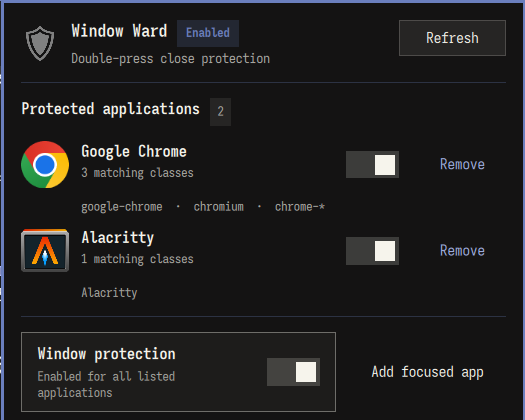
Window Ward protects selected applications from an accidental Super+W or Super+Q. The first
protected close command warns; pressing either shortcut again on the same window within the
configured interval closes it normally.
View Window Ward on the Omarchy Plugin Marketplace.
Requirements
- Compatibility target: Omarchy 4.0.4 / Hyprland 0.56.2; the 0.4.2 candidate still requires its own official-install/runtime acceptance before release.
- Python 3.10 or newer and hyprctl
Install
omarchy plugin add https://github.com/r404r/omarchy-window-ward.git --enable
~/.config/omarchy/plugins/io.github.r404r.window-ward/scripts/setup
hyprctl reload
hyprctl configerrors
The second command is intentionally explicit: Omarchy plugins do not have install hooks. It adds a
small marked block to the user-owned Hyprland bindings and backs the file up first.
It refuses to replace an existing ~/.local/bin/window-ward file or a modified managed block.
The managed block deliberately claims both Super+W and Super+Q. On an older Omarchy release
where Super+Q was not yet a default close shortcut, setup therefore adds it as a protected close
shortcut; resolve any existing personal Super+Q binding before running setup.
After updating from 0.4.0, run the setup command again and then hyprctl reload. Setup recognizes
only the exact previous W-only block, backs it up, and atomically migrates it to protect both W and Q;
an edited or unknown block is still rejected.
Before downgrading from 0.4.1 or later, run the current scripts/uninstall; the 0.4.0 uninstaller does not
recognize the newer two-shortcut managed block. Reinstall the older version and rerun its setup afterward.
Configure
window-ward list
window-ward add-focused "My application"
window-ward set-app-enabled application-id false  # or: true
window-ward remove application-id
window-ward timeout 3000
window-ward enable   # or: disable
window-ward doctor
Configuration is stored at ~/.config/window-ward/config.json. Matching uses window class and
initialClass; Window Ward never needs browser URLs, profiles, titles, passwords or tokens.
Configuration input is capped at 48 KiB and the status JSON response at 64 KiB.
The panel resolves each icon automatically from the application rule ID, then its exact class and
initialClass values, using the active system icon theme; a generic application icon is the final fallback.
Each list row can be paused independently or removed after a second confirmation click.
Adding an already-covered application preserves its existing rule and enabled state; it does not silently replace a grouped rule with a narrower match. Unknown/failed status is not an editable snapshot: refresh successfully before changing rules.
Confirmation time and notification dismissal
window-ward timeout 3000 sets confirmWindowMs to 3000 milliseconds: the interval
in which a second protected close shortcut on the same window confirms closing it. No application
is closed merely because that interval expires. The CLI also requests that duration
for its notification, but the notification server controls the visible lifetime.
In the Omarchy notification implementation inspected on 2026-09-05, normal toasts
last at least 8 seconds (at most 30 seconds), and hovering pauses their countdown.
Thus a 3-second confirmation can have a longer-lived toast; its visibility does
not mean the confirmation is still armed. This host policy is not configurable
through Window Ward, and lowering timeout cannot override the host minimum.
Right-click the toast to dismiss it immediately. Left-click also dismisses after the host's default-action/focus handling; Window Ward provides no action to close the application. Dismissing the toast does not clear the independent confirmation token. Window Ward reuses the host notification card, not a custom popup with its own close button. These interaction details may change with Omarchy updates.
Remove
~/.config/omarchy/plugins/io.github.r404r.window-ward/scripts/uninstall
omarchy plugin remove io.github.r404r.window-ward
hyprctl reload
Always run uninstall before omarchy plugin remove; otherwise the global binding points to a
removed plugin. If the repository was removed first, remove the marked WINDOW WARD block from
~/.config/hypr/bindings.lua, then run hyprctl reload. The uninstall script preserves application rules.
Also remove a dangling installer link only after verifying that it is a symlink:
[[ -L ~/.local/bin/window-ward ]] && rm ~/.local/bin/window-ward
Development
tests/test-window-ward.sh
python3 -B tests/test_backend.py
tests/test-setup.sh
python3 -B tests/test_integration.py
node tests/test-ward-model.mjs
tests/test-panel-theme.sh
tests/test-controller-smoke.sh # requires Quickshell; isolated, headless fixtures
python -B bin/window-ward --help >/dev/null
cache_dir=$(mktemp -d); trap 'rm -rf "$cache_dir"' EXIT; PYTHONPYCACHEPREFIX="$cache_dir" python -m py_compile scripts/window_ward_integration.py scripts/setup scripts/uninstall
bash -n tests/*.sh
omarchy plugin validate "$PWD"
QMLLINT=${QMLLINT:-/usr/lib/qt6/bin/qmllint}
"$QMLLINT" -I "$OMARCHY_PATH/shell" BarWidget.qml Panel.qml WardController.qml
Omarchy's qs.* modules are resolved by Quickshell at runtime, so standalone qmllint may report
unresolved-import warnings even with the correct import path. Treat those warnings as best-effort;
release validation also requires loading the plugin on the verified Omarchy version and checking logs.
Node.js is a development-test dependency only. The model/static tests do not prove real panel lifecycle or notification behavior. The headless controller smoke is a required local pre-release check on a Quickshell-capable machine (Ubuntu CI does not provide Quickshell); retain its output with the candidate SHA and do not substitute Node/static tests for it. Retain official-install runtime acceptance for each final candidate. Keep generated caches outside the checkout.
See CONTRIBUTING.md. Licensed under MIT.