
Omarchy Plugin Ideas — desktop alerts


Never miss a plugin idea worth building.
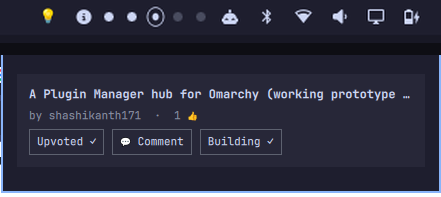
An Omarchy shell plugin that desktop-notifies you when someone posts a new idea to this repo's Ideas discussions, plus a bar icon (💡) — badged when there's something unseen — with a panel for browsing open ideas and acting on them — Upvote, Comment, Build it.
Looking to post or browse plugin ideas instead of installing anything? Go straight to the ideas board or the Discussions tab — no install required.
How it works
Notifications (Service.qml). Every intervalSeconds (default 300), the
plugin POSTs an anonymous GraphQL query to api.github.com/graphql for the
configured repo — no token or gh auth login needed, since GitHub serves
public data to unauthenticated requests too (just under a small
shared-per-IP rate limit; 5-minute polling stays well under it, but a
heavily shared IP, e.g. some ISPs/CGNAT, can hit it from unrelated traffic).
If that happens, it falls back once to gh api graphql when the GitHub CLI
is installed and logged in.
It fetches the repo's 15 most recent discussions and compares the highest
discussion number it's seen before against the ones in the configured
category. Anything newer fires a desktop notification via
omarchy-notification-send; clicking the notification opens the discussion
in your browser.
The first poll after install only records the current state — it will not replay the repo's entire idea history as a wall of notifications.
Every successful poll also writes the highest known idea number in the
configured category to ~/.local/state/omarchy/settings/idea-alerts-latest.json
— this is what badges the bar icon (see below). It's a one-way, single-writer
file: only the service writes it, only the bar icon reads it.
Bar badge. The 💡 icon shows a small dot when there are ideas newer than
the last time you opened the panel — the bar's icon slot is only 21px, too
small for a legible number, so the exact count is in the tooltip instead
(hover the icon). Opening the panel, by any means — clicking the icon, an
IPC open/toggle call, or shell.summon — marks everything caught up and
clears it. The badge tracks the notifier's view of the category, so it can
lag up to one intervalSeconds behind a truly brand-new post.
Browse panel (BarWidget.qml + Panel.qml). Click the 💡 in the bar to
fetch and list the repo's open ideas (same anonymous-then-gh fetch as
above, on demand — it doesn't share state with the notifier beyond reading
the badge file above). Ideas already labeled built are left out of the
list — showing something that already shipped just invites a duplicate
claim on it. Anything else carrying a claimed or in-progress label (see
status labels) gets a small badge
next to its title, so it's obvious at a glance that it's already spoken for.
Each idea gets three actions:
- 👍 Upvote — adds a GitHub reaction via
gh api graphql. Needsgh auth login(write access); falls back to opening the discussion in your browser ifghisn't available oruseGhForActionsis turned off. - 💬 Comment — opens the discussion straight at the comment box
(
#new_comment_field). No auth needed. - 🛠️ Build it — posts the standard claim comment ("I'd like to build
this!...") via
gh api graphql. Same auth requirement anduseGhForActionsbehavior as Upvote; otherwise falls back to the comment-box deep link. Posting this doesn't apply theclaimedlabel itself — that's still a maintainer step (see CONTRIBUTING.md) — so a freshly-claimed idea won't show the badge until that happens.
Requirements
curlandxdg-open(both present on Omarchy by default)- The target repo and its Discussions must be public
- No account, token, or
gh auth loginrequired for notifications or browsing gh auth loginonly if you want Upvote/Build it to actually post to GitHub instead of falling back to your browser
If the configured repo can't be reached, you'll get one notification saying so instead of silent failure — then it stays quiet until the next successful poll.
Security notes
Omarchy plugins run unsandboxed inside the shell process — review the source before installing anything, this one included. Specifically:
- The click-to-open action on notifications (
--exec "xdg-open <url>") is only ever set after the URL is checked against a regex matching the exact discussion URL GitHub would generate for the configured owner/repo (IdeaAlertsModel.isSafeDiscussionUrl). A malformed or unexpected API response can't smuggle an arbitrary shell command in. - The panel never writes to GitHub silently. Upvote and Build it only run
gh api graphql— using your own locally-authenticatedghsession — when you click them; nothing runs on a timer or on open. - The background notifier only ever reads (GraphQL queries), never writes.
Known limitations
- The service (notifications) and bar-widget (panel) can't be independently
enabled/disabled through the
omarchy pluginCLI today — disabling the plugin turns off both. Removing just the bar icon means editing~/.config/omarchy/shell.jsonby hand. - The bar badge only counts the configured category and only updates on the service's own poll cycle — it's a "roughly how many," not a live counter.
Install
omarchy plugin add https://github.com/ranjithrajv/omarchy-plugin-ideas.git --enable
Or, once listed, install straight from the Omarchy Plugin
Marketplace. Run omarchy plugin update io.github.ranjithraj.idea-alerts to pick up upstream changes later.
If the 💡 icon doesn't show up in the bar after enabling: on some setups
omarchy plugin enable --section and omarchy bar put both report success
without actually writing the placement (a shell bug, not this plugin — worth
reporting upstream if you hit it). Work around it by adding the widget to
~/.config/omarchy/shell.json yourself, under bar.layout.<section>:
{ "id": "io.github.ranjithraj.idea-alerts" }
then omarchy restart shell. The service (notifications) works regardless —
only the bar icon needs this.
Editing Service.qml or IdeaAlertsModel.js after install requires
omarchy restart shell to take effect — service-kind plugins mount once at
shell startup and don't hot-reload their code the way bar widgets and panels
do.
To remove: omarchy plugin disable io.github.ranjithraj.idea-alerts, then
delete the folder.
Configuration
Optional. Create ~/.local/state/omarchy/settings/idea-alerts.json to point
it at a different repo or category:
{
  "owner": "ranjithrajv",
  "repo": "omarchy-plugin-ideas",
  "category": "ideas",
  "intervalSeconds": 300,
  "useGhForActions": true
}
All fields are optional and fall back to the defaults shown above. Set
useGhForActions to false to make Upvote and Build it always open your
browser instead of attempting a real write via gh api graphql, even if
gh is installed and authenticated. The file is watched, so edits apply
without restarting the shell.
Manual check
omarchy-shell idea-alerts check   # poll immediately
omarchy-shell idea-alerts status  # current config + last-seen discussion number
omarchy-shell idea-alerts reset   # forget last-seen state and re-baseline (use after repointing owner/repo)
License
Public domain — see LICENSE. No external dependencies beyond the
curl and xdg-open binaries already present on Omarchy.