
Simple Hotspot — share your Wi-Fi uplink from the Omarchy bar
Share the laptop's Wi-Fi connection with a phone without dropping the laptop's own connection. A toggle and a password field, nothing else.
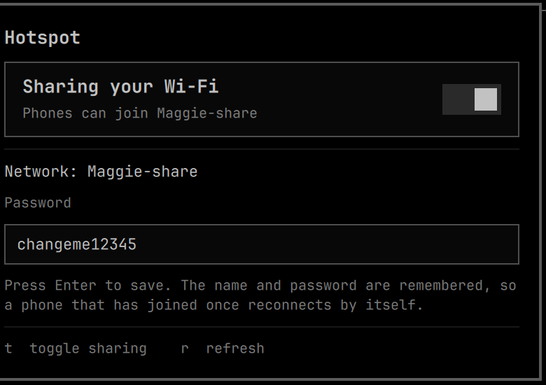
What it's for
One-device Wi-Fi: planes, hotels, conference networks, anywhere a single paid or authenticated session is all you get. The laptop keeps that session and your phone joins a local access point whose traffic is routed out through it — so you stop switching the connection back and forth between devices.
The SSID and password are stored permanently by NetworkManager, so a phone that has joined once reconnects on its own the moment you flip the toggle.
Is this for you?
| Requirement | Why |
|---|---|
| Wi-Fi adapter supporting AP mode alongside managed | The hotspot runs on a virtual interface so your uplink stays up |
| NetworkManager | It provides the AP, DHCP, DNS and NAT |
dnsmasq installed |
NM spawns its own instance for shared mode (do not enable dnsmasq.service) |
iw, nmcli |
Interface creation and configuration |
Check your adapter first:
iw list | grep -A6 'valid interface combinations'
You need a line containing #{ AP } <= 1 together with managed. Note the #channels
value on that line — see the limitation below.
Developed on an ASUS ROG Zephyrus G14 (GA403WM) with a MediaTek MT7925, on Omarchy 4 / Arch.
Install
omarchy plugin add https://github.com/rawritude/omarchy-simple-hotspot.git --enable
omarchy bar move io.github.rawritude.simple-hotspot --section right
Then install the helpers and the polkit action. omarchy plugin add clones into
~/.config/omarchy/plugins/, so run it from there:
cd ~/.config/omarchy/plugins/io.github.rawritude.simple-hotspot
sudo ./contrib/install.sh
sudo pacman -S --needed dnsmasq
Nothing to edit: the polkit action is scoped to whoever is logged in locally and active,
so there is no username to substitute. Earlier versions used a hand-edited
/etc/sudoers.d rule for the same command; the installer removes it if it finds one.
Removing it
omarchy plugin remove io.github.rawritude.simple-hotspot
sudo ~/.config/omarchy/plugins/io.github.rawritude.simple-hotspot/contrib/install.sh --uninstall
nmcli connection delete Hotspot     # removes the stored SSID and password
--uninstall removes both helpers and the polkit action — the only things this plugin puts
outside its own directory. It deliberately leaves the stored Hotspot connection alone, since
deleting it would silently un-pair every phone that has joined; the nmcli line above is
there for when you do want that.
dnsmasq is left installed since other things may use it. Your own Wi-Fi connections are
untouched.
Usage
Click the ((•)) icon, set a password (8+ characters, press Enter), flip the toggle.
Your phone sees a network named <hostname>-share.
Keys in the panel: t toggle, r refresh. IPC for keybinds:
omarchy-shell io.github.rawritude.simple-hotspot toggle
omarchy-shell io.github.rawritude.simple-hotspot on
omarchy-shell io.github.rawritude.simple-hotspot off
The CLI works standalone too: hotspot-share on|off|status|info|set-password|set-ssid.
The one real limitation
A Wi-Fi radio usually cannot transmit on two channels at once. On this hardware the capability line reads:
#{ managed, P2P-client } <= 2, #{ AP } <= 1, #{ P2P-device } <= 1, total <= 3, #channels <= 1
#channels <= 1 means the hotspot must use the same channel as your uplink. You cannot
run a 2.4 GHz hotspot while connected to a 5 GHz network. The helper reads the uplink's
current channel on every start and pins the AP to it, so this is handled automatically and
adapts as you move between networks — but if your uplink is on a channel your adapter
cannot run an AP on, the hotspot will not start.
Design notes
NetworkManager does the work. ipv4.method shared gives the AP, DHCP, DNS and NAT in one
setting. There is no hostapd configuration, no hand-written dnsmasq config, and no
iptables rules to install or clean up. The only reason dnsmasq must be installed is that
NM spawns the binary itself.
The connection profile is created once, then only brought up and down. Recreating it on each toggle is what makes a phone treat it as a new network every time; keeping it means the SSID and PSK are stable and reconnection is automatic.
One narrow privilege. Only creating and destroying the virtual AP interface needs root.
It runs through pkexec against a polkit action scoped with allow_active, so the grant is
reachable only from a session that is logged in locally and currently active — not from an
SSH session, a timer, or a background process. That is the main reason it is polkit and not
the NOPASSWD sudoers rule earlier versions shipped: sudo has no notion of where a call
came from. Two lesser reasons — a malformed /etc/sudoers.d file can break sudo
system-wide, and the sudoers rule had to be hand-edited to insert a username.
allow_active is yes, so there is no prompt: this is a bar toggle pressed when a phone
needs the network, and a password on every press would defeat it. What it authorises is
narrow, and the helper constrains itself further:
- interface names must match
^[a-z][a-z0-9]{0,14}$(no paths, no shell metacharacters), and every command it runs is an absolute path addrequires the base interface to exist and refuses a target that already exists as anything other than an APaddanddelboth act only on interfaces this helper created, proven by a marker file in root-owned/run(mode0700, so an unprivileged caller cannot forge one). Nothing intrinsic identifies our vif — same phy as the station interface, and NetworkManager randomises the vif's MAC — and the interface's type is not evidence of ownership either. An earlier version accepted any interface of typeAP, which would have let a caller adopt or destroy an access point belonging to hostapd or another tool; underallow_activethat needs no authentication, so the marker is required with no fallback. The cost is that an unmarked leftover must be removed by hand as root, or left for the next reboot, which clears the vifs and/runtogether
So the grant cannot be turned into a general root shell, nor aimed at your uplink to drop it, and nothing is passwordless beyond that one argument-checked command.
No shell interpolation. The password comes from a text field and is passed as an argv element, never as part of a command string.
Credits
- NetworkManager — provides the access point, DHCP, DNS
and NAT. This plugin is largely a friendly face over
nmcli. - Omarchy by Basecamp (MIT) — the shell, its
plugin system, and the
Toggle,TextFieldandKeyboardPanelcomponents the panel is built from. - Quickshell by outfoxxed (LGPL-3.0) —
the QML shell framework, and
Process/StdioCollectorfor talking to the helper. - omarchy-hotspot by shivamnarkar47
(MIT) — an independent implementation of the same idea, read while building this one. It
takes a different route — hostapd, a hand-configured dnsmasq and explicit iptables NAT —
where this plugin leans on NetworkManager's
ipv4.method sharedfor all of it. Both independently arrived at running the AP on a virtual interface so the uplink survives, and at polkit rather than sudo for the one privileged call. Worth a look if you want the control that a hand-rolled stack gives you.
License
MIT — see LICENSE.