
Omarchy Mirror
Omarchy bar widget + CLI for mirroring an Android device wirelessly with scrcpy — no cable, no fixed IP, no manually hunting for the wireless-debugging port.
Why this exists
Android 11+ Wireless debugging advertises a random port every time it's
toggled or the phone reboots — there's nothing to hardcode. This plugin
discovers the device over mDNS (avahi-browse), falls back to a cached
address or a USB bootstrap, then launches scrcpy sized to the phone's own
aspect ratio.
Requirements
Install on the host:
omarchy pkg add scrcpy android-tools
avahi-daemonrunning (ships enabled on Omarchy) — used for wireless device discovery.jqandhyprctl— both part of a base Omarchy install (jqis a directomarchypackage dependency;hyprctlships with Hyprland). Nothing extra to install for either.- The phone paired once: Settings → Developer options → Wireless debugging →
Pair device with pairing code, then on the host:
This only needs to happen once per phone/network — after that, discovery is automatic every time Wireless debugging is on.adb pair <ip>:<pairing-port>
Installation
omarchy plugin add https://github.com/RektyRowdyy/android-mirror.git --enable
This clones the plugin, validates it, and enables it in the bar's right section. To place it elsewhere, or enable it later:
omarchy plugin enable io.github.rektyrowdyy.android-mirror --section <left|center|right>
Then do the "Required local setup" below — the Hyprland window rule especially, since without it the mirror window gets tiled and stretched, destroying the phone's aspect ratio.
Using it
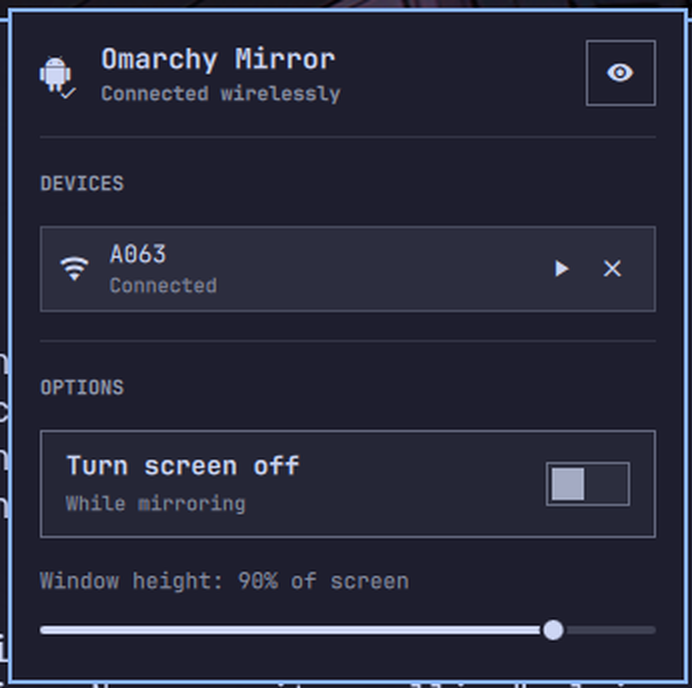
Clicking the bar icon opens a popup listing every device the plugin can see — wireless (via mDNS) and USB. Each row shows the model name, transport, and connection state, with a mirror/disconnect button on the right.
| Bar icon click | Action |
|---|---|
| Left click | Open the device popup |
| Right click | Skip the popup — discover, connect, and launch scrcpy immediately |
| Middle click | Force an immediate status refresh |
Inside the popup, click a device row to mirror it, or its trailing button to
disconnect. The eye icon in the header toggles whether the IP address, port,
and device serial are shown in the clear or masked as •••• — masked is the
default, since these are visible on a screen share. Model name is never
masked.
The OPTIONS section lets you change the mirror window's size (as a percentage of your screen) and whether to turn the phone's screen off while mirroring, without leaving the popup.
Settings
The bar-icon refresh interval is configurable from the widget's settings
panel (or directly in shell.json's bar-layout entry for this plugin):
| Setting | Default | Purpose |
|---|---|---|
| Refresh interval | 15s | How often the bar polls connection state |
Window height and turn-screen-off live in the popup's OPTIONS section
instead, since the shell has no way for a plugin to write back to
shell.json — they're persisted to
~/.config/android-mirror/config.json and apply to every launch path
(popup, right-click, SUPER+SHIFT+R, and the bare CLI) equally.
Required local setup (not shipped in the plugin)
Omarchy plugins run inside the shared Quickshell process and can't register Hyprland window rules or keybindings. Add these yourself, once:
~/.config/hypr/hyprland.lua — without this, Hyprland tiles the scrcpy
window and stretches it to fill its slot, destroying the phone's aspect ratio:
o.window("^(scrcpy)$", {
  float = true,
  center = true,
  keep_aspect_ratio = true,
  tag = "-default-opacity",
  opacity = "1 1",
})
~/.config/hypr/bindings.lua (optional, for a keyboard shortcut):
o.bind("SUPER + SHIFT + R", "Omarchy mirror", "android-mirror launch")
The android-mirror CLI (bin/android-mirror) also works standalone from a
terminal:
android-mirror status                # JSON connection state
android-mirror devices               # JSON list of every discovered device
android-mirror connect|launch|disconnect [ip:port|serial]
android-mirror config get|set <key> <value>
connect/launch/disconnect run the full discovery ladder when no target
is given, or act on one specific device (an ip:port for wireless, a bare
serial for USB) otherwise — the same distinction the popup's rows use.
Development
scripts/dev-install.sh   # copies this repo into ~/.config/omarchy/plugins/
                          # and validates it
omarchy-plugin-validate ~/.config/omarchy/plugins/io.github.rektyrowdyy.android-mirror
It's a copy, not a symlink — omarchy-plugin-validate's symlink check always
rejects a symlinked plugin root, so dev-install.sh doesn't bother trying
one. Re-run it after each change.
Removal
omarchy plugin remove io.github.rektyrowdyy.android-mirror
This removes the plugin itself, but leaves behind the CLI's own state — delete these too for a clean slate:
rm -rf ~/.config/android-mirror ~/.local/state/android-mirror
And if you added the Hyprland window rule or keybinding from "Required local
setup" above, remove those lines from hyprland.lua/bindings.lua yourself.
License
MIT — see LICENSE.