
PredatorSense — for Acer Predator laptops
An Omarchy omarchy-shell plugin: a real power/CPU/GPU/battery/keyboard
control center in your bar, built specifically for Acer Predator laptops (and useful, minus
the Acer-only bits, on any Intel intel_pstate + RAPL laptop).
Tested on: Acer Predator Helios Neo 16 (PHN16-71), Intel i5-13500HX, NVIDIA RTX 4050. Every control below — the Profile selector, CPU turbo/cores/frequency/power-limit, thermal profile, GPU mode switching, 80% battery charge limit, fan speed, and all keyboard-RGB modes — was verified working end to end on that exact model before this was published.
This is an independent, unofficial project — not affiliated with, endorsed by, or supported by Acer Inc. "Predator" and the Predator logo are trademarks of Acer Inc., used here only to identify the hardware this plugin targets. See NOTICE.md.
Why
Windows has Acer's own PredatorSense app. Omarchy didn't have anything, so this ports the useful parts of it — plus a few things the original doesn't even do (CPU core-count control, RAPL power-limit presets) — into a proper bar widget that matches your theme, under the same name.
Install
omarchy plugin add https://github.com/Rezwoan/Omarchy-PredatorSense.git --enable --yes
That's it — no terminal, no sudo, nothing else to run. The panel works immediately in read-only mode (live status only). The first time you want to actually change something, click Enable privileged controls in the panel — that's a single native password prompt (via polkit), not a command you type. See How it works for why this is safe.
Optionally move it in the bar or bind a key to summon it:
omarchy bar move io.github.rezwoan.performance --section right
Unlocking the Acer-only sections
Two optional AUR packages unlock more of the panel — everything else works without them:
| Package | Unlocks |
|---|---|
linuwu-sense-dkms |
Keyboard tab (RGB), 80% battery charge limit, fan speed |
envycontrol |
GPU mode switching (Integrated / Hybrid / Nvidia) |
If linuwu-sense-dkms is installed but the Keyboard tab still says it isn't detected, its
kernel module probably lost the race to the stock acer_wmi driver at boot — the panel detects
this and shows an Enable keyboard RGB now button that fixes it with, again, one click and
one password prompt. No manual modprobe/blacklist editing.
What it does
General tab
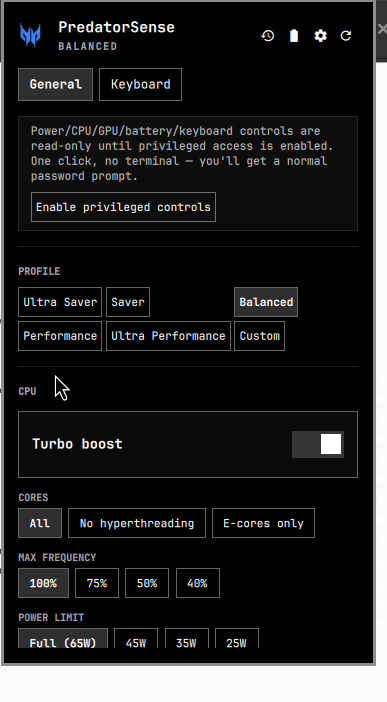
- One unified Profile selector — Ultra Saver / Saver / Balanced / Performance / Ultra Performance / Custom — each named preset bundling CPU cores, turbo, frequency cap, RAPL power limit, thermal profile, fan, keyboard color, and screen brightness. Persisted and silently reapplied on every boot. Custom isn't a real preset — it's a passive indicator that lights up whenever a raw control below (or in the Advanced popover) has been hand-tuned since the last named preset was applied.
- Advanced (small gear ⚙ button next to the GPU-stats/battery-info icons): the raw power
profile (power-profiles-daemon) and thermal profile (every
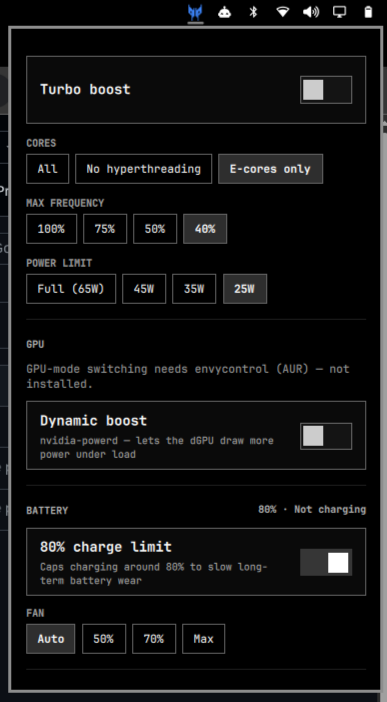
platform_profileyour firmware exposes, not a hardcoded list) controls, for manual overrides outside the named presets. - CPU: turbo boost, core mode (all / no hyperthreading / E-cores only), max frequency cap, RAPL package power limit
- GPU: mode switching (needs
envycontrol, reboot required), Nvidia dynamic-boost toggle - Battery: live percentage/status, 80% charge-limit toggle, fan speed
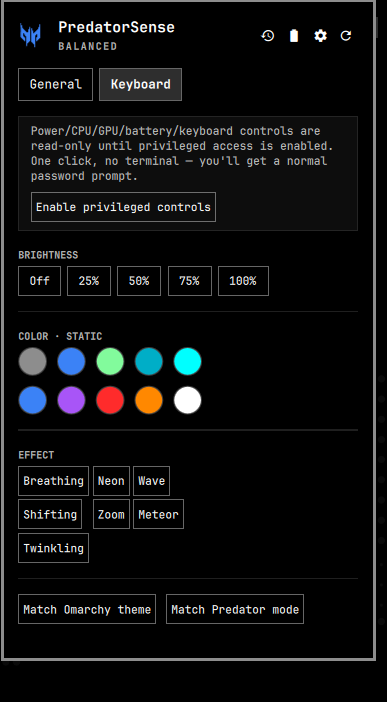
Keyboard tab (4-zone RGB)
- Brightness (5 steps)
- Static colors: theme accent, live Predator-mode color (green/magenta/blue, matching whatever the bar icon is currently tinted), plus 9 fixed swatches
- 7 animated effects (Breathing / Neon / Wave / Shifting / Zoom / Meteor / Twinkling)
- Quick actions: match Omarchy theme, match Predator mode
The bar icon is the Predator claw mark, recolored live to match your active mode — green for battery saver, neon magenta for performance, blue for balanced, your theme's foreground color otherwise.
How it works
Every privileged write goes through one root-owned, verb-whitelisted script
(/usr/local/bin/omarchy-perf-helper) — it only accepts an exact, hardcoded set of
verbs/values (turbo on|off, cpu-cores all|no-smt|ecore, six-digit hex colors validated by
regex, etc.) and refuses everything else. It can't be redirected into running arbitrary
commands even though it runs as root.
Authorization is a polkit action scoped to that exact binary path
(org.freedesktop.policykit.exec.path), not a sudoers file. There is no passwordless
(NOPASSWD) rule anywhere — that's a deliberately avoided anti-pattern, not an oversight.
polkit's auth_admin_keep means you authenticate once and it's remembered for a few minutes,
not on every single click, the same mechanism tools like GParted and Timeshift use. setup.sh
(what the "Enable privileged controls" button runs, via pkexec) installs the helper and this
policy — nothing is installed until you click that button.
Uninstall
omarchy plugin remove io.github.rezwoan.performance
sudo rm -f /usr/local/bin/omarchy-perf-helper \
           /usr/share/polkit-1/actions/io.github.rezwoan.performance.helper.policy \
           /etc/systemd/system/omarchy-perf-restore.service
sudo systemctl daemon-reload
(The last three lines only apply if you'd clicked "Enable privileged controls" — skip them if you never did.)
Compatibility
| Feature | Requires |
|---|---|
| Bar icon, status, Profile selector, power profile | Any Omarchy 4.0.1+ install |
| Thermal profile, CPU turbo/cores/frequency, RAPL power limit | Intel CPU with intel_pstate + RAPL (most 8th-gen+ Intel laptops) |
| GPU mode switching, dynamic boost | NVIDIA Optimus laptop + envycontrol |
| Keyboard RGB, 80% battery limit, fan speed | Acer laptop + linuwu-sense-dkms |
Not an Acer Predator? The General tab (minus GPU/battery-limit/fan) still works on any Intel laptop. The Keyboard tab and those two General-tab rows will just stay hidden.
Issues & contributing
Found a bug, or your Predator model behaves differently? Open an issue — bug report or feature request. PRs welcome; see CONTRIBUTING.md for the project layout and how to test a change for real (hot-reload on an already-placed bar widget is unreliable — that file explains the actual verification loop).