
Omarchy NetEase Cloud Music
An Omarchy shell plugin for NetEase Cloud Music (网易云音乐). Features a compact bar widget with playback controls, an expandable popup panel with cover art, draggable seek bar, volume/loop/shuffle controls, and time-synced lyrics with bilingual translation.
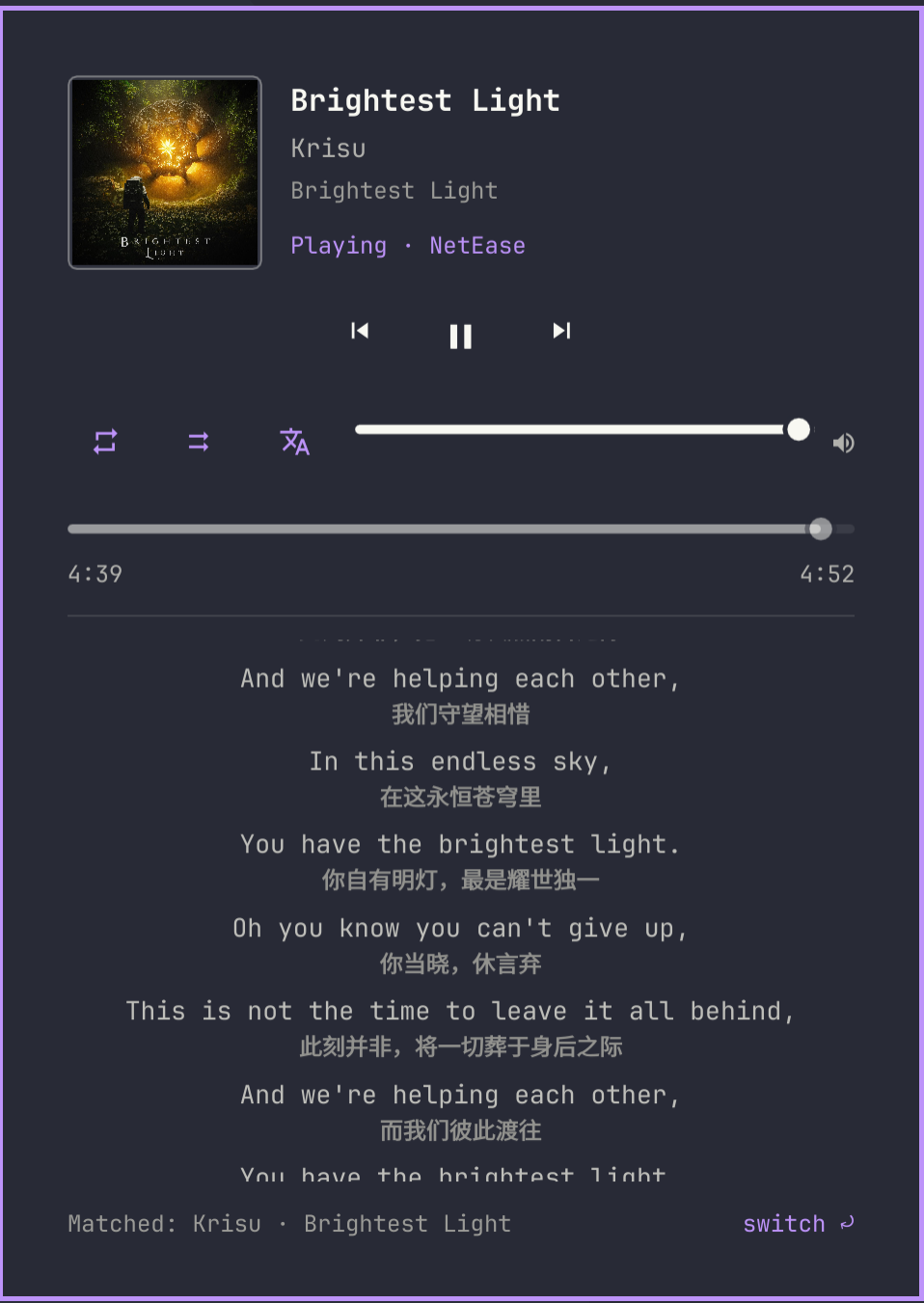
🌟 Features
- 🎵 Compact Bar Widget
- Minimal transport controls (Previous / Play-Pause / Next).
- Hover tooltip displays current track and artist.
- Scroll wheel over the widget quickly skips tracks.
- Responsive in both horizontal and vertical bar orientations.
- 📜 Time-Synced Lyrics & Translation
- Real-time auto-scrolling LRC lyrics with active line highlighting.
- Interactive lyrics: click any line to seek directly to that timestamp.
- One-click lyric translation toggle (
译/TR).
- 🎯 Smart Song Matching & Manual Correction
- Automatically queries NetEase's public API using track title, artist, and duration cross-validation.
- One-click candidate switcher (
匹配有误?换一个/switch) in the panel footer to cycle through alternative matches if a cover or live version is matched. - Manual match overrides are persisted in
~/.cache/omanetease/matches.json.
- ⚡ Offline Lyric Caching
- Fetched lyrics and translations are cached locally under
~/.cache/omanetease/lyrics/. - Cached tracks load instantly and work offline without redundant network requests.
- Fetched lyrics and translations are cached locally under
- 🎛️ Full-Featured Popup Panel
- High-resolution cover art display.
- Draggable position slider with elapsed and total duration timestamps.
- Volume control, repeat/loop mode, and shuffle toggles.
- Smooth sub-second playback position interpolation between MPRIS ticks.
- Fallback state with a direct player launch button when the player is closed.
- 🔌 Universal MPRIS Compatibility
- Tailored for netease-cloud-music-gtk4, but compatible with any MPRIS-compliant media player via configurable match patterns.
- 🌐 Bilingual Internationalization (i18n)
- Native Chinese and English UI support with automatic system locale detection.
📁 Project Structure
~/.config/omarchy/plugins/io.github.robin0315.omanetease/
├── manifest.json     # Plugin manifest: metadata, entry points & settings schema
├── Service.qml       # Headless daemon: MPRIS monitoring, lyric fetching & IPC
├── Panel.qml         # Bar widget & popup lyrics panel UI
├── LyricsModel.js    # LRC parser & lyric/translation time synchronizer
├── I18n.js           # Bilingual localization strings (zh / en)
└── test/             # Unit tests for LRC parsing and alignment
📋 Requirements
- Omarchy with the Omarchy shell (Quickshell)
- An MPRIS-capable NetEase Cloud Music player, for example:
(Note: On Arch Linux,omarchy pkg aur add netease-cloud-music-gtk4-gitnetease-cloud-music-gtk4-gitis recommended as 2.5.3 release may have build issues against recentgtk4-rs) curl(used for background lyric and search API queries)
🚀 Installation
Option 1: Via Omarchy CLI
omarchy plugin add https://github.com/Robin0315/omanetease --enable --yes
Option 2: Manual Git Clone
git clone https://github.com/Robin0315/omanetease.git ~/.config/omarchy/plugins/io.github.robin0315.omanetease
omarchy plugin enable io.github.robin0315.omanetease
Updating
To update an existing installation:
git -C ~/.config/omarchy/plugins/io.github.robin0315.omanetease pull
omarchy-shell shell rescanPlugins
🎮 Controls & Interactions
Bar Widget
| Action | Interaction |
|---|---|
| Play / Pause | Left-click the play/pause icon (or launch player if closed) |
| Next / Previous | Left-click the next/previous icons |
| Toggle Lyrics Panel | Right-click, middle-click, or click any blank area of the widget |
| Switch Tracks | Scroll wheel up (Previous) / down (Next) over the widget |
| Track Info | Hover to view title, artist, and playback status tooltip |
Popup Panel
| Action | Interaction |
|---|---|
| Seek to Timestamp | Drag the progress slider or click directly on any lyric line |
| Toggle Translation | Click the 译 / TR button |
| Fix Song Match | Click 换一个 (switch ⤾) in the footer to cycle candidates |
| Keyboard Shortcuts | Space: Play/Pause<br>n: Next track<br>p: Previous track<br>Esc: Close panel<br>Tab / Shift+Tab: Switch panels |
⌨️ Keybindings & IPC
The background service exposes IPC endpoints via io.github.robin0315.omanetease.media. You can bind them in your window manager (e.g. Hyprland):
-- ~/.config/hypr/bindings.lua (example)
o.bind("SUPER + ALT + P", "NetEase play/pause", "omarchy-shell io.github.robin0315.omanetease.media playPause")
o.bind("SUPER + ALT + N", "NetEase next track", "omarchy-shell io.github.robin0315.omanetease.media next")
o.bind("SUPER + ALT + B", "NetEase previous track", "omarchy-shell io.github.robin0315.omanetease.media previous")
o.bind("SUPER + ALT + L", "NetEase toggle panel", "omarchy-shell io.github.robin0315.omanetease toggle")
Available IPC Commands
| Command | Description |
|---|---|
omarchy-shell io.github.robin0315.omanetease.media playPause |
Toggle playback |
omarchy-shell io.github.robin0315.omanetease.media next |
Skip to next track |
omarchy-shell io.github.robin0315.omanetease.media previous |
Skip to previous track |
omarchy-shell io.github.robin0315.omanetease.media seek <sec> |
Seek to position in seconds (e.g. seek 45.5) |
omarchy-shell io.github.robin0315.omanetease.media launch |
Raise or launch the player |
omarchy-shell io.github.robin0315.omanetease.media refresh |
Retry fetching lyrics for the current track |
omarchy-shell io.github.robin0315.omanetease.media rematch |
Cycle to the next candidate match |
omarchy-shell io.github.robin0315.omanetease.media status |
Returns JSON status (playback state, song ID, lyrics, etc.) |
omarchy-shell io.github.robin0315.omanetease toggle |
Open or close the lyrics popup panel |
⚙️ Configuration
Settings can be adjusted through Omarchy's graphical settings UI or directly in ~/.config/omarchy/shell.json:
| Key | Type | Default | Description |
|---|---|---|---|
matchPattern |
string |
"netease" |
Substring matched against the MPRIS bus name or desktop entry. |
hideWhenIdle |
boolean |
false |
Hide the bar widget when the player is not running. |
showTranslation |
boolean |
true |
Show translated lyrics beneath the original text when available. |
launchCommand |
string |
"netease-cloud-music-gtk4" |
Command used to launch the player (e.g., flatpak run ...). |
language |
string |
"auto" |
Panel language: "auto" (system locale), "zh", or "en". |
Example shell.json configuration
{
  "widgets": [
    {
      "id": "io.github.robin0315.omanetease",
      "matchPattern": "netease",
      "hideWhenIdle": false,
      "showTranslation": true,
      "launchCommand": "netease-cloud-music-gtk4",
      "language": "auto"
    }
  ]
}
💡 Notes & Details
- Lyric API: Lyrics are resolved via NetEase's public web API endpoints without authentication. If a network blip occurs, the plugin degrades gracefully to a "no lyrics" state and will retry when re-opened.
- Cache Management: Lyrics are saved in
~/.cache/omanetease/lyrics/(automatically pruned if exceeding size limits), and match corrections are saved in~/.cache/omanetease/matches.json. - Built-in Media Widget: The standard
omarchy.mediawidget will also detect the player. You can choose to run both side-by-side or remove the generic media widget from your bar configuration.
🛠️ Development
For development, clone the repository into any directory and symlink it into ~/.config/omarchy/plugins/io.github.robin0315.omanetease:
ln -s "$(pwd)" ~/.config/omarchy/plugins/io.github.robin0315.omanetease
- Panel Reloading: Edits in Panel.qml hot-reload via:
omarchy-shell shell rescanPlugins - Service Reloading: Edits in Service.qml require restarting the shell host:
omarchy restart shell
Unit Tests
Unit tests cover LRC parsing, timestamp synchronization, and translation alignment:
npm test
# or directly:
node test/run.mjs
📄 License
MIT © 2026 Robin0315 luobing.me@gmail.com