
Omahub
← All plugins
R

ZenPDF

by Rohan Patnaik

Open a private, local-first desktop workspace for selected PDFs from Omarchy Quattro.

Security review

Potentially dangerous behavior detected · 17 findings

Deterministic scan — not a security guarantee

High
Risk level
High
Analyzed commit
d06a592
Scanned
2 weeks ago
  • high destructive_filesystem …/worker/Dockerfile:15

    Destructive operation on the root filesystem or a block device.

    rm -rf /var/lib/apt/lists/*
  • high destructive_filesystem …/packaging/zenpdf-launch:42

    Low-level disk manipulation or write command.

    dd bs=1024 count=60 of="$1" 2>/dev/null
  • high permission_ownership …/workflows/ci.yml:167

    Recursively changes file ownership.

    chown -R package-builder:package-builder apps/desktop/packaging/arch
  • high permission_ownership …/worker/Dockerfile:38

    Recursively changes file ownership.

    chown -R zenpdf:zenpdf /app /var/lib/zenpdf-worker
  • medium external_hosts …/worker/Dockerfile:19

    Downloads or connects to an external HTTP(S) host.

    wget -O pdfsizeopt_libexec_linux.tar.gz https://github.com/pts/pdfsizeopt/releases/download/2023-04-18/pdfsizeopt_libexec_linux-v9.tar.gz \
  • medium external_hosts …/worker/Dockerfile:23

    Downloads or connects to an external HTTP(S) host.

    wget -O pdfsizeopt.single https://raw.githubusercontent.com/pts/pdfsizeopt/2bab16031dad854e42c2910859564d9a962bc16c/pdfsizeopt.single \
  • medium package_manager …/workflows/ci.yml:76

    System-wide Python package installation (not --user).

    pip install --disable-pip-version-check
  • medium package_manager …/self-host/page.tsx:29

    System-wide Python package installation (not --user).

    pip install -r requirements.txt",
  • medium package_manager …/worker/Dockerfile:31

    System-wide Python package installation (not --user).

    pip install --no-cache-dir --require-hashes -r requirements.lock \
  • Downloads or connects to an external HTTP(S) host.

    git clone --no-checkout https://github.com/rohan-patnaik/ZenPDF \
  • Docs package_manager docs/OPERATIONS.md:57

    System-wide Python package installation (not --user).

    pip install -r requirements.txt && python main.py`
  • Docs package_manager README.md:100

    System-wide Python package installation (not --user).

    pip install -r requirements.txt && python main.py`
  • Docs package_manager CONTRIBUTING.md:20

    System-wide Python package installation (not --user).

    pip install -r requirements.txt && python main.py`
  • Command runs with sudo, elevating the process beyond the plugin environment.

    sudo pacman -U "$package_path"
  • Command runs with sudo, elevating the process beyond the plugin environment.

    sudo pacman -U ./zenpdf-git-0.1.0.r0.g${published_sha:0:7}-1-x86_64.pkg.tar.zst
  • Docs sudo README.md:72

    Command runs with sudo, elevating the process beyond the plugin environment.

    sudo pacman -U "$package_path"
  • Docs sudo README.md:87

    Command runs with sudo, elevating the process beyond the plugin environment.

    sudo pacman -Rns zenpdf-git

Automated analysis only — not a security guarantee.

AI advisory review

Review recommended

Language-model assessment · ~deepseek/deepseek-v4-flash-latest — advisory only

Low
AI risk level
Low
Recommendation
review
Model
~deepseek/deepseek-v4-flash-latest
Analyzed commit
d06a592
Reviewed
2 weeks ago

The Omarchy plugin itself is a thin launcher that only checks for a preinstalled zenpdf-launch binary and starts it; the high deterministic findings are mostly from Dockerfile, CI, and documentation operations that do not run during plugin installation. The main concern is that the README's install instructions pin a different source revision (97122a2...) than the commit analyzed here (d06a592...), so a user following those instructions would build and sudo-install code that was not part of this review.

  • Plugin.qml is minimal: it runs `command -v zenpdf-launch`, then either launches it or shows a notification; no network access, credential handling, persistence, or privilege escalation.
  • The high-severity scan findings are not user-facing plugin risks: `rm -rf /var/lib/apt/lists/*` is normal Dockerfile cleanup, `dd` in zenpdf-launch appears to be the documented bounded startup-log capture, and `chown`/`pip` findings are in CI/container contexts.
  • README install instructions pin revision 97122a2564887b5c70b15ca69c9627adf7dd919a, which does not match the analyzed commit d06a5921cd8cd28e5d8ad5545c750195fa122ec4; a user following the README would build and install a different, unreviewed native package.
  • Installation requires `sudo pacman -U` of a locally built Arch package, so the native binary installed on the system should be reviewed at the exact revision users are told to build.
  • The plugin depends on a preinstalled `zenpdf-launch` binary and does not download or install it itself, which limits the plugin's own attack surface.
How this check works

This review combines the deterministic scan (the rule-based results above) with an independent look at the plugin's code by a language model. The model reads a trimmed sample of the repository's files, the manifest, and the README, then gives a plain-language risk level and a recommendation: install (no notable danger), review (look closer first), or avoid (clearly dangerous).

It runs on the same analyzed commit as the deterministic scan and is strictly advisory — it is not a security guarantee and never blocks a plugin by itself. A human moderator still reviews plugins before they are listed.

AI advisory only — automated analysis, not a security guarantee.

Install
$ omarchy plugin add https://github.com/rohan-patnaik/ZenPDF --enable
Productivity #quickshell #launcher #security

ZenPDF

ZenPDF is an open-source PDF toolkit. The existing product is a Next.js web app with a Convex backend and Python worker; a private, local-first native desktop workspace for Omarchy Quattro is now being developed in the same repository.

At a glance

  • A private desktop workspace for documents you deliberately select—no cloud upload is part of the Omarchy workflow.
  • A broad PDF toolkit: merge, split, convert, edit, sign, protect, OCR, compare, redact, crop, and more.
  • The Omarchy plugin is a thin launcher for the native desktop app; the desktop product is under active alpha development.

Install on Omarchy

Build and install the exact native Arch package using the Omarchy plugin instructions, then enable the launcher with the command in that section.

Live app

Preview
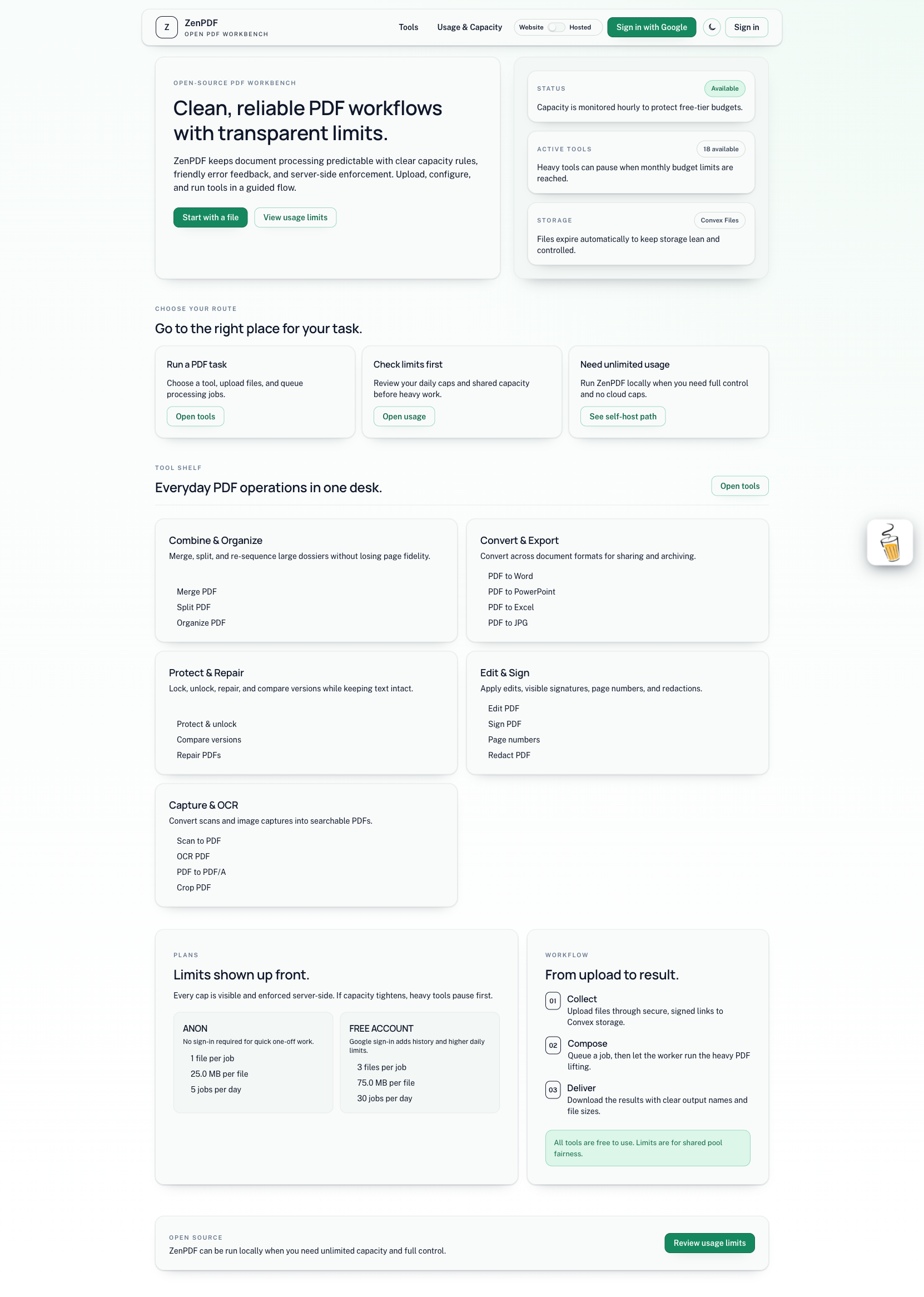
ZenPDF homepage

The root preview.png is the marketplace cover for the native plugin listing.

Tool scope (27)

  • Merge PDF, Split PDF, Compress PDF
  • PDF to Word, PDF to PowerPoint, PDF to Excel
  • Word to PDF, PowerPoint to PDF, Excel to PDF
  • Edit PDF, PDF to JPG, JPG to PDF
  • Sign PDF, Watermark, Rotate PDF, HTML to PDF
  • Unlock PDF, Protect PDF, Organize PDF
  • PDF to PDF/A, Repair PDF, Page numbers
  • Scan to PDF, OCR PDF, Compare PDF, Redact PDF, Crop PDF

Repository layout

  • apps/web: Next.js app (UI, API routes, Convex client)
  • apps/worker: background worker for PDF processing
  • apps/desktop: native Omarchy/Arch desktop app (planned and under active development)
  • docs: product, architecture, feature internals, and operations

The root manifest.json and Plugin.qml provide the Omarchy Quattro plugin contract and launch the installed native zenpdf binary.

Omarchy plugin

The plugin is a thin local launcher. Build the native Arch package as your normal user from the immutable reviewed revision below, then install it and add the plugin:

zenpdf_revision=97122a2564887b5c70b15ca69c9627adf7dd919a
work_root=$(mktemp -d)
git clone --filter=blob:none --no-checkout \
  https://github.com/rohan-patnaik/ZenPDF.git "$work_root/repo"
cd "$work_root/repo"
git fetch --depth=1 origin "$zenpdf_revision"
git checkout --detach "$zenpdf_revision"
test "$(git rev-parse HEAD)" = "$zenpdf_revision"

mkdir "$work_root/source"
git archive --format=tar --prefix=ZenPDF/ "$zenpdf_revision" \
  | tar -xf - -C "$work_root/source"
printf '%s\n' "$zenpdf_revision" \
  >"$work_root/source/ZenPDF/.zenpdf-source-revision"
source_archive="$work_root/repo/apps/desktop/packaging/arch/zenpdf-source-$zenpdf_revision.tar.gz"
tar -C "$work_root/source" -czf "$source_archive" ZenPDF

cd apps/desktop/packaging/arch
package_path=$(ZENPDF_SOURCE_ARCHIVE="$source_archive" \
  ZENPDF_EXPECTED_REVISION="$zenpdf_revision" makepkg --packagelist)
ZENPDF_SOURCE_ARCHIVE="$source_archive" \
ZENPDF_EXPECTED_REVISION="$zenpdf_revision" \
  makepkg --cleanbuild --clean --noconfirm
sudo pacman -U "$package_path"
omarchy plugin add https://github.com/rohan-patnaik/ZenPDF.git --enable --yes
omarchy-shell shell summon io.github.rohan-patnaik.zenpdf '{}'

The exact revision is also embedded in the package version and source marker. The PKGBUILD refuses a moving Git branch or an archive without a matching 40-character revision. The native application depends on Qt 6 and qpdf; the package resolves the complete Arch dependency set. ZenPDF processes only user-selected local files in this desktop workflow.

Remove the plugin and native package with:

omarchy plugin remove io.github.rohan-patnaik.zenpdf
sudo pacman -Rns zenpdf-git

Quick start (local)

  1. Copy environment files:
    • apps/web/.env.example -> apps/web/.env.local
    • apps/worker/.env.example -> apps/worker/.env
  2. Ensure ZENPDF_WORKER_TOKEN matches in both env files.
  3. Start Convex (terminal 1, long-running):
    • cd apps/web && npx convex dev
  4. Start web app (terminal 2, long-running):
    • cd apps/web && npm install && npm run dev
  5. Start worker (terminal 3, long-running):
    • cd apps/worker && python -m pip install -r requirements.txt && python main.py
  6. Open http://localhost:3000.

Desktop build

ZenPDF Desktop is built independently, so the existing web and worker products keep their current toolchains. With Qt 6 Base, Qt 6 PDF, qpdf, CMake 3.25+, Ninja, and a C++23 compiler installed:

cmake -S apps/desktop -B build/desktop -G Ninja -DCMAKE_BUILD_TYPE=Debug
cmake --build build/desktop
ctest --test-dir build/desktop --output-on-failure

See apps/desktop/README.md for local-data and packaging details. Desktop progress is tracked without parity claims in docs/ACROBAT_PARITY.md. Alpha scope, exact feature-branch package installation, and known limits are documented in docs/ALPHA.md.

Core docs

  • Product scope: docs/PRD.md
  • System design: docs/ARCHITECTURE.md
  • Per-feature internal logic: docs/FEATURE_LOGIC.md
  • Security, deploy, monitoring, self-host ops: docs/OPERATIONS.md
  • Contributor workflow: CONTRIBUTING.md
  • Desktop capability matrix: docs/ACROBAT_PARITY.md
  • Desktop security and recovery model: docs/DESKTOP_SECURITY.md

License

  • ZenPDF is licensed under the GNU Affero General Public License v3.0 (AGPL-3.0).
  • See LICENSE for full terms.

Attribution

  • Copyright (c) 2026 Rohan Patnaik.
  • Forks and redistributions must preserve copyright and license notices.
  • Hosted modified versions must provide corresponding source code to users under AGPL.
  • See NOTICE for attribution details.