
Omahub
← All plugins
R

Focus Forge

by Rooke Poole

A focused-work and recovery timer forged into the Omarchy bar.

Security review

No obvious issues detected

Deterministic scan — not a security guarantee

None
Risk level
None
Analyzed commit
b1bdcf4
Scanned
1 month ago

No potentially dangerous behavior detected in the analyzed commit.

Automated analysis only — not a security guarantee.

AI advisory review

No obvious issues detected

Language-model assessment · ~deepseek/deepseek-v4-flash-latest — advisory only

None
AI risk level
None
Recommendation
install
Model
~deepseek/deepseek-v4-flash-latest
Analyzed commit
b1bdcf4
Reviewed
1 month ago

Focus Forge is a straightforward Pomodoro-style timer bar widget. Its code only manages timer state, displays UI, and sends a fixed local desktop notification via notify-send; there is no network access, file modification, obfuscation, or destructive behavior. The deterministic scan found no issues and the manual review agrees.

How this check works

This review combines the deterministic scan (the rule-based results above) with an independent look at the plugin's code by a language model. The model reads a trimmed sample of the repository's files, the manifest, and the README, then gives a plain-language risk level and a recommendation: install (no notable danger), review (look closer first), or avoid (clearly dangerous).

It runs on the same analyzed commit as the deterministic scan and is strictly advisory — it is not a security guarantee and never blocks a plugin by itself. A human moderator still reviews plugins before they are listed.

AI advisory only — automated analysis, not a security guarantee.

Install
$ omarchy plugin add https://github.com/rookepoole/omarchy-focus-forge --enable
Productivity #bar #quickshell

Focus Forge

A compact 25-minute focus / 5-minute recovery timer for the Omarchy Quattro bar. The timer lives inside the existing Omarchy shell process, uses the active theme, and sends a local desktop notification when a phase completes.
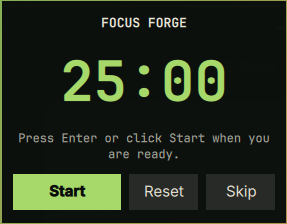
Focus Forge preview

Install

omarchy plugin add https://github.com/rookepoole/omarchy-focus-forge.git --enable

Use

  • Left-click the bar timer to open its controls.
  • Press Enter in the panel or click Start/Pause.
  • Right-click the bar timer for a fast pause/resume.
  • Reset restores the current phase; Skip switches focus/recovery.

Move it with:

omarchy bar move io.github.rookepoole.focus-forge --section right

Dependencies and permissions

Requires Omarchy Quattro. Uses only Qt/Quickshell APIs and Omarchy’s installed notify-send; it makes no network requests, requests no privileges, and does not write configuration files.

Remove

omarchy plugin remove io.github.rookepoole.focus-forge

License

MIT © 2026 Rooke Poole.