
Market Pulse for Omarchy
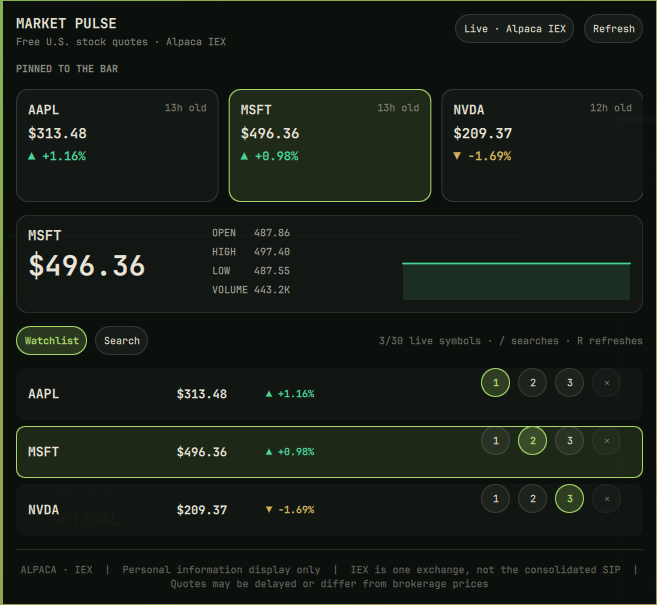
Market Pulse is a native Omarchy bar widget for three pinned U.S. stock or ETF quotes, a larger live watchlist, symbol search, daily metrics, and local session sparklines. It uses Alpaca Basic's free IEX market-data feed.
[!IMPORTANT] Manual setup is required after installation. Market Pulse does not bundle a shared API key. Each user creates free Alpaca paper-account credentials and stores them locally with
./configure.sh.
What it does
- Shows three selectable symbols directly in the Omarchy bar.
- Keeps up to 30 U.S. stocks or ETFs in the panel watchlist.
- Searches Alpaca's active U.S. equity catalog by symbol or company name.
- Assigns any result or watchlist row to bar slot 1, 2, or 3.
- Shows current price, percentage change, open, high, low, volume, quote age, and a local sparkline.
- Keeps last-good values visible during network, provider, authentication, or rate-limit failures.
- Marks every state as live, cached, stale, unavailable, or setup-required.
- Calls no account, balance, position, order, or trading endpoint.
Requirements
- Omarchy Quattro with the Omarchy shell plugin commands.
- A free Alpaca account with paper-account API credentials.
- Commands already present on a normal Omarchy installation: Bash,
curl,jq,flock, and GNU coreutils.
Alpaca currently documents the Basic plan as $0, with real-time IEX coverage for U.S. stocks and ETFs. Basic is limited to IEX rather than the full consolidated SIP. See Alpaca's market-data plan comparison and IEX/SIP explanation.
Install
Install and enable it with:
omarchy plugin add https://github.com/rookepoole/omarchy-market-pulse.git --enable
Omarchy installs it at:
~/.config/omarchy/plugins/io.github.rookepoole.market-pulse/
The widget will show MARKET PULSE · SETUP until the manual setup below is complete.
Manual setup
1. Create free Alpaca paper credentials
- Create or sign in to an Alpaca account at app.alpaca.markets.
- Open the Paper Trading environment. Market Pulse does not need a funded brokerage account.
- Generate paper API credentials.
- Keep the API key ID and secret available for the next step. Alpaca may show the secret only once.
Use paper credentials, not live-trading credentials. Never paste either value into GitHub, an issue, manifest.json, shell.json, a screenshot, or a command-line argument.
2. Run the setup script
Open a terminal and run:
cd ~/.config/omarchy/plugins/io.github.rookepoole.market-pulse
./configure.sh
The script prompts for the key ID and hides the secret while it is entered. It then:
- Creates
~/.config/omarchy/market-pulse/with mode0700. - Writes
~/.config/omarchy/market-pulse/alpaca.curlwith mode0600. - Stores the credentials as curl headers, outside the plugin repository and
shell.json. - Validates them with one AAPL snapshot from Alpaca's IEX feed.
- Prints success without printing either credential.
Middle-click Market Pulse in the bar to refresh immediately after setup. A shell restart is normally unnecessary. If the widget does not notice the new configuration, run:
omarchy restart shell
3. Check setup status
cd ~/.config/omarchy/plugins/io.github.rookepoole.market-pulse
./configure.sh --status
This reports only whether the credential file is present, owned by the current user, structurally valid, and mode 0600. It never prints the credential contents.
Use
- Left click: Open or close the Market Pulse panel.
- Middle click: Refresh the pinned bar quotes immediately.
/while the panel is open: Focus stock search.Rwhile the panel is open: Refresh pinned quotes and the visible watchlist.- Escape: Leave search or close the panel.
- Slot buttons
1,2,3: Pin that symbol to the corresponding bar position. + Watch: Add a search result to the watchlist.×: Remove an unpinned symbol from the watchlist.
The bar refresh interval defaults to 30 seconds and can be changed from the Omarchy bar-widget settings. Valid values are 15–900 seconds. The larger watchlist refreshes only while its panel is open. Up to 30 symbols are stored because that matches Alpaca Basic's currently documented free WebSocket symbol ceiling and keeps the interface bounded if streaming is added later.
Default symbols
The initial bar slots are:
- AAPL
- MSFT
- NVDA
The initial watchlist also includes TSLA, AMZN, META, and GOOGL. Search for a different stock or ETF, then select slot 1, 2, or 3 to replace a pinned symbol.
Data and accuracy limits
Market Pulse is an informational desktop display, not a trading terminal.
- Free quotes use Alpaca's IEX feed. IEX is one exchange and does not represent every U.S. trade or the consolidated national best bid and offer.
- Prices, daily volume, highs, and lows can differ from a brokerage or consolidated SIP source.
- Thinly traded symbols may appear stale when no recent IEX trade exists.
- OTC market data is excluded from search because Alpaca documents it as requiring separate access.
- Search can return a symbol that later becomes unavailable, renamed, delisted, or restricted.
- Local sparklines are samples collected while Market Pulse is running. They are not historical price charts and reset with the shell process.
- The plugin gives no financial advice and must not be used to place or automate trades.
Credential and network boundary
The QML UI invokes the bundled market-pulse helper with fixed argument arrays. It does not invoke a shell, interpolate symbols into executable commands, or receive credential values.
The helper enforces these boundaries:
- Accepts at most 30 symbols matching
^[A-Z0-9][A-Z0-9.-]{0,14}$. - Sends credentials through a mode-
0600curl config, not URL parameters or process arguments. - Connects only to these fixed HTTPS endpoints:
https://data.alpaca.markets/v2/stocks/snapshotshttps://paper-api.alpaca.markets/v2/assets
- Applies TLS, connection-time, total-time, and response-size limits.
- Filters search to active, non-OTC U.S. equities.
- Stores only quote, asset-catalog, and freshness data under
~/.local/state/omarchy/market-pulse/. - Never writes credentials into the cache.
- Never calls Alpaca account, balance, position, order, or trading endpoints.
The plugin is unsandboxed because all Omarchy shell plugins run in the shared long-lived Quickshell process. Review third-party plugin code before enabling it.
Troubleshooting
MARKET PULSE · SETUP
Run ./configure.sh --status. If setup is incomplete or the credential file permissions changed, run ./configure.sh again.
Credentials rejected
Generate fresh paper API credentials in Alpaca and rerun:
./configure.sh
Cached or stale quotes
Market Pulse intentionally preserves the last good response. Check the network, verify Alpaca's service status, and middle-click the widget. The panel always displays the quote age.
A quote differs from another app
This is expected when the other source uses consolidated SIP data. Market Pulse labels its free source as Alpaca · IEX rather than presenting it as full-market coverage.
Search is slow the first time
The first search downloads and filters Alpaca's active U.S. asset catalog. The filtered catalog is cached locally for 24 hours; subsequent searches are local and fast.
Update
omarchy plugin update io.github.rookepoole.market-pulse
Updates do not touch the credential or state directories because both live outside the installed Git checkout.
Remove
First remove credentials and cached market data:
cd ~/.config/omarchy/plugins/io.github.rookepoole.market-pulse
./configure.sh --remove
Then remove the plugin:
omarchy plugin remove io.github.rookepoole.market-pulse
./configure.sh --remove deletes only the explicit Market Pulse credential file, cache files, and empty Market Pulse state directories. It does not alter other Omarchy configuration.
Development and verification
From the repository root:
omarchy plugin validate .
node tests/model.test.js
bash tests/helper.test.sh
bash tests/security-boundary.test.sh
The helper tests replace curl with a local fixture transport. They test successful snapshots, caching, symbol rejection, asset filtering, credential non-disclosure, provider failure, malformed JSON, stale fallback, and strict credential-file permissions without using a real API key.
Before a release, also validate the four QML files with Qt's qmllint, install the plugin in a disposable Omarchy user-plugin directory, and exercise horizontal and vertical bars, panel open/close/Escape, enable/disable, restart, update, and removal.
Repository layout
omarchy-market-pulse/
├── manifest.json
├── BarWidget.qml
├── Panel.qml
├── QuoteCard.qml
├── Sparkline.qml
├── Model.js
├── market-pulse
├── configure.sh
├── assets/
│   └── market-pulse-preview.png
├── README.md
├── LICENSE
└── tests/
    ├── fake-curl
    ├── model.test.js
    ├── helper.test.sh
    ├── security-boundary.test.sh
    └── fixtures/
License
MIT © 2026 Rooke Poole.
Alpaca and IEX are trademarks of their respective owners. This independent plugin is not affiliated with, endorsed by, or sponsored by Alpaca or IEX.