
Logitech for Omarchy
I only have three logi devices. If you send a pr for your device, i'll be happy to merge after verification
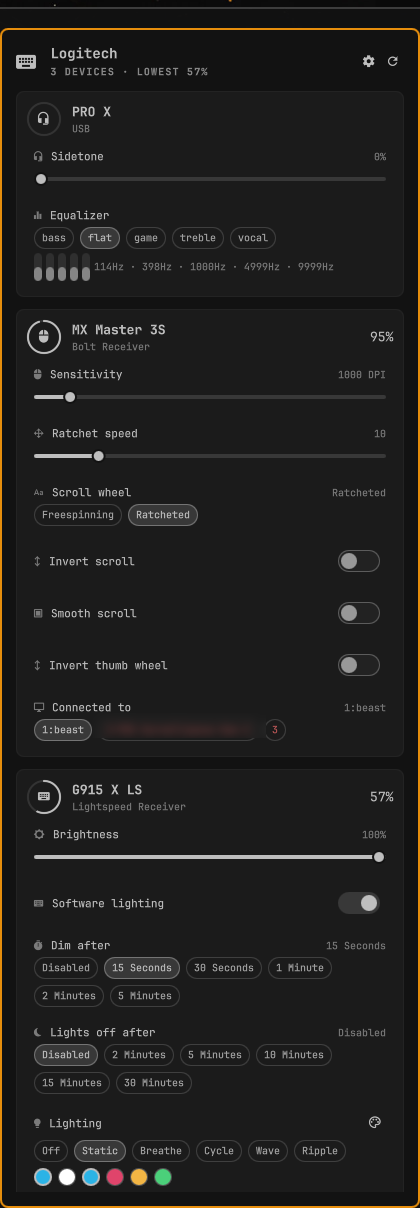
Control your Logitech hardware from the Omarchy bar: battery at a glance, a popup with the settings actually worth reaching for — mouse DPI and scroll behavior, keyboard brightness and RGB, headset sidetone and equalizer — and a full settings window for everything else, from button remapping to a custom equalizer curve.
Everything talks HID++ through Solaar's Python library. No vendor software, no Windows VM, no root.
Requirements
- Omarchy (Quattro) with the Omarchy shell
solaar— provides thelogitech_receiverPython library and the udev rules that give your user access to the HID++ deviceslibnotifyfor low-battery notifications (already present on Omarchy)
omarchy pkg add solaar
Solaar's udev rules land at install time. If devices only show up as root, replug them or reboot once so the rules apply.
Install
omarchy plugin add https://github.com/rvcabc/omarchy-logitech --enable
~/.config/omarchy/plugins/io.github.rvcabc.logitech/bin/logi service install
The plugin needs this one manual step: enabling it in the bar is not enough, because the panel talks to a background daemon.
logi service install writes a systemd user unit, enables the daemon, and
symlinks logi into ~/.local/bin. Nothing is installed system-wide and
nothing runs as root. Add --theme-hook if you also want the keyboard
repainted whenever you switch Omarchy themes, or --no-path to skip the
symlink.
It will not overwrite anything it did not create. Every file it writes
carries a managed-by: io.github.rvcabc.logitech marker, and the symlink counts
as its own only while it points into this plugin. Anything else at those paths —
your own ~/.local/bin/logi, a unit you wrote yourself, a file owned by another
user — makes the install refuse and stop, naming the path:
$ logi service install
{"ok": false, "error": "/home/you/.local/bin/logi already exists and was not
 created by this plugin. Move it aside yourself, or re-run with --backup to
 have it renamed to logi.bak.<timestamp>."}
Re-run with --backup to have the conflict renamed to <name>.bak.<timestamp>
next to itself rather than destroyed. Managed files are replaced atomically
(written to a temporary file in the same directory, then renamed over the
target), so an interrupted install cannot leave a half-written unit behind.
Remove
logi service uninstall
omarchy plugin remove io.github.rvcabc.logitech
logi service uninstall disables the user unit and removes the unit file, the
~/.local/bin symlink, and the theme hook — but only where those still carry
the plugin's marker or still point into the plugin. Anything you replaced by
hand in the meantime is reported as left-alone and kept. Backups made by
--backup are never touched; delete them yourself when you no longer want them.
Removing the plugin leaves your devices on whatever settings they currently
hold; logi rgb <device> off hands lighting back to the keyboard's onboard
effect first, if you want that.
In the bar
- Click — open the panel
- Right-click — match lighting to the current Omarchy theme
- Middle-click — rescan for devices
- Scroll — keyboard backlight brightness
Inside the panel: r rescans, t matches the theme, arrows walk the rows,
left/right adjusts whatever is selected, Enter activates it. Host switching
takes a deliberate Enter or click — arrow keys will not hand your mouse to
another machine by accident.
The bar button shows battery for whichever device has the least left and turns urgent below 20%. The daemon raises one notification per discharge cycle.
Two widget settings control what the bar draws — set them in the bar's widget
settings, or inline on the widget's entry in ~/.config/omarchy/shell.json:
| Setting | Options |
|---|---|
batteryScope |
Weakest device (default) — one entry for the device most likely to die first · All devices — one glyph and indicator per connected device |
batteryStyle |
Percent (default) — a number · Icon — the battery glyph ramp · Bar — a drawn level bar · Battery — a drawn outline lighting one segment per quarter charge · Off |
{ "id": "io.github.rvcabc.logitech", "batteryScope": "All devices", "batteryStyle": "Battery" }
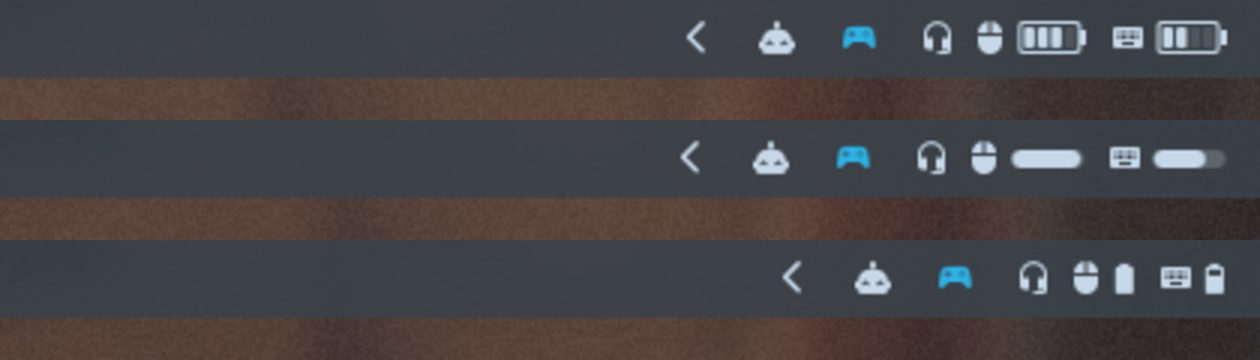
A device that reports no battery (a headset running over USB, say) shows just
its glyph rather than a fake empty indicator, a low battery tints only its own
cell urgent, and a charging device gets the charging ramp or a bolt so it never
reads as a dying one. The pre-1.1 showBatteryText: false is still honored
when batteryStyle was never set.
The settings window
The popup stays curated; the settings window shows everything writable. Open it
with the gear in the popup header, s while the popup is open, or
omarchy shell io.github.rvcabc.logitech settings (a toggle). It
opens on whichever monitor has focus, one tab per device, Esc or a click
outside closes it.
- Controls — the popup's set, with draggable sliders
- Fine tuning — everything else writable: high-resolution scroll and thumb-wheel modes, and whatever else the device claims
- Button behavior — per-button diversion:
Regular,Diverted(events go to software instead of acting on this machine),Mouse Gestures,Sliding DPI. The gesture button showingDivertedis correct — that is how gestures work; set itRegularand gestures stop. - Button assignments — remap each button to any action the device offers
- Equalizer (headsets) — a preset cycler above one ±12 dB slider per band.
Drag any band and the preset reads
custom; the name comes back when the curve matches a preset again. - Device info — read-only values, for reference
Command line
The same backend drives the panel and the terminal:
logi list                              # human-readable summary of everything
logi status                            # the JSON the panel consumes
logi status --all                      # including settings the panel hides

logi set mx-master-3s dpi 1600
logi set g915-x-ls brightness_control 50
logi set pro-x sidetone 30
logi set pro-x equalizer bass          # flat | bass | vocal | treble | game
logi set pro-x equalizer 114Hz=-6      # one band, by name, prefix ("114"), or index ("0")
logi set pro-x equalizer 2,4,0,-3,1    # the whole curve at once
logi toggle mx-master-3s hires-smooth-invert

logi rgb g915-x-ls static --color 2bb3e6
logi rgb g915-x-ls breathe --color e0446b --period 6000
logi rgb g915-x-ls off
logi theme                             # match the current Omarchy theme accent
Device keys are slugs of the device name (logi list prints them); any unique
substring of the name works too. Every command prints one JSON object, so
failures read as {"ok": false, "error": ...} rather than a traceback — and
exit non-zero, so logi set ... && ... behaves in scripts.
What gets exposed
The panel draws a curated set of settings — the ones worth a bar popup rather than every HID++ feature a device claims:
| Device class | Popup | Settings window adds |
|---|---|---|
| Mice | Battery, DPI, ratchet speed, scroll wheel mode, scroll and thumb-wheel inversion, host switching | High-resolution scroll modes, per-button diversion and gestures, button remapping |
| Keyboards | Battery, brightness, software lighting, per-zone RGB effects, dim and sleep timeouts | Whatever else the keyboard exposes |
| Headsets | Sidetone, equalizer presets | Per-band ±12 dB equalizer sliders |
Developed against an MX Master 3S (Bolt), a G915 X LS (Lightspeed), and a PRO X
headset (USB). Any other Logitech device Solaar recognizes appears
automatically; the popup draws the controls it knows how to draw (see
CONTROL_SPECS in bin/logi), the settings window draws every writable
setting generically, and logi status --all prints the lot as JSON. The only
things deliberately hidden are the raw RGB blobs (the lighting UI owns those)
and the per-key color map (a hundred-row footgun).
How it works
| File | Role |
|---|---|
bin/logi |
The whole backend: discovery, reads, writes, and the daemon |
omarchy-logitech.service |
systemd user unit that keeps the daemon running |
Panel.qml |
Bar button and popup |
SettingsWindow.qml |
The full settings window |
Service.qml |
Unix-socket client the panel and window drive |
Model.js |
Glyphs and formatting |
hooks/theme-set.d/ |
Optional hook that repaints lighting on theme changes |
Why a daemon? Building Solaar's settings list for a wireless device takes
2–5 seconds, because it probes every HID++ feature the device claims. Paying
that per slider tick is hopeless, so logi daemon holds the devices open and
answers over $XDG_RUNTIME_DIR/omarchy-logitech.sock; reads and writes then
cost one HID++ round trip. The panel keeps one socket open for the session and
matches replies to requests by id. Every CLI command prefers the daemon and
falls back to doing the work in-process when it is not running (--direct
forces the slow path), so nothing depends on the daemon being up.
systemctl --user status omarchy-logitech    # is it up
logi ping                                    # ask it directly
journalctl --user -u omarchy-logitech -f     # what it is doing
Notes and gotchas
- Zone effects do nothing until software lighting is on. A keyboard owns
its lighting until the host claims it, so
logi rgbenablesrgb_controlfirst. Turning it back off returns the keyboard to its onboard effect. - A keyboard can answer on two paths. Plugged in over USB and paired to
its Lightspeed receiver, it enumerates twice and only one path carries the
features.
discover()folds the two into one entry, preferring the path that actually exposes settings. - Brightness snaps. The G915 has four backlight levels, not a hundred, so the slider jumps to the nearest one; the panel trusts the value the device reports back over the one it asked for.
- Writing a setting makes udev emit
changeon the hidraw node. The daemon rebuilds only onadd/remove— reacting tochangewould make every write invalidate its index and pay for a rebuild on the next request. - Solaar's GUI can run alongside this, but both hold the same devices open; if readings go strange, close one of them.
- Python 3.14 makes Solaar's device destructors raise during interpreter
shutdown, which is why
bin/logiexits throughos._exit()after an explicit flush.