
Omarchy Keyboard Shortcuts
A native Omarchy settings panel for viewing and changing Hyprland keyboard shortcuts. It applies changes immediately while keeping handwritten Lua and Omarchy's packaged defaults untouched.
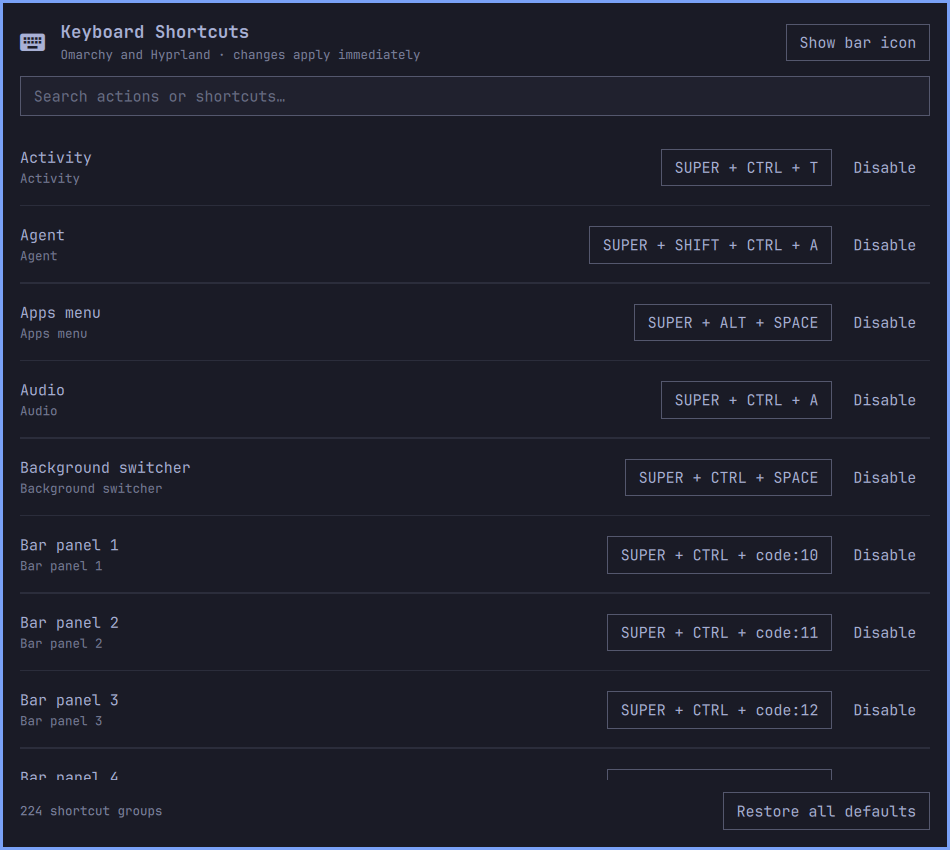
Features
- Search all effective Omarchy and user shortcut groups by name, typed shortcut, or by pressing the shortcut chord.
- Display physical
code:Nbindings as familiar keys using the active XKB keymap, while preserving their layout-independent representation internally. - Capture a new shortcut directly from the keyboard.
- Suspend Hyprland actions while capturing, then restore them immediately;
Super+Escis an emergency reset if capture is ever interrupted. - Detect conflicts and explicitly replace an existing assignment.
- Disable one shortcut, reset one shortcut, or restore all defaults.
- Validate every generated Lua change with
hyprctl reloadandhyprctl configerrors, rolling back automatically on failure. - Open from
Setup > Keyboard > Keyboard Shortcutswith an optional bar icon. - Preserve advanced callback-based Lua bindings as visible, read-only entries.
Install
Requirements
- Omarchy Quattro with its Hyprland Lua configuration and Omarchy shell.
- Python 3,
hyprctl, andomarchy-shell, all provided by Omarchy. xkbcliis optional and improves labels for physicalcode:Nbindings.
Install the public repository through Omarchy, then explicitly run its integration step:
omarchy plugin add https://github.com/sahzudin/omarchy-keymap.git --yes
~/.config/omarchy/plugins/io.github.sahzudin.keymap/install.sh
The integration step adds marked, reversible entries to the user's Hyprland,
Omarchy menu, and shell configuration. It runs entirely with user permissions
and leaves packaged files under /usr/share/omarchy untouched.
The panel is installed without a bar icon by default. To start with one:
~/.config/omarchy/plugins/io.github.sahzudin.keymap/install.sh --with-bar
When the icon is hidden, omarchy plugin list reports this mixed
panel,bar-widget plugin as disabled; for mixed plugins that column describes
bar placement. The panel remains enabled through shell.json and continues to
open from the Omarchy menu.
For development, place or symlink this directory at
~/.config/omarchy/plugins/io.github.sahzudin.keymap, rescan plugins, and run
./install.sh.
How persistence works
The installer adds one marked require("hypr.keymap") block to
~/.config/hypr/bindings.lua. The settings panel owns only these files:
~/.config/hypr/keymap.lua— generatedhl.unbindando.bindcalls.~/.config/omarchy-keymap/overrides.json— the editable shortcut model.~/.local/state/omarchy-keymap/backups/— timestamped backups.
The generated file first unbinds every affected source and destination chord, then recreates the selected actions. Removing an override therefore exposes the current Omarchy default again instead of freezing an old copy.
Command-line backend
python3 scripts/keymap.py list
python3 scripts/keymap.py set <group-id> "SUPER + SHIFT + R"
python3 scripts/keymap.py disable <group-id>
python3 scripts/keymap.py reset <group-id>
python3 scripts/keymap.py reset-all
python3 scripts/keymap.py set-bar true
Remove
Run the cleanup before deleting the plugin directory:
~/.config/omarchy/plugins/io.github.sahzudin.keymap/uninstall.sh
omarchy plugin remove io.github.sahzudin.keymap
Use uninstall.sh --purge to also remove the generated keymap and saved
overrides. Without --purge, those inactive files remain available for a
future reinstall.
Development checks
python3 -m unittest discover -s tests -v
python3 -m py_compile scripts/keymap.py