
Omarchy Agent Chat
A native Omarchy Shell bar plugin: a single prompt box that asks your default coding agent and opens it in a terminal to answer. Past questions are saved and shown for reuse.
Features
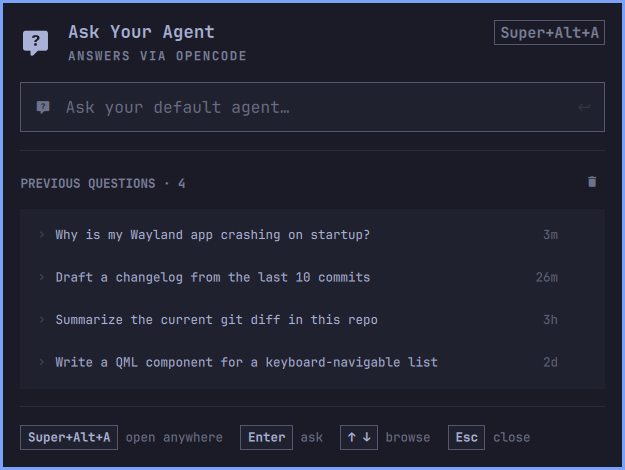
- A bar icon that opens a compact "Ask Your Agent" panel. Type a question and
press Enter — the panel launches the default agent in a terminal with
your prompt as the message (
omarchy agent prompt "<question>"). - History — every question is saved (newest first), stamped with how long ago you asked it. Walk the list with ↑/↓ without leaving the prompt, press Enter to load one back into the field and edit it, Del to drop it, or the trash icon to empty the list.
- Type to narrow — once you start typing, the list filters down to the saved questions that match, so an old prompt is a few keystrokes away.
- An empty history offers three starter questions instead of an empty box.
- The panel header reads the configured default agent (
omarchy-default-agent) and shows who will answer. If none is set it says so, and points atomarchy default agent <name>. - An optional global Hyprland shortcut opens/closes the panel from anywhere —
Super+Alt+A by default, managed by
scripts/bindings.py. - Supports shell IPC (
open,close,toggle,show,hide) so you can summon it from the Omarchy menu or a keybinding.
No privileges are required. The prompt is passed as an argument array (never a
shell command string), and history is written atomically to
~/.local/state/omarchy/chat/history.json.
How the answer is delivered
Omarchy's default agent is a terminal coding agent (opencode, claude,
codex, …). Running non-interactively and streaming its reply into a GUI is
agent-specific and fragile, so this plugin does the reliable thing: the panel
captures your question and opens the agent in a terminal, pre-seeded with it.
The panel is about prompting and reusing the question, not rendering the
agent's terminal output.
Requirements
- Omarchy with the Quickshell bar (
omarchy.bar) - A default coding agent set via
omarchy default agent <name> - Python 3, only when using the optional global-shortcut helper
Install
omarchy plugin add https://github.com/sahzudin/omarchy-chat.git --enable
To opt into the optional Super+Alt+A global shortcut, run:
python3 ~/.config/omarchy/plugins/io.github.sahzudin.omarchy-chat/scripts/bindings.py install
The helper verifies the key is free, safely backs up
~/.config/hypr/bindings.lua, adds one clearly marked binding block, updates
the widget's openShortcut setting, and reloads Hyprland. The plugin works
fine without this shortcut.
For local development, link the checkout into the user plugin directory and enable it:
ln -s ~/Projects/omarchy-chat ~/.config/omarchy/plugins/io.github.sahzudin.omarchy-chat
omarchy plugin enable io.github.sahzudin.omarchy-chat right
Saved changes under ~/.config/omarchy/plugins/ reload automatically. If a
change does not apply, force a reload:
omarchy-shell shell rescanPlugins
(The shell may need omarchy restart shell once after a large edit, since
rescanPlugins can reuse a cached compile.)
Usage
- Left-click the bar icon — open the panel and focus the prompt field.
- Type a question and press Enter — the default agent opens in a terminal to answer it.
- Typing also filters the saved questions below the field.
- ↑/↓ moves through those saved questions; Enter loads the highlighted one back into the field, Del deletes it. Clicking a row does the same as Enter, and the × on the highlighted row deletes it.
- Esc steps off the list first, then closes the panel.
Configuration
Per-widget settings go in the widget's entry in ~/.config/omarchy/shell.json
under bar.layout.<section>:
{
"id": "io.github.sahzudin.omarchy-chat",
"icon": "", // any Nerd Font glyph
"openShortcut": "SUPER + ALT + A", // global panel shortcut
"historyLimit": 100 // max saved questions
}
The file hot-reloads on save. Note the bar icon glyph is cosmetic and depends
on your bar font — change icon if it doesn't render.
Change the global shortcut
The panel's open/close shortcut is a managed Hyprland binding in
~/.config/hypr/bindings.lua (a marked block between -- BEGIN Agent Chat managed binding and the matching -- END). Change it safely with the helper:
python3 scripts/bindings.py set "SUPER + CTRL + K"   # bind a new key
python3 scripts/bindings.py remove                    # drop the binding
python3 scripts/bindings.py status                    # show the active key
install re-binds the last-used key (or SUPER + ALT + A).
Remove
omarchy plugin remove only unlinks the plugin folder and rewires the bar;
it does not touch the Hyprland keybinding written to
~/.config/hypr/bindings.lua, so drop that first:
python3 scripts/bindings.py remove
omarchy plugin disable io.github.sahzudin.omarchy-chat
omarchy plugin remove io.github.sahzudin.omarchy-chat
License
MIT — see LICENSE.