
Ominder
Ominder is an Omarchy Quattro bar widget for creating and reviewing lightweight reminders. It uses Omarchy's native omarchy reminder command, so reminders fire through the standard desktop notification system.
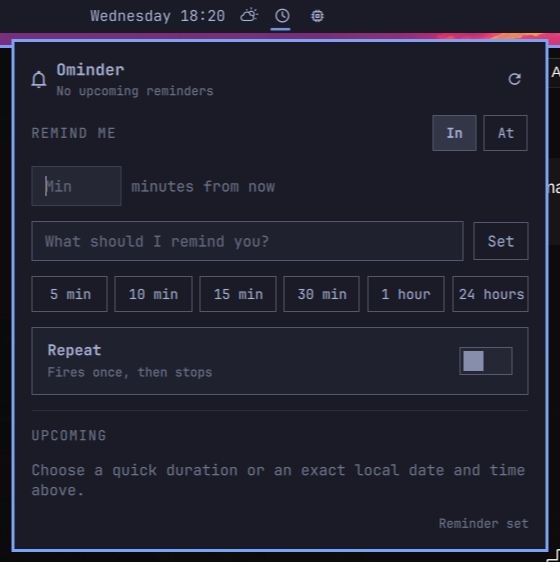
Current features
- Create a reminder with a duration or an exact local date and time, plus an optional message.
- Use quick presets for 5, 10, 15, 30, or 60 minutes, or 24 hours.
- Flip Repeat on to keep a reminder firing on its interval.
- See upcoming reminders and their remaining time.
- Stop an individual repeat, or clear every reminder at once.
- Open the panel from the bar or through shell IPC.
The In mode passes a whole-minute duration straight to omarchy reminder.
The At mode accepts YYYY-MM-DD and HH:MM, validates them in the local
timezone, and converts the selected time to the whole-minute duration that the
underlying command requires. Exact-time reminders never fire before the chosen
minute, but can arrive less than one minute after it. Interval-based repeating
is available in In mode only.
Requirements
- Omarchy 4 / Quattro shell
- The built-in
omarchy remindercommand
Install
Install Ominder from GitHub and enable its bar widget:
omarchy plugin add https://github.com/sahzudin/ominder.git --enable
If you want to choose its bar placement explicitly:
omarchy plugin enable io.github.sahzudin.ominder center
Local development
Validate the source folder first:
omarchy plugin validate .
npm test
The official Omarchy plugin guide loads development plugins from ~/.config/omarchy/plugins/<plugin-id>/. Copy this checkout there while developing. The plugin ID is:
io.github.sahzudin.ominder
After discovery, enable it with:
omarchy plugin enable io.github.sahzudin.ominder center
Open and close the panel without clicking the bar:
omarchy-shell shell summon io.github.sahzudin.ominder '{}'
omarchy-shell shell hide io.github.sahzudin.ominder
Saved plugin files are hot-reloaded. If discovery needs to be forced:
omarchy-shell shell rescanPlugins
Remove
omarchy plugin remove io.github.sahzudin.ominder
Ominder intentionally has no install.sh: installation does not add rows to
the shared Omarchy menu, edit shell.json directly, install hooks, or create
plugin-owned artifacts outside its plugin directory. The standard removal
command disables the bar widget and removes the plugin directory, leaving no
Ominder-owned menu rows or commands behind.
Reminders already created through Ominder are user data owned by Omarchy's
built-in reminder service. Removing the UI plugin does not cancel them; they
remain visible through omarchy reminder show and fire normally.
Repeat rules are the one file Ominder keeps outside its plugin directory. They
are user data too, and omarchy plugin remove leaves
~/.local/state/ominder/repeating.json in place; with no widget running,
nothing re-arms from it. Delete the file to discard those rules:
rm -f "${XDG_STATE_HOME:-$HOME/.local/state}/ominder/repeating.json"
rmdir --ignore-fail-on-non-empty "${XDG_STATE_HOME:-$HOME/.local/state}/ominder"
Repeating reminders
omarchy reminder only arms one-shot timers, so recurrence is Ominder's own
bookkeeping rather than a flag passed through to the command. Turning Repeat
on stores a rule in $XDG_STATE_HOME/ominder/repeating.json (falling back to
~/.local/state/ominder/repeating.json); each time that reminder fires, the bar
widget arms the next one with a plain omarchy reminder call. Every reminder
Ominder creates is therefore an ordinary Omarchy reminder, visible to
omarchy reminder show like any other.
Two consequences follow from that design:
- Rules only advance while the Quattro shell is running. An occurrence due during a reboot is skipped rather than replayed, and the schedule resumes at the next one.
- Each rule keeps a fixed anchor and measures every re-arm against it, so the
rounding to whole minutes that
omarchy reminderrequires stays within about half a minute instead of accumulating.
Clearing reminders from Ominder also drops the rules behind them. Clearing them
elsewhere — omarchy reminder clear, or the built-in reminders panel — leaves
the rules with no armed timer; Ominder notices on its next poll and retires
them rather than re-arming behind your back.
Architecture
manifest.json declares one bar-widget entry point. BarWidget.qml owns the bar button and loads Panel.qml internally, matching the official Quattro plugin contract. No second Quickshell process is started.
Model.js holds the pure logic — parsing omarchy reminder show --json,
validating exact local timestamps, converting them to durations, and planning
which repeat rules are due — so it is tested under Node without a shell.
test/model-test.js covers those paths.
The removal policy is covered by test/removal-policy-test.js. If a future
version adds an installer, the test requires a paired uninstaller and checks
that every known shared Omarchy configuration target is handled symmetrically.
License
MIT