
Singlenote for Omarchy
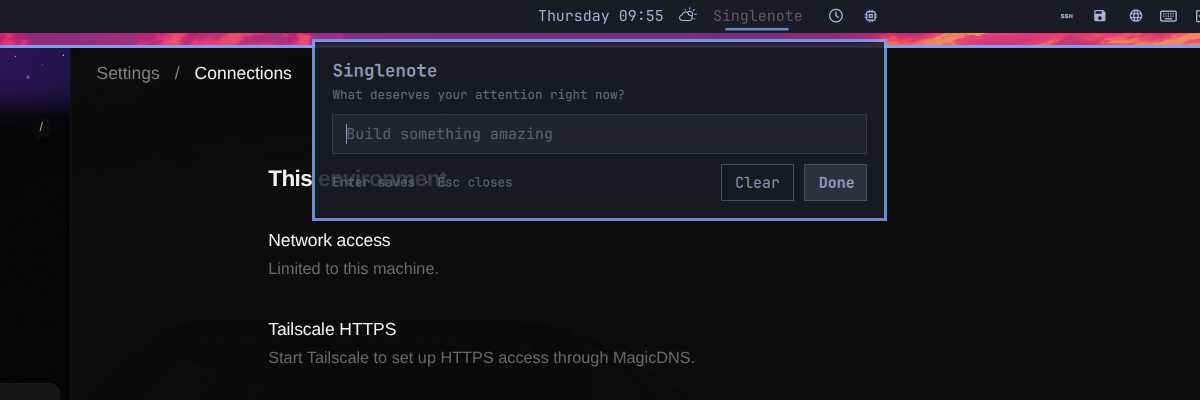
Singlenote keeps one task in the center of the Omarchy bar. It is inspired by One Thing, but is implemented against Omarchy 4's native Quickshell plugin API rather than Waybar.
Features
- one persistent, editable task in the bar;
- left-click to edit;
- instant file-watched updates with no polling;
- a theme-aware, keyboard-focused popup on the currently focused monitor;
- a
one-thingCLI for shell scripts and integrations; - an optional
SUPER+ALT+Oshortcut installed only when the key is free; - local-only storage at
$XDG_STATE_HOME/singlenote/state.json(falling back to~/.local/state/singlenote/state.json).
Requirements and permissions
- Omarchy 4 (Quattro) with its Quickshell-based shell;
- Python 3, using only the standard library;
- no network access, external services, extra packages, or elevated privileges.
Like every Omarchy shell plugin, Singlenote runs unsandboxed with your user permissions. It writes only its task state, its managed CLI, and—when free—its clearly marked Hyprland shortcut. The installer backs up the bindings file before adding that shortcut and never replaces an existing binding.
Install
From a local checkout:
./install.sh
Once the repository is published, Omarchy can install the plugin itself:
omarchy plugin add https://github.com/sahzudin/omarchy-singlenote.git --enable
~/.config/omarchy/plugins/io.github.sahzudin.singlenote/install.sh
The second command installs the CLI and optional keyboard shortcut. Plugin
placement and enabling are delegated to Omarchy, so omarchy refresh shell
does not erase the widget.
Use
Click the text in the bar, type, and press Enter. Escape and outside-click also
save. Use the popup's Clear button or one-thing clear to remove the task.
one-thing set "Build something amazing"
one-thing show
one-thing clear
one-thing edit
one-thing toggle
one-thing show --json
Piped text is accepted too:
printf '%s\n' "Review the release" | one-thing set
The plugin watches the state file, and the CLI also sends a best-effort shell refresh after changes. The bar therefore changes immediately without a timer.
Configure
Use Omarchy's bar settings to change the visible-character limit, empty label, position, or ordering. The default placement is the center section.
To use a different shortcut, remove the managed block from
~/.config/hypr/bindings.lua and bind this command to any free key:
o.bind("SUPER + ALT + O", "Edit Singlenote", "omarchy-shell shell toggle io.github.sahzudin.singlenote {}")
Uninstall
./uninstall.sh
The normal uninstall keeps the current task. To delete it as well:
./uninstall.sh --purge
The uninstaller disables and removes the plugin, deletes only the CLI and keybinding it owns, and leaves unrelated Omarchy configuration untouched.
Development
npm test
npm run validate
Singlenote targets the plugin API shipped with Omarchy 4 and uses only Python's standard library for its CLI and installer helpers.
See SECURITY.md for the security model and vulnerability reporting instructions.
License
MIT