
OmaPrayers
Prayer times in the Omarchy bar: a to-scale day strip or a ruled timetable, Arabic and English, offline calculation and optional notifications.
Demo
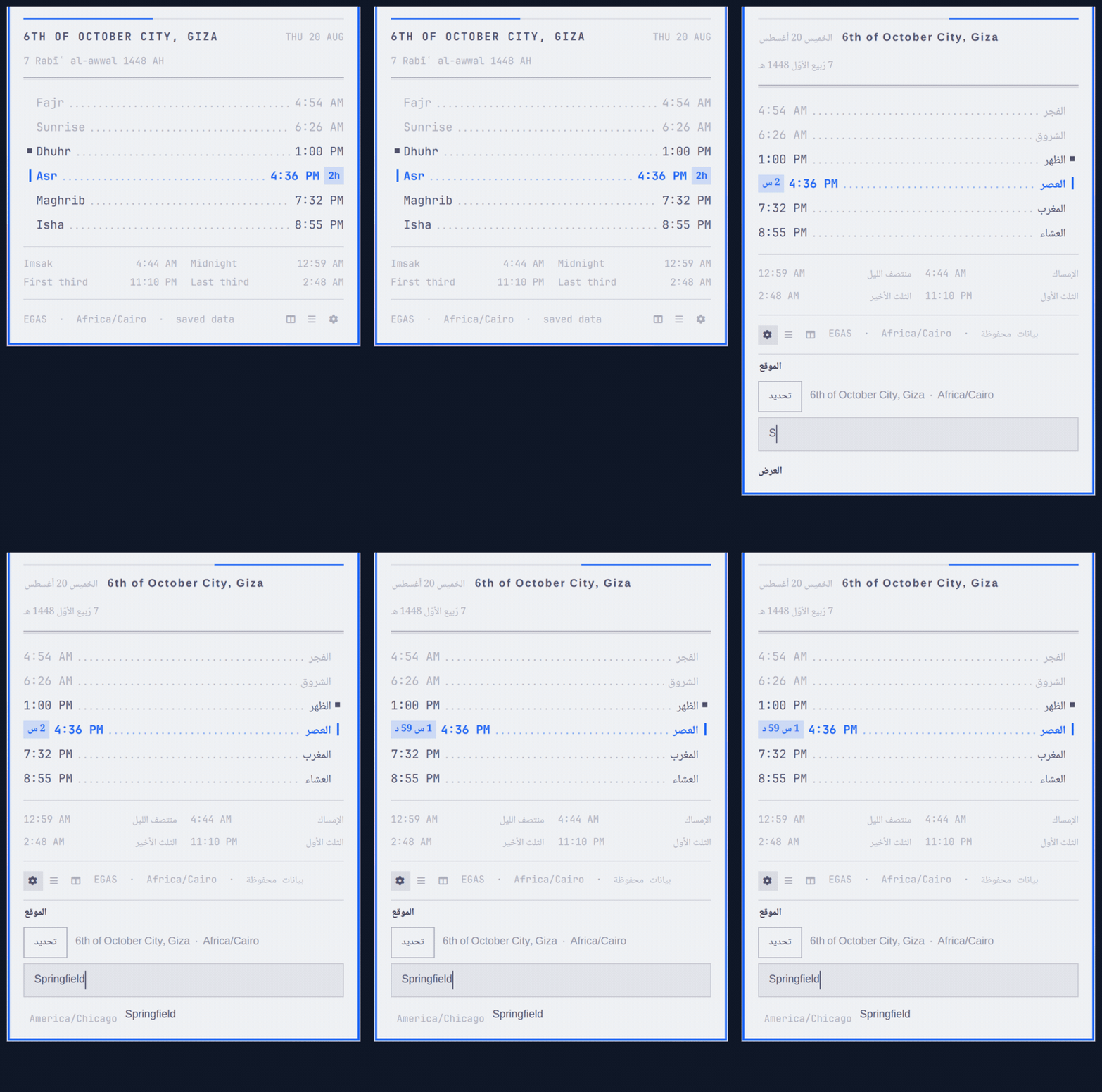
S switches layouts, A switches to Arabic, and the gear opens a city
search that resolves a place to its coordinates and timezone.
Screenshots
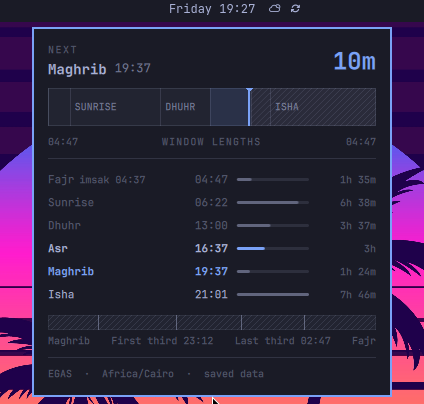
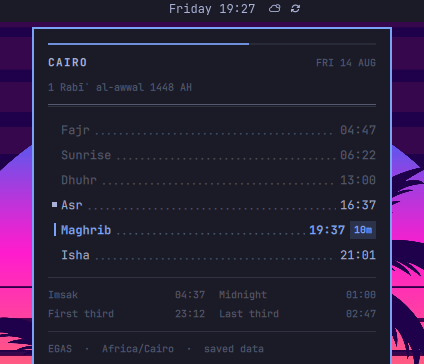
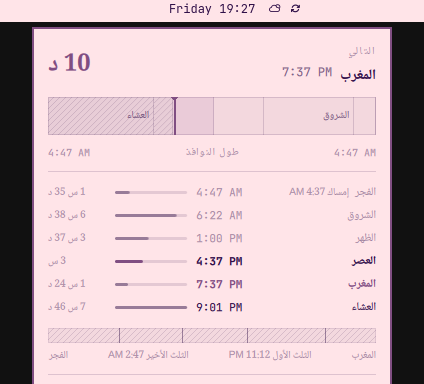
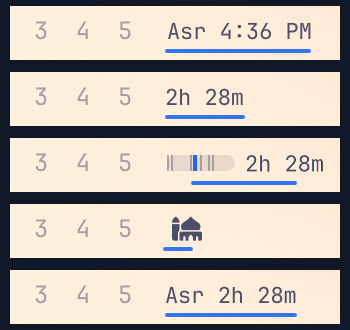
Five bar label forms, from name and countdown to a miniature day strip to a single glyph:
Highlights
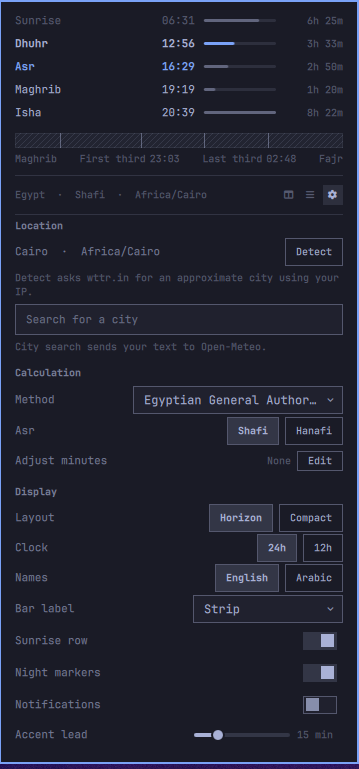
- Horizon draws the day to scale, marks where you are, and compares the length of each prayer window. Compact is a ruled timetable with a night-marker grid.
- The bar chip pairs a miniature day strip with the next prayer countdown. Vertical bars use a rotated text label.
- English and Arabic names, dates and countdowns; Arabic uses a configurable Noto Naskh Arabic face.
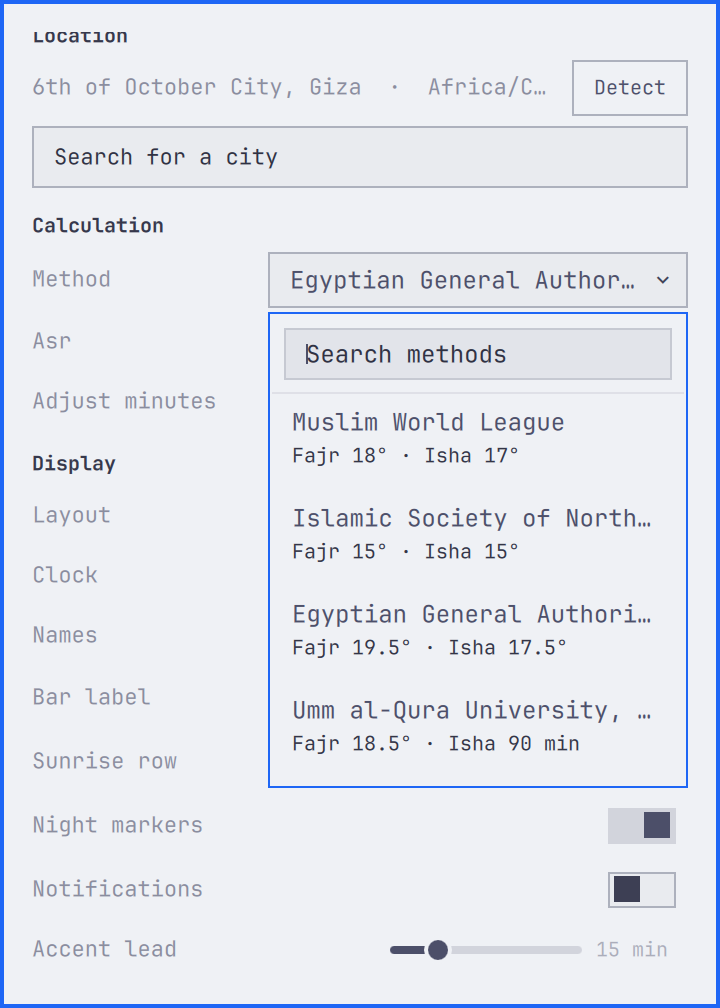
- Prayer times are calculated offline for 25 methods. Choose the method and Shafi or Hanafi Asr from the panel, then tune individual times if needed. Nojumi uses standard Asr while preserving your saved school preference.
- Optional prayer-time and advance notifications, deduplicated across monitors and shell reloads.
- Location and presentation are set from the panel. The city search lists
same-named cities with their region and zone —
Springfieldspans two — and applies nothing until you pick one. - Picking a city can suggest its regional calculation method. The suggestion is never applied without confirmation.
Controls
- Left click toggles the panel; middle click cycles the bar label;
right click (or
R) reloads timezone data;Esccloses;Tabswitches to the neighbouring panel.
| Key | Effect |
|---|---|
D |
Show or hide the settings section |
C or / |
Jump to the city search |
M |
Open the calculation-method picker |
S |
Switch the panel layout |
B |
Cycle the bar label |
T |
Switch 24-hour and 12-hour |
A |
Switch English and Arabic |
H, J, K, L and X are reserved by Omarchy's panels.
Requirements
- Omarchy 4 (Quattro)
- Bash, GNU coreutils,
jqand installedtzdata curl8.4 or newer for city search and the optional Detect buttonnoto-fontsfor Arabic mode
Prayer-time calculation does not require network access.
Install
omarchy plugin add https://github.com/salemsayed/omaprayers.git --enable
The widget goes to the right section of the bar; move it with
omarchy bar move io.github.salemsayed.omaprayers --section right --index 0
if you prefer another spot.
Configure
Location, calculation method, Asr school, six tuning values, layout, panel
centering, bar label, clock format, language, sunrise and night markers,
notifications and the accent lead time are on the panel's settings section.
Accent lead controls both the bar highlight and the advance prayer reminder
when notifications are enabled. Off disables advance reminders while keeping
prayer-time notifications.
Press M to open the method picker directly.
Use omarchy bar set for the same settings and for advanced calculation
options:
omarchy bar set io.github.salemsayed.omaprayers barDisplay "Icon only"
omarchy bar set io.github.salemsayed.omaprayers panelStyle "Compact"
omarchy bar set io.github.salemsayed.omaprayers timeFormat "12-hour"
omarchy bar set io.github.salemsayed.omaprayers notifications true --json
omarchy bar set io.github.salemsayed.omaprayers calculationMethod 5 --json
omarchy bar set io.github.salemsayed.omaprayers hanafi true --json
omarchy bar set io.github.salemsayed.omaprayers highLatitudeRule "Angle based"
Change a location as a set — label, coordinates and timezone:
omarchy bar set io.github.salemsayed.omaprayers locationLabel "Alexandria"
omarchy bar set io.github.salemsayed.omaprayers latitude "31.2001"
omarchy bar set io.github.salemsayed.omaprayers longitude "29.9187"
omarchy bar set io.github.salemsayed.omaprayers timezone "Africa/Cairo"
Every option is in Configuration.
Remove
omarchy plugin disable io.github.salemsayed.omaprayers
omarchy plugin remove io.github.salemsayed.omaprayers
Notification deduplication state is kept. To delete it too:
rm -r -- "$HOME/.local/state/omarchy/io.github.salemsayed.omaprayers"
Data sources
Prayer times are calculated locally. The astronomy algorithm is ported from adhan-js and checked against published timetables, adhan-js and recorded AlAdhan output; see Validation. AlAdhan is not used at runtime.
The city search uses Open-Meteo geocoding; the optional Detect button reads the connection's apparent city from wttr.in and only fills the search box. Nothing is applied until you pick a result.
Accuracy
Prayer times are calculated offline from explicit latitude, longitude and an IANA timezone; the computer's timezone is not assumed. The astronomy algorithm is ported from adhan-js. The engine includes 25 methods, including Nojumi and Custom, with built-in minute adjustments and fixed intervals listed in Validation.
Validation covers eight official timetable fixtures (462 rows, all within their published variance), a seeded adhan-js comparison (3,000 regular and 300 polar cases, exact to the second), and a recorded AlAdhan corpus of 60 snapshots across 40 cities: 1,723 days and 18,953 timing cells compared, every residual within one minute after the documented method differences, 122 polar days where AlAdhan returns invalid output skipped, and 36 Umm al-Qura Hijri dates matched exactly.
Calculated times are not mosque iqama schedules. Choose the method used by the nearest authority, select the local Asr school, compare with a trusted local calendar, then adjust Fajr, Sunrise, Dhuhr, Asr, Maghrib or Isha in the panel. Imsak, Sunset and Midnight tuning and the high-latitude, midnight, Shafaq, Hijri and Custom options remain available through configuration. Defaults: Cairo, method 5 (Egyptian General Authority of Survey), Shafi Asr, 24-hour, English, Horizon, notifications off.
The Nojumi profile is published by the Astronomical Research Center in Qom
(nojumi.org): Fajr at 18°, Maghrib
at 3.75° outside Iran and 4.5° in Iran, Isha at 15° because the source
publishes no Isha parameter, and sunset-to-Fajr legal midnight.
Nojumi uses local ID 1000. Its Asr choice is disabled and its midnight
is always sunset-to-Fajr. Your saved Asr and midnight preferences remain
intact and apply again when you switch to another method. Existing methods,
including Qum and Tehran, keep their previous behavior. The picker marks
Isha as an estimate, not a time published by Nojumi.