
WWAN connection widget
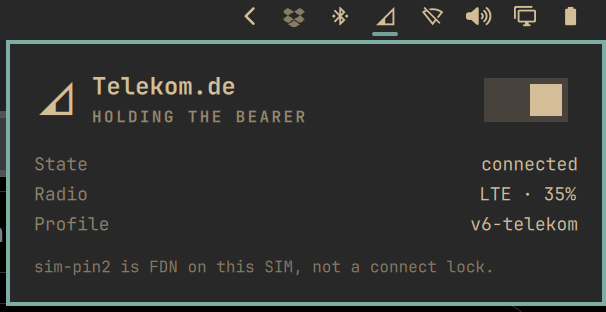
Bar widget for cellular / mobile data on Omarchy 4 (Quattro). It shows signal and operator, and connects or disconnects the NetworkManager gsm profile with one switch.
The widget hides when the machine has no modem. Wi-Fi and Ethernet stay in the stock network widget.
Plugin id: io.github.serg3k.omarchy-plugin-wwan. Listed on Omarchy Plugins.
Features
- Hides when no modem is present
- One switch for mobile data: unblock the WWAN radio if needed, enable the modem, bring the gsm profile up
- Bar icon tracks the NetworkManager profile, not leftover ModemManager state
- Panel shows operator, access technology, signal, profile, and a short state line
- Stays visible when Wi-Fi or Ethernet owns the default route
Requirements
- Omarchy 4.0.0 Quattro or later (Quickshell bar, not Waybar)
ModemManagerandNetworkManager- A gsm / WWAN modem that already works with
mmcliand an NM gsm profile (APN saved in NetworkManager)
This plugin does not ship an APN editor. Save the gsm profile with nmtui first. If the modem stays in enabling or low power, see FCC unlock.
FCC unlock
Many US-sold Lenovo, Dell, and HP modules stay in enabling or low power until you enable an FCC unlock script. That is host setup. This plugin does not ship unlock scripts.
- Find the modem
vid:pidinlsusborlspci -nn. Match it to a name under/usr/share/ModemManager/fcc-unlock.available.d/. - As root, link only that script and restart ModemManager:
mkdir -p /etc/ModemManager/fcc-unlock.d
ln -sft /etc/ModemManager/fcc-unlock.d /usr/share/ModemManager/fcc-unlock.available.d/vid:pid
systemctl restart ModemManager
On this ThinkPad the Quectel EM061K-GL id is 2c7c:6008.
Do not symlink every file in fcc-unlock.available.d. Some vendors ship their own unlock package instead of the ModemManager script.
See Arch Wiki: FCC locking and ModemManager: FCC unlock.
Install
This repo is a plugin: manifest.json at the root.
omarchy plugin add https://github.com/serg3k/omarchy-plugin-wwan.git --enable
From a local checkout:
mkdir -p ~/.config/omarchy/plugins
ln -sfn "$(pwd)" ~/.config/omarchy/plugins/io.github.serg3k.omarchy-plugin-wwan
omarchy plugin validate ~/.config/omarchy/plugins/io.github.serg3k.omarchy-plugin-wwan
omarchy plugin enable io.github.serg3k.omarchy-plugin-wwan
If the icon does not appear, run omarchy-shell shell rescanPlugins or omarchy restart shell. Move it with omarchy bar move io.github.serg3k.omarchy-plugin-wwan --section right if you want a different slot.
Removal
omarchy plugin remove io.github.serg3k.omarchy-plugin-wwan
That disables the widget and removes the checkout or symlink under ~/.config/omarchy/plugins/. A hand-made folder with no git remote is moved to a timestamped backup instead of being deleted.
Use
- Click the bar icon to open the panel.
- Switch turns mobile data on or off. On: unblock the WWAN radio if needed, enable the modem, bring the gsm profile up. Off: take the profile and bearer down; the radio stays on so the next connect is fast.
- Right-click the bar icon toggles the same switch. Middle-click refreshes status.
- There is one switch. rfkill, airplane mode, and ThinkPad FN are not a second control. If the radio is blocked, the same switch turns it back on as part of mobile data on.
- The bar still shows the modem when Wi-Fi owns the default route.
Keyboard
Inside the panel:
t: toggle mobile datar: refresh status- arrows /
jk: move the cursor - enter / space: activate
esc: close
Icons
| What you did | Bar glyph |
|---|---|
| Mobile data connected | Signal wedge (more fill = stronger) |
| Profile down, radio still on | Empty wedge, dim |
| Radio off (rfkill / disabled) | Slashed signal wedge |
sim-pin2 on a working modem is FDN, not a lock. A real PIN/PUK lock blocks the switch.
Hardware tested
| Date | Machine | Modem | Notes |
|---|---|---|---|
| 2026-08-18 | Lenovo ThinkPad T14 Gen 6 (21QJ00DTGE), Omarchy 4.0.0, kernel 6.18.2-arch2-1 |
Quectel EM061K-GL (LTE) | NM profile v6-telekom, operator Telekom.de, FCC unlock 2c7c:6008 already on the host |
Other laptops with a ModemManager gsm device should work the same. They are not tested in this tree.
License
MIT. See LICENSE.