
Omarchy Hotspot
A mobile hotspot that never drops your Wi-Fi. One click in your Omarchy
bar turns this laptop into a Wi-Fi AP (OmarchyHotspot) that shares your
current connection — while the station link stays up the entire time.



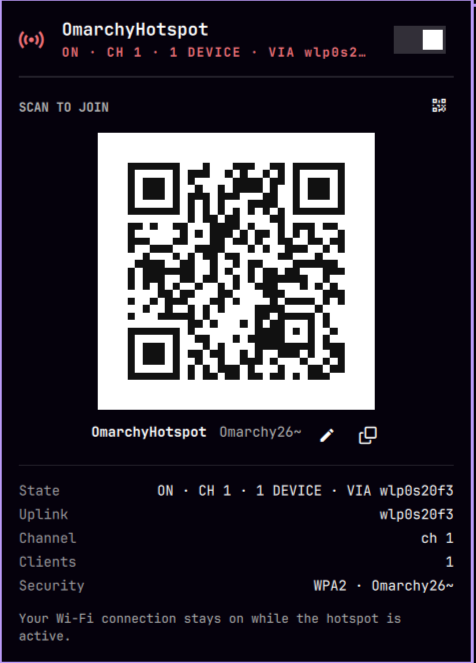
The hotspot popup: hero toggle, scannable QR code, and live connection details.
Features
- 🔥 Concurrent STA+AP — your existing Wi-Fi connection keeps working while clients join the hotspot. No radio juggling, no disconnects.
- 📱 Scannable QR code — join with any phone camera (
WIFI:T:WPA;S:OmarchyHotspot;P:…;;), shown right in the popup. - 🎛️ Interactive panel — hero toggle, live status (uplink, channel, connected clients), copy-password, keyboard navigation (
j/k,Enter,Esc). - 🌐 Shares any uplink — NAT follows the default route: Ethernet, phone tether, or a VLAN-tagged interface. Whatever carries your internet is shared.
- 🔒 WPA2 with a persistent random password — editable in the panel (pencil icon → inline field; takes effect immediately, QR regenerates).
- ⚡ Passwordless toggling — a scoped polkit rule lets the bar widget drive the root helper without prompts.
How it works
The AP runs on a virtual interface (ap0) alongside your station interface:
┌─────────────── phone ───────────────┐        ┌──────────── laptop ────────────┐
│  scan → WPA2 → DHCP → DNS → browse │  ════►  │ ap0 (hostapd + dnsmasq)        │
└─────────────────────────────────────┘        │      │ NAT (iptables MASQUERADE)│
                                               │      ▼                         │
                                               │ wlp0s20f3 (your Wi-Fi, stays up)│
                                               └────────────────────────────────┘
hostapdserves the AP onap0under a transient systemd unit (omarchy-hotspot.service) — journald logging, clean lifecycle.dnsmasqhands out10.42.0.10–200and resolves DNS (omarchy-hotspot-dns.service).- iptables does NAT/forwarding, with an explicit INPUT accept on
ap0— UFW's default DROP policy would otherwise eat client DHCP/DNS. - The bar plugin (
io.github.shivamnarkar47.omarchy-hotspot) pollsstatusviapkexecand renders the popup with the QR matrix (qrencode → 0/1 modules, same format asomarchy.wifiqr).
Requirements
- Omarchy (or any Hyprland + Quickshell setup),
iw,nmcli,qrencode - Packages:
hostapd,dnsmasq(installed byinstall.shvia pacman) - A Wi-Fi card whose driver supports concurrent station + AP on separate
virtual interfaces. Verify with:
Intel AX200/AX210 (iwlwifi) work; the AP must mirror the station's channel and channel width (the helper does this automatically — a width mismatch makes iwlwifi silently refuse to beacon).iw list | grep -A3 "valid interface combinations" # look for: #{ managed } <= 1, #{ AP, ... } <= 1
Installation
The repository root is a valid Omarchy plugin (manifest.json at the root,
validated by omarchy plugin validate). Two steps:
# 1. The bar widget (installs as io.github.shivamnarkar47.omarchy-hotspot from the repo's manifest)
omarchy plugin add https://github.com/shivamnarkar47/omarchy-hotspot --yes
omarchy plugin enable io.github.shivamnarkar47.omarchy-hotspot --section right

# 2. The system helper (root helper, polkit rule, NM config, packages)
git clone https://github.com/shivamnarkar47/omarchy-hotspot.git
cd omarchy-hotspot
./install.sh          # asks for your password once
install.sh does:
- Installs
hostapd+dnsmasq(pacman) - Installs
src/omarchy-hotspot-helper→/usr/local/bin/ - Installs the polkit rule (passwordless
pkexecfor the helper only) - Tells NetworkManager to never touch
ap0(it would force station mode)
Removal
omarchy plugin remove io.github.shivamnarkar47.omarchy-hotspot --yes      # bar widget
sudo rm /usr/local/bin/omarchy-hotspot-helper  # system helper
sudo rm /etc/polkit-1/rules.d/50-omarchy-hotspot.rules
sudo rm /etc/NetworkManager/conf.d/99-unmanaged-ap0.conf
nmcli general reload
sudo pacman -Rns hostapd dnsmasq               # optional: if nothing else uses them
Usage
- Click the hotspot icon in the bar → panel opens.
- Flip the switch (or press
Enter). Status shows uplink, channel, clients. - Scan the QR with any phone, or join manually:
- SSID:
OmarchyHotspot - Password: shown in the panel (copy button included)
- SSID:
- Toggle off when done — your Wi-Fi was never interrupted.
Troubleshooting
| Symptom | Cause / fix |
|---|---|
| Phone can't see the AP | AP channel width ≠ station width. Recreate the profile / check journalctl -u omarchy-hotspot. |
| Connects but no internet | Check iptables -L INPUT -n — UFW's DROP policy must not cover ap0 (the helper inserts an ACCEPT). |
nl80211: Match already configured |
The ap0 vif must be ip link set up before hostapd starts (the helper does this). |
| No DHCP | journalctl -u omarchy-hotspot-dns — verify --log-dhcp shows DISCOVER → OFFER → ACK. |
| Turned on but nothing happens / no error | Opening the popup when the hotspot fails now shows a red HOTSPOT FAILED TO START banner with the reason. If the panel stays silent, the toggle itself may not have run the helper (polkit) — check journalctl -u omarchy-hotspot and that the passwordless pkexec rule in /etc/polkit-1/rules.d/50-omarchy-hotspot.rules matches your user. |
Extending
The plugin is a plain Quickshell bar widget:
plugin/
├── manifest.json   # id, kinds, bar-widget metadata
├── Panel.qml       # bar button + popup UI (hero, QR, details)
└── qr.sh           # QR matrix generator (WIFI: scheme)
Ideas: client list with MACs, per-client bandwidth, SSID/password settings
in shell.json, 5GHz band preference, WPA3, scheduled on/off.
Credits
This plugin stands on the shoulders of the Omarchy desktop environment (and its Quickshell shell framework) by Basecamp / DHH, without which there would be no bar to plug into.
Specific acknowledgement is due to Omarchy's built-in plugins that this project learned from and reused patterns from:
- 🧭
omarchy.network— the bar widget (plugin/Panel.qml) is explicitly modeled on its structure and conventions. - 📷
omarchy.wifiqr— the QR matrix generator reuses the same 0/1 module format, so hotspot join codes render identically to Wi-Fi QR codes.
The runtime is powered by excellent upstream free software:
- hostapd — the IEEE 802.11 AP and WPA/WPA2
authenticator that serves the
ap0interface. - dnsmasq — DHCP and DNS for connected clients.
- NetworkManager — station connectivity and the
unmanaged-interface exemption that keeps
ap0free for the AP. - Quickshell — the QtQuick shell framework the bar widget is written in.
- qrencode — encodes the
WIFI:payload into the scannable matrix.
Contributors
Thanks to everyone who has helped improve this project:
| Contributor | Role |
|---|---|
Shivam Narkar — @shivamnarkar47 |
Creator & maintainer |
Muhammad Dicky Isra — @DaDecky |
Contributor (scoped IPv6 resolver fix) |
JunaidIRF — @JunaidIRF |
Contributor (inline SSID editor & popup overflow fix) |
Want to join them? See CONTRIBUTING.md for how to get started.
License
MIT