
WalkingPad Control

Control a KingSmith WalkingPad from the Omarchy bar over Bluetooth LE. No vendor app, no account, no network access.
Features
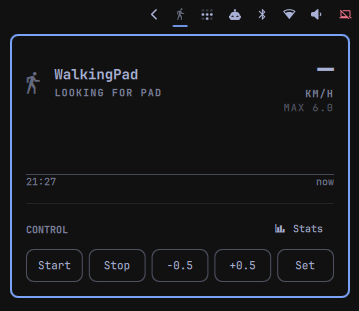
- A bar icon and popup that start and stop the belt, step the speed, set an exact speed, and show distance, steps and elapsed time.
- A live chart in the popup: steps per minute over the last 60 wall-clock minutes.
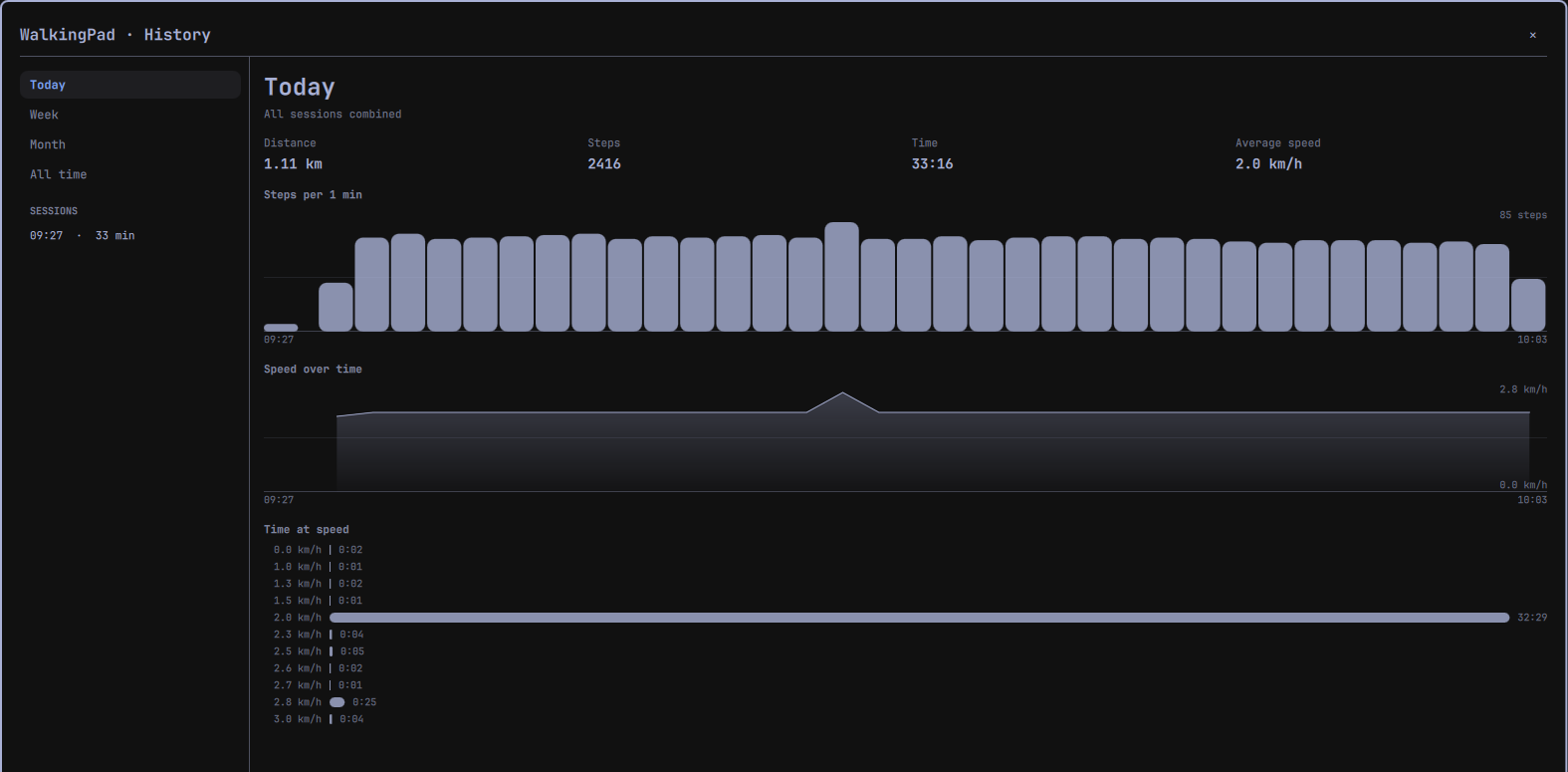
- An analysis window that browses the full history by day, week, month or all time, and opens any single walk on its own charts.
- A private history on disk that never leaves the machine, with
walkingpad-statsto query it as JSON. walkingpad-bridge, a standalone line-delimited JSON process that owns the BLE link and can be scripted on its own.
Everything here runs locally. There is no cloud, no telemetry and no phone-home.
Another plugin for the same pad
msegoviadev/omarchy-walkingpad is a different Omarchy plugin for KingSmith pads, and it is good work. It was listed shortly before this one, and this one was written without knowledge of it — parallel work on the same idea, not either derived from the other.
Go and try it as well. There are ideas in it worth learning from, and some may well find their way here.
Requirements
- Omarchy, for the bar widget and the analysis window.
- A KingSmith WalkingPad. Developed and measured against a C2 on firmware 6.1.2.
Nothing to install. The bridge runs on system Python and uses only
python-gobject and bluez, both already part of an Omarchy base install. There
is no build step, no virtualenv and no pip.
Nothing here asks for root, installs a package, or writes a service unit. It runs entirely as your own user, as a child process of the shell.
Installation
omarchy plugin add https://github.com/shllg/omarchy-walkingpad-control.git
Omarchy warns that plugin code runs unsandboxed, clones the repository, validates
the clone, installs it to ~/.config/omarchy/plugins/<id>/, and offers to enable
it. Then add the WalkingPad Control widget to the bar from the shell's widget
settings — a bar layout entry is what mounts the widget.
Installed plugins are git checkouts rather than copied release bundles, so
omarchy plugin update fast-forwards this one in place and re-validates it,
rolling back if validation fails.
Removing it
omarchy plugin remove io.github.shllg.walkingpad
Omarchy asks to confirm, then disables the plugin — which removes its bar layout entry — and deletes the checkout. Because this is a git checkout rather than a copied folder it is removed outright, with no backup copy; the repository remains upstream. The bridge is a child process of the shell, so it exits with the plugin. There is no unit to disable and nothing to clean up outside the checkout.
⚠ Your walking history is deliberately not deleted. It lives outside the
plugin, under ${XDG_STATE_HOME:-$HOME/.local/state}/walkingpad/, and removal
leaves it alone so that reinstalling keeps your history. Delete that directory
yourself if you want the data gone.
Usage
The bar widget
The icon shows whether the pad is reachable and whether the belt is moving. Opening the popup gives distance, steps and elapsed time, the steps-per-minute chart, and five controls: Start, Stop, -0.5, +0.5 and Set for typing an exact speed. Stats in the section header opens the analysis window.
Settings
One setting, in the widget's own configuration:
| Setting | Default | Meaning |
|---|---|---|
| Session gap (minutes) | 5 | Two bouts of walking closer together than this are treated as one session. |
It is presentation policy only. It never affects what is recorded, and never affects safety.
The analysis window
The left rail selects Today, Week, Month or All time and lists the sessions in that period. The right pane shows the period's activity profile and totals; selecting a session replaces it with that walk's own speed and cadence charts.
Walking history
The plugin keeps a private history under
${XDG_STATE_HOME:-$HOME/.local/state}/walkingpad/, created with mode 0700.
This is personal health data — a record of when its owner is at their desk and
moving — and it never leaves the machine.
Nothing is ever pruned. At one hour of walking a day, growth is roughly 70 MB a year, and there is no retention setting.
Querying it
bin/walkingpad-stats prints JSON on stdout. Five subcommands: sessions,
session, totals, profile and residuals.
Output is one JSON object on a single line. Piped through jq for reading here,
with each bucket's start and end epochs elided:
bin/walkingpad-stats totals --by day

{
  "by": "day",
  "buckets": [
    {
      "key": "2026-08-24",
      "dur_s": 3780, "dist_km": 3.03, "steps": 4382, "v_avg": 2.9,
      "unobserved_s": 0, "unobserved_dist_km": 0.0, "unobserved_steps": 0
    },
    {
      "key": "2026-08-25",
      "dur_s": 1560, "dist_km": 1.18, "steps": 1704, "v_avg": null,
      "unobserved_s": 1560, "unobserved_dist_km": 1.18,
      "unobserved_steps": 1704
    }
  ],
  "skipped_rows": 0
}
Reported numbers can include an unobserved share: walking the pad's own counters
recorded while the plugin was not connected. That share is always shown separately
from observed walking, never folded silently into the same total. The second day
above is entirely unobserved, so its distance and steps are exact while v_avg is
null — no speed curve was recorded, and inventing an average from a total would
be a guess presented as a measurement.
Every subcommand takes --store to point at a different directory, which is how
the tests drive it. There is no --help: output is JSON on stdout, and usage
errors are JSON too.
Scripting the bridge directly
./bin/walkingpad-bridge [--max-speed 6.0] [--max-step 0.5] [--replay PATH]
It writes one JSON object per line to stdout and reads one per line from stdin. Out:
{"t": "link", "state": "connected", "addr": "<pad-addr>", "name": "KS-BLC2"}
{"t": "status", "belt": "running", "speed": 2.3, "target": 2.5, "mode": "manual",
 "time": 1011, "dist_km": 0.7, "steps": 1318}
In:
{"cmd": "speed", "kmh": 2.5}
{"cmd": "start"}
{"cmd": "stop"}
speed is the belt's actual speed and target is what was last commanded.
They differ during a ramp, and that is not an error. target is null until
something is commanded: attaching to a belt already running does not tell us what
it was aimed at, and reporting 0.0 there would read as a stop. pad_set_speed is
the pad's own stored value and is diagnostic only — it reads 0.0 when the speed
was set at the panel.
Behaviour that looks like a bug and is not
The pad is usually absent. It sleeps and stops advertising entirely when idle,
and BLE cannot wake it — that needs the panel or the remote. {"t":"link", "state":"absent"} is the normal resting state, so the bridge backs off for 30 s
between scans rather than retrying hard, and the widget renders it as deliberate
rather than broken.
Speed changes ramp, they do not jump. The pad accelerates at roughly
0.25 km/h per second and there is no acknowledgement anywhere in the protocol. The
bridge therefore reports speed and target separately; a UI showing only
speed would make every click look like it had failed for two seconds.
Status is polled, not pushed. The pad answers queries and never volunteers a frame — with notifications subscribed, silence produces nothing at all. The 1 Hz poll loop is load-bearing. Removing it as "redundant with notifications" produces a permanently frozen UI that looks like an idle pad rather than a bug.
Only one connection at a time. The phone app and this plugin are mutually exclusive. Being unable to connect while the app is attached is a state to surface, not a fault to retry into. On your own machine the picture is different: BlueZ owns that one link and shares it between local clients, so a second copy of the bridge does not fail — it quietly doubles how often the pad is polled.
Safety
⚠⚠ The motion controls have not been signed off against hardware. Everything below is implemented, and the logic is tested against protocol frames captured from a real pad — including the two-part start, which has its own recording-based test. But the start, stop and speed paths have not yet been exercised end to end on a moving belt. Until they are, treat anything that moves the belt as beta: stand clear when starting, and keep the panel or the remote within reach. The read-only side — status, history, the charts — is exercised and safe.
- ⚠ Stop is NOT unconditional. The pad's stop opcode is a toggle: it stops a running belt and starts a stopped one. Stopping is therefore only sent when a recent frame shows the belt moving or counting down. Without that evidence the bridge refuses and says so — the panel and remote always work. An earlier version of this file claimed stop was always safe; it was wrong.
- Everything that moves the belt is refused unless a status frame arrived recently. Without an acknowledgement in the protocol, a recent frame is the only evidence there is a live pad on the other end.
- Speed changes clamp to one step per command (0.5 km/h by default). A person may be standing on the belt, so the worst case of a stuck key or a double click is one small increment rather than a continuous acceleration.
- A link that goes silent for 15 s is torn down and rescanned rather than shown as live, because BlueZ will report a dead link as connected.
- Commands are never re-sent on a timer. A retry loop fights the stop opcode's own toggle behaviour; one command per user action is the rule.
Starting the belt is the dangerous part
⚠ The pad starts at ~3.5 km/h regardless of the speed it has stored, and a speed
command sent to a stopped belt does not start it — the command is kept and the
belt stays put. So starting is always two steps: start, then set the speed as
soon as belt becomes running. There is roughly a two-second window at
belt: "running", speed: 0.0 before the pad accelerates.
The per-command 0.5 km/h clamp does not protect this. It governs changes; the start speed is the pad's own. Anything offering a one-click start has to handle both steps or it puts 3.5 km/h under someone's feet.
The pad must be in manual mode
In mode: "standby" the pad answers status queries but silently ignores start,
stop and speed alike — and the BLE mode-switch command is ignored too, so nothing
here can leave that state. Only the M button on the panel can. The bridge
refuses motion commands in standby and says so, rather than writing into the void:
{"t":"error","code":"standby","msg":"pad is in standby and ignores commands; …"}
The OTA service is deliberately untouched
The pad exposes an unauthenticated TI-style firmware update service at
f000ffc0-0451-4000-b000-000000000000. Nothing here ever writes to it, and
nothing should. A bad image bricks the control board. It is named in the source
only so that nobody later mistakes it for a missing feature.
Development
git clone git@github.com:shllg/omarchy-walkingpad-control.git
cd omarchy-walkingpad-control
bin/link-skills
Run bin/link-skills once after cloning. A fresh clone has no
.claude/skills/ or .codex/skills/ directory and this repository's git hooks are
inactive until you do — the clone's own checkout cannot bootstrap them.
Those directories are symlink trees pointing at the tracked skill files in
.agents/skills/, and they cannot be committed. This repository is the installed
plugin: omarchy plugin add clones it and validates the clone before installing,
and the validator rejects any plugin that contains a symlink. One tracked symlink
would make the plugin uninstallable for every user, so the trees are gitignored and
recreated locally instead.
bin/link-skills is idempotent. It creates the links and points core.hooksPath
at .githooks, after which the post-checkout and post-merge hooks re-run it,
so the links survive branch switches, pulls and merges.
Running your edits in the real bar
bin/plugin-link            # which source is installed?
bin/plugin-link local      # point the bar at this working tree
bin/plugin-link published  # point it back at a fresh clone of origin
Linked to local, the running shell reloads on save, so QML edits appear in the
bar immediately. Switch to published before verifying a release, because that
is what a user actually receives.
The switch replaces the plugin directory and rescans, rather than going through
omarchy plugin remove / add. Disabling a plugin splices its widget out of the
bar layout, so the round trip would otherwise lose its position in the bar every
time. The walking history is never touched — it lives outside the plugin
directory, and bin/plugin-link prints where it is on every run so you can see
that it survived.
⚠ Do not run omarchy plugin update --all while local is linked.
omarchy-plugin-update calls git -C on the plugin directory, and git -C
follows the symlink: it would fetch and fast-forward inside this repository,
and reset --hard ORIG_HEAD here if validation then failed. bin/plugin-link status repeats this warning whenever the local tree is live.
Checks
bin/check-repo
Seven steps: no tracked symlink; no import outside the standard library; an
executable bin/walkingpad-bridge with the expected shebang; the manifest checks;
the Omarchy plugin validator; qmllint over the tracked QML; and the test suite.
Needs jq, plus the test dependency below.
GitHub Actions runs the same script on every push, but two steps need tools a CI
runner does not have and print SKIP there rather than failing: check plugin
needs omarchy-plugin-validate, and check qml needs a Qt 6 qmllint and
$OMARCHY_PATH. A green build is therefore not evidence that the QML type-checks.
Run bin/check-repo on an Omarchy machine before releasing.
⚠ check qml calls /usr/lib/qt6/bin/qmllint by absolute path on purpose. On
Arch the bare qmllint is the Qt 5 binary; handed Qt 6 QML it exits 255
printing nothing at all, which is indistinguishable from a clean pass. Quickshell
also maps the config root to qs, so the import path has to contain a qs
directory or every qs.Ui type silently fails to resolve. check-repo builds that
directory itself.
Replay
./bin/walkingpad-bridge --replay fixtures/c2-fw6.1.2.jsonl
This plays captured status frames with no hardware and no Bluetooth at all, so the bridge and the QML layer can be exercised without the physical pad. This matters because the pad sleeps and stops advertising entirely, and BLE cannot wake it; only the physical panel or remote can. For most of a working day, there may be no pad reachable to develop against at all.
Replay is a frame player, not a pad simulator. It answers each poll with the next captured status frame, matching the real pad: every frame observed from the pad was a reply to a poll query, and replay invents nothing. Start, stop and speed commands are logged to stderr and ignored, with no acknowledgement. That is intentional because the real protocol has no ACK; a synthetic reply would teach the UI behaviour the real pad does not have. A successful replay run does not mean a command worked against a real pad.
The fixture covers the running, idle, starting and stopped belt states. Playback loops back to the start when it reaches the end of the file.
Tests
python -m pytest tests/ -v
Needs the python-pytest package from the distribution repositories. It is a
development dependency only; the plugin itself never needs it, and installing the
plugin never installs anything.
The protocol codec is tested against real frames captured from a WalkingPad C2 on
firmware 6.1.2, in fixtures/, so the entire suite runs with no hardware present.
Moving a belt is covered separately by docs/smoke-test.md, which requires an
operator standing clear of the pad.
Guidance
AGENTS.md is the canonical guidance for anyone — or anything — changing this
repository. Read it and docs/design-spec.md before your first change.
Documentation
docs/design-spec.md— architecture, safety model, and decision recordsdocs/protocol-evidence.md— what was measured on real hardware, and whydocs/plugin-evidence.md— the Omarchy loader, manifest and validator contractdocs/release.md— how a release is tagged, published and re-verifieddocs/smoke-test.md— the hardware checklist, and the open hardware questionsdocs/plans/— the design decisions the code cites by section number
Licence
MIT. See LICENSE.