
Workspace Overview
A full-screen workspace overview for Omarchy — every workspace across every monitor, with live window thumbnails. Click to jump, drag to move a workspace to another display.
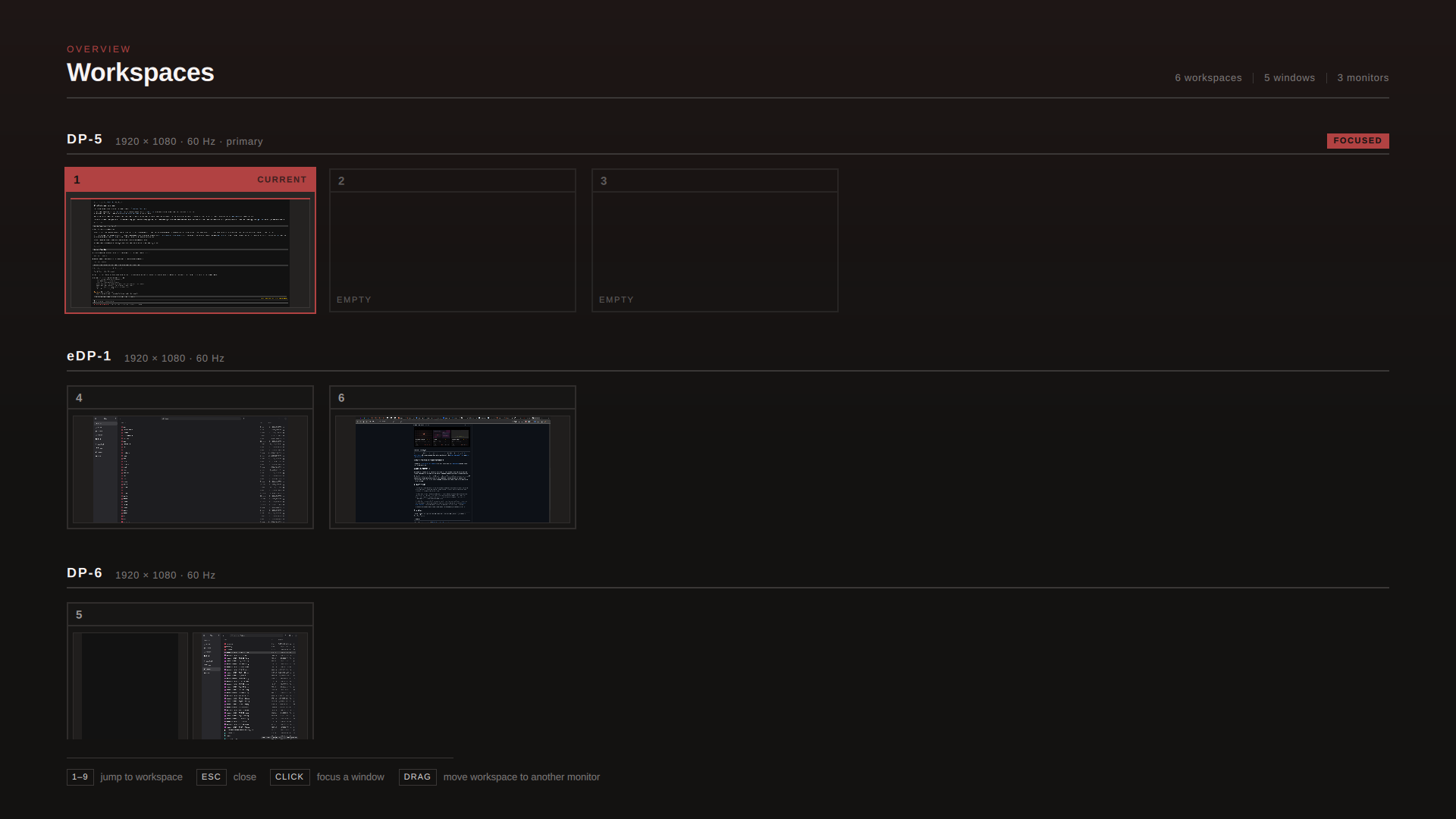
Workspaces are grouped by the monitor they live on. The focused monitor is badged, the current workspace is filled with your theme accent, and empty workspaces are still shown and still clickable — clicking one creates it.
Why not hyprexpo?
hyprexpo is a compositor plugin, so its overview zooms out
under your finger as you swipe — genuinely nicer to use. The tradeoff is that Hyprland
plugins are ABI-pinned to the exact compositor build: every Hyprland bump silently stops
it loading until hyprpm update is re-run.
This runs inside omarchy-shell instead, so it survives updates. The honest cost: the
overlay appears when the swipe completes rather than tracking your finger, because
Hyprland's gesture system fires a Lua callback once at the threshold and can't stream
swipe progress to an external process.
Requirements
| Hyprland | 0.56+ (Lua config and hl.dsp.* dispatchers) |
| Omarchy | quattro or newer (the shell plugin system) |
| Quickshell | 0.3+ (ScreencopyView, HyprlandToplevel.wayland) |
Verified on Hyprland 0.56.2 / Quickshell 0.3.0.
Thumbnails rely on Hyprland's hyprland_toplevel_export_manager_v1, which renders
windows on workspaces you can't currently see — so the previews are real, not placeholders.
Install
omarchy plugin add https://github.com/sirmenef/omarchy-workspace-overview.git --enable
omarchy restart shell
The restart matters: a brand-new overlay plugin is registered by a rescan but its loader
isn't mounted until the shell restarts, so summon returns ok and nothing appears.
Verify it registered:
omarchy-shell shell listPlugins | grep workspace-overview
Set up a trigger
The plugin ships no keybindings — it only exposes an IPC toggle, so you choose how to open it. Both snippets below go in your Hyprland config.
Three-finger swipe up — ~/.config/hypr/input.lua:
hl.gesture({
  fingers = 3,
  direction = "up",
  action = function()
    hl.dispatch(hl.dsp.exec_raw(
      [[omarchy-shell shell toggle io.github.sirmenef.workspace-overview '{}']]))
  end,
})
A keybinding — ~/.config/hypr/bindings.lua:
o.bind("SUPER + GRAVE", "Workspace overview",
  [[omarchy-shell shell toggle io.github.sirmenef.workspace-overview '{}']])
Every
TABcombination is already taken by Omarchy's window and workspace navigation. If you want a Task-View-style<key> + Tab, you need a spare modifier. Remapping Caps Lock to Hyper frees one — addcaps:hypertokb_optionsininput.luaand bindMOD3 + TAB. That costs you a plain Caps Lock key;shift:both_capslock_cancelputs Caps Lock on both-Shifts-together, which is where Omarchy parks it by default.
Apply with hyprctl reload, then check hyprctl configerrors is empty.
Controls
1–9, 0 |
jump to that workspace |
| Click a workspace | jump to it |
| Click a window | focus that window directly |
| Drag a workspace | drop it on another monitor's row to move it there |
| Scroll | when you have more rows than fit |
Esc / click away |
close |
| Trigger again | close |
Configuration
Everything is in Overview.qml, near the top:
cAccent |
follows the Omarchy theme; set to a fixed colour to pin it |
headingFamily / bodyFamily |
Archivo by default (omarchy pkg aur add ttf-archivo-variable); falls back to a system sans |
design tokens (cInk, cCard, …) |
the greys of the whole surface |
du(px) |
every dimension scales from a 1920px reference, so proportions hold at any resolution |
Editing note: plugin hot-reload proved unreliable in practice. After changing
Overview.qml, run omarchy restart shell rather than trusting a save to take effect —
otherwise you will debug code that isn't running.
Uninstall
omarchy plugin remove io.github.sirmenef.workspace-overview
Then delete the gesture/keybinding you added.
Notes
- The overlay opens on the focused monitor, not all of them.
- Thumbnails are captured live only while the overview is open, and freeze during a drag so the compositor isn't re-rendering every window mid-gesture.
- Workspaces 1–5 are always shown, plus any other workspace that currently exists — the same rule Omarchy's bar widget uses, so the two never disagree.
License
MIT — see LICENSE.