
OmaQuote
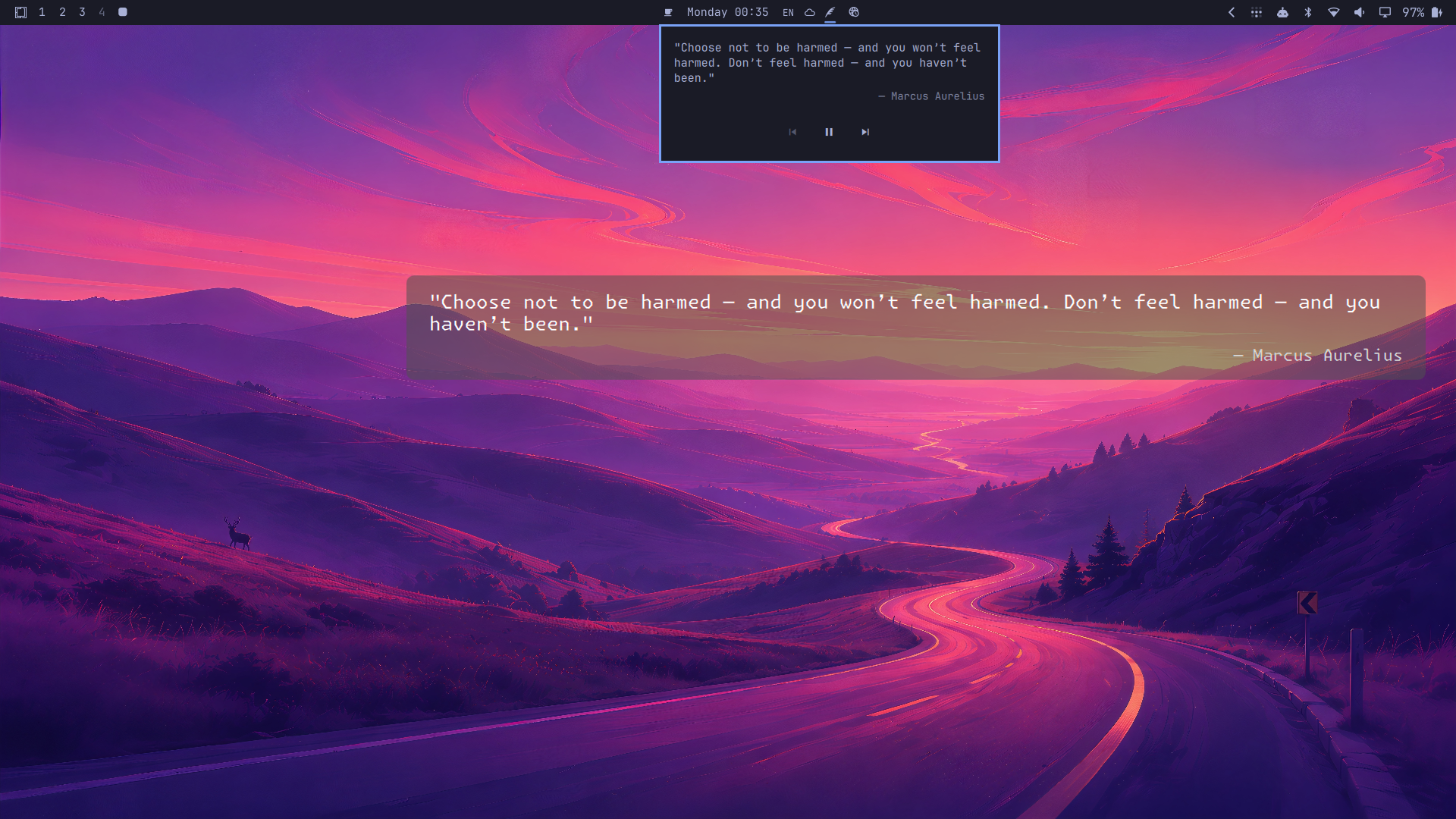
OmaQuote is an Omarchy Quattro plugin that puts a theme-aware quote on your desktop. The same quote appears on every display, above the wallpaper and below application windows, without intercepting clicks. Its icon in the system bar opens Quote Controls for navigation and Automatic Advance Pause.
It works out of the box with a bundled quote collection. OmaQuote can advance when the wallpaper changes, on a timer, or on command. Wallpaper rotation stays entirely under Omarchy's control.
Why
I used Variety's desktop quotes and wanted the same experience without running a separate wallpaper manager: a small, native Omarchy plugin that feels like it belongs to the shell. OmaQuote is that Omarchy-native counterpart to Variety's quote feature.
Install
omarchy plugin add https://github.com/snikulin/omaquote.git --enable
Remove it with:
omarchy plugin remove io.github.snikulin.omaquote
Removing the plugin preserves your configuration, quotes, and selection state, so reinstalling picks up where you left off.
Upgrade from 1.0
Existing installations need to be disabled and enabled once so Omarchy registers the new system-bar widget:
omarchy plugin disable io.github.snikulin.omaquote
omarchy plugin enable io.github.snikulin.omaquote
omarchy restart shell
The restart clears Qt's cached QML directory listing so the newly added widget entry point can load. Fresh installations do not need this step. The quote icon is part of the enabled plugin; removing it from the bar disables OmaQuote rather than leaving an invisible background service behind.
Configure
OmaQuote needs no configuration. To override its defaults, create
~/.config/omarchy/omaquote/config.json:
{
  "version": 1,
  "visible": true,
  "selectionMode": "shuffle",
  "advanceOnWallpaperChange": true,
  "intervalMinutes": 0,
  "horizontalAlignment": "right",
  "verticalPositionRatio": 0.4,
  "maximumWidthRatio": 0.7,
  "maximumHeightRatio": 0.8,
  "screenMargin": 32,
  "fontFamily": null,
  "preferredFontSize": 24,
  "minimumFontSize": 12,
  "textColor": null,
  "attributionColor": null,
  "backdropColor": null,
  "backdropOpacity": 0.55,
  "shadow": false
}
All fields except version are optional. Colors accept #RRGGBB or
#AARRGGBB; null follows the active Omarchy theme. Selection can be
shuffle or random, alignment can be left, center, or right, and ratios
range from 0 to 1. Set intervalMinutes to 0 to disable the timer.
Configuration changes are picked up automatically.
Use your own quotes
Create ~/.config/omarchy/omaquote/quotes.json:
{
  "version": 1,
  "quotes": [
    {
      "text": "The quote text.",
      "attribution": "Optional credit"
    },
    {
      "text": "A quote without attribution."
    }
  ]
}
A user collection replaces the bundled collection. Changes are reloaded automatically, and invalid edits leave the last valid collection running.
Already have Variety quotes? Import them once with:
./tools/import-variety.py
By default, the importer reads Variety's standard quotes.txt location and
writes the OmaQuote user collection. It never overwrites an existing collection
unless you pass --force. See the import guide for
custom paths and format details.
Control
Click the quote icon in the system bar to open the full current quote and its fixed Previous, Pause/Resume, and Next controls. Long quotes scroll without moving the controls. While the popover has keyboard focus, use Left, Space, Right, and Escape. Opening the popover does not activate Automatic Advance Pause.
The same controls are available over IPC:
omarchy-shell io.github.snikulin.omaquote previous
omarchy-shell io.github.snikulin.omaquote next
omarchy-shell io.github.snikulin.omaquote pause
omarchy-shell io.github.snikulin.omaquote resume
omarchy-shell io.github.snikulin.omaquote togglePause
omarchy-shell io.github.snikulin.omaquote show
omarchy-shell io.github.snikulin.omaquote hide
omarchy-shell io.github.snikulin.omaquote toggle
omarchy-shell io.github.snikulin.omaquote reload
omarchy-shell io.github.snikulin.omaquote status
status returns JSON for diagnostics and scripting. show, hide, and
toggle affect the current session without rewriting your configuration.
Previous and Next traverse a browser-like, runtime-only Presentation History of up to 100 quotes; after going back, Next first moves forward through that history. Pause stops timer and wallpaper-triggered advances, while Backward and Forward Navigation remain available and no missed changes are queued. Resume begins a full Interval. A service restart or valid Configuration Reload clears Automatic Advance Pause; a Collection Reload preserves it.
Development
OmaQuote is developed entirely through software agents. They implement the code, tests, documentation, and reviews; I define and control the target functionality, constraints, and final decisions.
Run the complete test suite from the repository root:
./tests/run
Like Omarchy itself, this project is for people who love computers. If OmaQuote is useful to you, you are welcome to use it, study it, report problems, and help develop it further.
The plugin code is licensed under the MIT License. The bundled quote collection has separate, documented sources and licensing.