
SoliDB bar widget
Reads the SoliDB HTTP API and surfaces every configured server in the Omarchy bar — databases, collections, storage and traffic — with a full-screen SDBQL console one keystroke away.
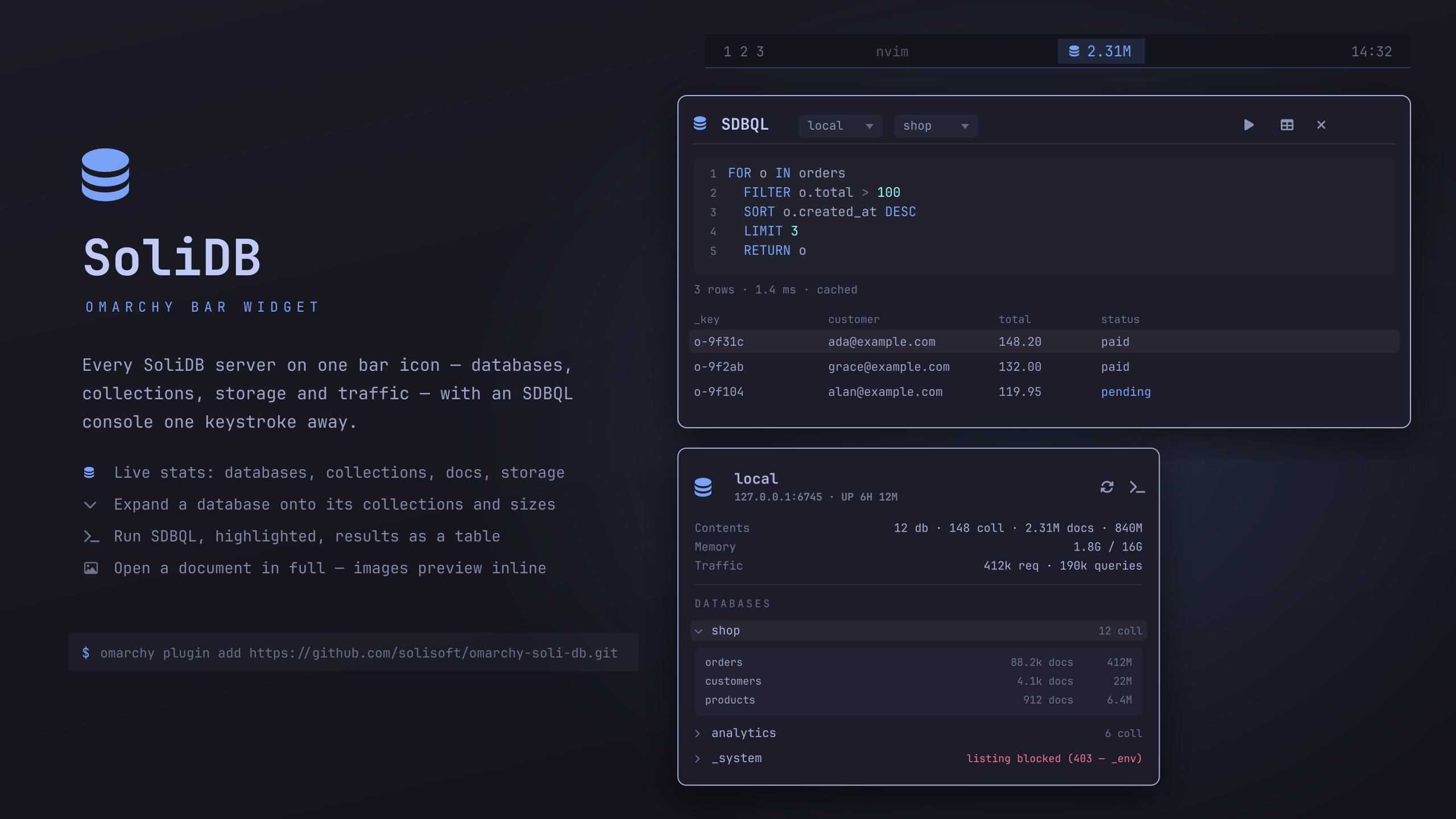
The preview is drawn, not screenshotted: tools/make-preview.py rebuilds it
from the geometry in Panel.qml and Console.qml, so no real instance's
database names, counts, or sizes appear in it. Pass a theme to render it in
another palette (tools/make-preview.py matte-black); it writes preview.svg
and preview.png and needs rsvg-convert plus a Nerd Font.
Service.qmlpolls/_api/health,/_api/cluster/status, and/_api/databasesin one helper round-trip so liveness, statistics, and the database list can never disagree with each other. Collections are fetched on demand when a row is expanded.solidb-fetch.pyis the only thing that speaks HTTP. It takes its whole job from the environment and usesurllib, so no credential and no character of user-typed SDBQL ever becomes a shell word.Model.jsdecodes, parses, and formats. Pure functions, no QML imports.Panel.qmlis the bar button plus the popup;Console.qmlis the overlay;QueryEditor.qmlis the multi-line editor the shared kit does not provide.
Nerd Font glyphs are written as \uXXXX escapes rather than literal
characters. Basic-plane private-use characters do not survive every tool that
edits these files, and a stripped glyph leaves a silently blank icon.
Requirements
- Omarchy Quattro with
omarchy-shell - A reachable SoliDB server
bash,python3, andwl-clipboard(forwl-copy) — all present on a stock Omarchy install
No curl: the helper uses Python's own HTTP client.
Installation
omarchy plugin add https://github.com/solisoft/omarchy-soli-db.git
The plugin lands disabled so you can read the code before it runs. Enable it once you have:
omarchy plugin enable io.github.solisoft.soli-db --section right
Then tell it about your servers — see Servers. Later updates are a fast-forward pull:
omarchy plugin update io.github.solisoft.soli-db
Removal
omarchy plugin remove io.github.solisoft.soli-db
That disables both halves, drops the entry from
~/.config/omarchy/shell.json, and deletes
~/.config/omarchy/plugins/io.github.solisoft.soli-db/. It does not remove
~/.config/omarchy/soli-db/, which holds your server list and query history;
delete that yourself if you want it gone. Nothing is installed outside those
two directories: no system packages, no services, no files under /etc,
/usr, or ~/.local. Removing it leaves SoliDB itself untouched.
Servers
Servers live in ~/.config/omarchy/soli-db/servers.json, not in
shell.json, so credentials are not sitting in a world-readable config. The
file is created 0600 on first run and must stay that way.
{
  "servers": [
    {
      "name": "local",
      "url": "http://127.0.0.1:6745",
      "username": "admin",
      "password": "admin"
    },
    {
      "name": "staging",
      "url": "https://db.staging.internal:6745",
      "usernameEnv": "SOLIDB_STAGING_USER",
      "passwordEnv": "SOLIDB_STAGING_PASSWORD"
    },
    {
      "name": "prod",
      "url": "https://db.example.com",
      "apiKey": "sk_...",
      "readOnly": true
    }
  ]
}
| Key | Meaning |
|---|---|
name |
shown in the bar and the console's server picker |
url |
base URL, trailing slashes ignored |
apiKey |
sent as X-API-Key; takes precedence over a username |
username / password |
the plugin calls POST /auth/login and caches the JWT |
usernameEnv / passwordEnv |
names of environment variables holding those, read from the shell's own environment |
readOnly |
refuses a mutating query outright, with no dialog |
The JWT is held in memory only, keyed by server name, and re-minted on the
first 401. It is never written to disk. Credentials reach the helper through
the process environment rather than argv, so they do not show up in ps.
usernameEnv/passwordEnv read the environment of omarchy-shell itself,
which is the Hyprland session environment — not your interactive shell's. If a
variable is not exported at session start the plugin will report Not
authorized; use literal username/password or an apiKey in that case.
Bar icon
on its own when a server is unreachable or refusing, N with
the document count when it is healthy, and dimmed when nothing answers.
| Interaction | Effect |
|---|---|
| left click | open/close the popup |
| right click | refresh now |
| middle click | open the SDBQL console |
Popup
The hero carries the active server, its uptime, and a one-line summary. Below
it are the live figures from /_api/cluster/status, then the server list (when
more than one is configured), then every database. Expanding a database lists
its collections with document counts and on-disk size.
| Key | Effect |
|---|---|
| ↑ / ↓ | move between rows |
| enter | expand a database, or switch to a server |
q |
open the console on the selected database |
s |
cycle to the next server |
y |
copy the row's name |
r |
refresh |
| esc | collapse an open database, then close |
Left-clicking a row does what enter does; right-clicking copies its name.
Console
A full-screen overlay: server and database pickers, a multi-line SDBQL editor with line numbers and syntax highlighting, and the results as a table or as JSON.
Keywords come from the server's own lexer, so the editor agrees with the parser
rather than with a guess, and the ones that write — INSERT, UPDATE,
UPSERT, REMOVE, REPLACE, CREATE, REFRESH — are coloured apart from the
rest, so a mutation is visible while you are typing it rather than only in the
confirmation dialog. Token colours are rotated off the theme's accent, so they
follow omarchy theme set instead of being pinned to one palette.
| Key | Effect |
|---|---|
ctrl+enter / ctrl+r |
run |
| enter | open the focused row in full (results focused) |
| enter | newline — SDBQL is a multi-line language |
ctrl+e |
clear the editor |
ctrl+c |
cancel a running query |
ctrl+↑ / ctrl+↓ |
walk the query history |
t |
toggle table ⇄ JSON (results focused) |
m |
load the next batch |
y |
copy the focused row as JSON |
| double-click | open a row in full |
/ |
jump back to the editor |
| esc | back out one layer, then close |
Results are virtualized: the list model is a row count and delegates index into a plain array, so a 1000-row batch instantiates only what is on screen. Table mode uses a constant row height — a height that depends on wrapped text means the scrollbar cannot know where it is.
Reading one document
A table row is one line and a JSON row is capped at twelve, which is right for
scanning and no use for reading. enter on the focused row — or a double-click
— opens the whole document over the console: pretty-printed, syntax-coloured,
selectable, and scrollable in both directions.
Columns in the table are ordered so a document's own fields come first and
SoliDB's bookkeeping (_id, _rev, the timestamps) sits after them, with
_key kept at the front. Widths are measured once per batch from the rows
themselves, so a timestamp column is wide and a chunk count is not.
Attachments
A document from a blob collection is a file, so the sheet shows it as one: name, MIME type, size and chunk count, with an inline preview when the bytes are an image. The rest get a description and a button that hands the file to whatever application your desktop uses for that type.
The document carries its own address — SoliDB stamps _id as
database:collection/key — so this works from any query without the plugin
having to parse one. Bytes are fetched from
/_api/blob/{db}/{collection}/{key} into $XDG_RUNTIME_DIR/omarchy-soli-db/
at 0600, under the original filename so the desktop can pick an application
by suffix. That directory is a tmpfs, and stale files from a previous session
are cleared at startup rather than on close, since an externally-opened file
should not be deleted out from under the application showing it. Anything over
16 MiB is described rather than fetched.
Mutating queries
A query containing INSERT, UPDATE, UPSERT, REMOVE, REPLACE, DELETE,
TRUNCATE, CREATE, or REFRESH as a word — anywhere, not just as the leading
keyword, because FOR u IN users FILTER u.stale REMOVE u IN users is a mutation
that does not start with one — runs behind a confirmation prompt. String
literals and comments are stripped before the test, so RETURN "delete me" does
not trip it.
The list is deliberately wider than the language: a false positive costs one
keystroke, a false negative writes to your database. The server enforces the
real permission regardless, so this is a speed bump for the operator, not the
security boundary. For a server you never want to write to, set
"readOnly": true and the query is refused outright.
If a query turns out to have modified data without going through the prompt, the status line says so in the urgent colour. There is no undo; the honest response is to be loud about it.
Cursors
A result set larger than one batch leaves a cursor open on the server. Every
path that abandons one — a new query, switching database or server, closing the
overlay, the plugin reloading — funnels through a single releaseCursor(),
which issues DELETE /_api/cursor/{id} detached, so it still runs when the QML
engine is going away.
What it executes
Omarchy shell plugins run as unsandboxed code inside the long-lived
omarchy-shell process, so it is worth being explicit about what this one
spawns. Nothing here runs with elevated privileges and nothing is downloaded at
runtime.
| What | Where | Why |
|---|---|---|
python3 solidb-fetch.py |
Service.qml |
every HTTP call; credentials go through the environment, not argv, and the query body over stdin |
python3 solidb-fetch.py --server-file … |
Service.qml |
detached cursor release; reads the credential from the 0600 config, so argv holds only a cursor id |
bash -c writing servers.json / history.json |
Service.qml |
creates them under umask 077; content arrives through the environment |
omarchy-shell shell summon … |
Panel.qml |
opens the console overlay |
wl-copy |
Panel.qml, Console.qml |
copy a name or a result row |
There are no user-supplied shell commands anywhere in this plugin.
Security
This plugin runs unsandboxed inside omarchy-shell, holds credentials, and
renders data from a network service, so the trust boundaries are worth stating.
Redirects are refused. urllib copies request headers onto a redirect
target, across hosts, so following a 302 would hand X-API-Key or the bearer
token to wherever the server pointed. A database API has no reason to redirect;
a 3xx is surfaced as an error instead. This matters most for a server reached
over plain http://, where anyone on the path can inject one.
Only http and https URLs are accepted. urllib will open file:// and
ftp:// just as happily, which would turn a URL in servers.json into a local
file read.
Credentials never reach argv. They go through the process environment, and
the detached cursor release — which cannot take an environment — re-reads them
from the 0600 config, so argv carries only a cursor id. A minted JWT is
reported on stderr, held in memory, and never written to disk.
Server-supplied text is rendered literally. Every Text in this plugin
pins textFormat: Text.PlainText. Qt's default is AutoText, which renders
anything HTML-shaped as rich text — wrong for a database browser regardless of
intent, since a document containing <b> should display as <b>. Short
strings that reach shared-kit components this plugin cannot pin — a status
label, an error message in the bar tooltip — are additionally stripped of angle
brackets and bounded in Model.plain().
Nothing user-supplied reaches a shell. Every spawn is an argv array, never
a shell string; the two bash -c scripts reference only quoted environment
variables and never interpolate a value into the script text. wl-copy is
called with -- before the payload.
history.json holds your query text at 0600, which is worth knowing if
you paste credentials or personal data into a literal. Delete the file to clear
it, or set historyLimit low.
Known and accepted: servers.json is read by whatever can read your home
directory, so it is only as private as the account; and TLS uses urllib's
default verified context, with no option to disable verification.
Limits
Responses are bounded at 4 MiB per invocation — a budget across every
endpoint a single call requests, not an allowance each, so a three-endpoint
poll cannot total three times the figure. The bound is on what is read off the
socket rather than on a Content-Length the peer chose to send, so a chunked
or lying endpoint cannot grow the shell's memory. Exceeding it reports as
oversize, distinctly from an outage. A result set that trips it is asking for a
LIMIT or a smaller batchSize; for reference, ten thousand rows of ordinary
documents weigh about 1.2 MB.
The query body travels over stdin, framed as a byte count, a newline, then
that many bytes. execve caps a single environment variable at ~128 KiB
(MAX_ARG_STRLEN, 32 pages, not raisable by any ulimit), and a generated
bulk INSERT passes that easily — sending the body through the environment
would fail to launch the process at all, with E2BIG rather than anything
legible. Length framing rather than read-to-EOF means neither side depends on
the pipe being closed. Queries are refused above 8 MiB with a sentence saying
so.
Settings
Display preferences are set inline on the widget's entry in
~/.config/omarchy/shell.json. Anything to do with servers or credentials
belongs in servers.json instead.
| Key | Default | Meaning |
|---|---|---|
refreshIntervalSec |
15 |
poll interval |
defaultServer |
"" |
server selected at startup; blank means the first |
showDocCount |
true |
show the document count next to the bar icon |
resultView |
"table" |
console result view: table or json |
historyLimit |
100 |
queries kept in the console history |
batchSize |
1000 |
rows fetched per query batch |
IPC
omarchy-shell io.github.solisoft.soli-db status     # one-line health summary
omarchy-shell io.github.solisoft.soli-db refresh
omarchy-shell io.github.solisoft.soli-db toggle
omarchy-shell io.github.solisoft.soli-db query shop # open the console on a database
omarchy-shell io.github.solisoft.soli-db server prod

omarchy-shell shell summon io.github.solisoft.soli-db '{"database":"shop"}'
omarchy-shell soli-db-console open '{"database":"shop","query":"RETURN 1+1","run":true}'
The summon form is what to bind in Hyprland: because this plugin declares an
overlay kind, shell summon routes to the console rather than the bar popup.
Known SoliDB bug
GET /_api/database/{db}/collection returns 403 for any database holding an
_env collection, so those databases cannot list collections at all. Two
is_protected_collection functions in the server disagree:
src/server/handlers/system.rs (used to skip collections) only guards
_system, while src/storage/protected.rs (enforced inside
Database::get_collection) guards _env in every database — so the listing
walks into _env, is refused, and the error aborts the whole response.
The widget renders that as listing blocked (403 — _env) on the row rather
than an empty expansion. Fixing it upstream is a one-line change in the server.
Notes for editing this plugin
Saving a file hot-reloads the plugin, but three things need a full
omarchy restart shell:
- new IPC methods — a hot reload keeps the handler already registered for the target, so the new function is reported as "Function not found";
Component {}blocks assigned to a property (such as the hero'strailingControl) — a hot reload keeps the previously instantiated item, so edits inside them appear to do nothing;- a plugin directory that is a symlink — the watcher does not follow it, so edits to the real path are invisible until a rescan or restart.
A method named console is rejected by QML with Illegal method name; the IPC
verb is query for that reason.
License
MIT — see LICENSE.