
Soli Proxy bar widget
Reads the soli-proxy admin REST API and surfaces every managed app in the Omarchy bar.
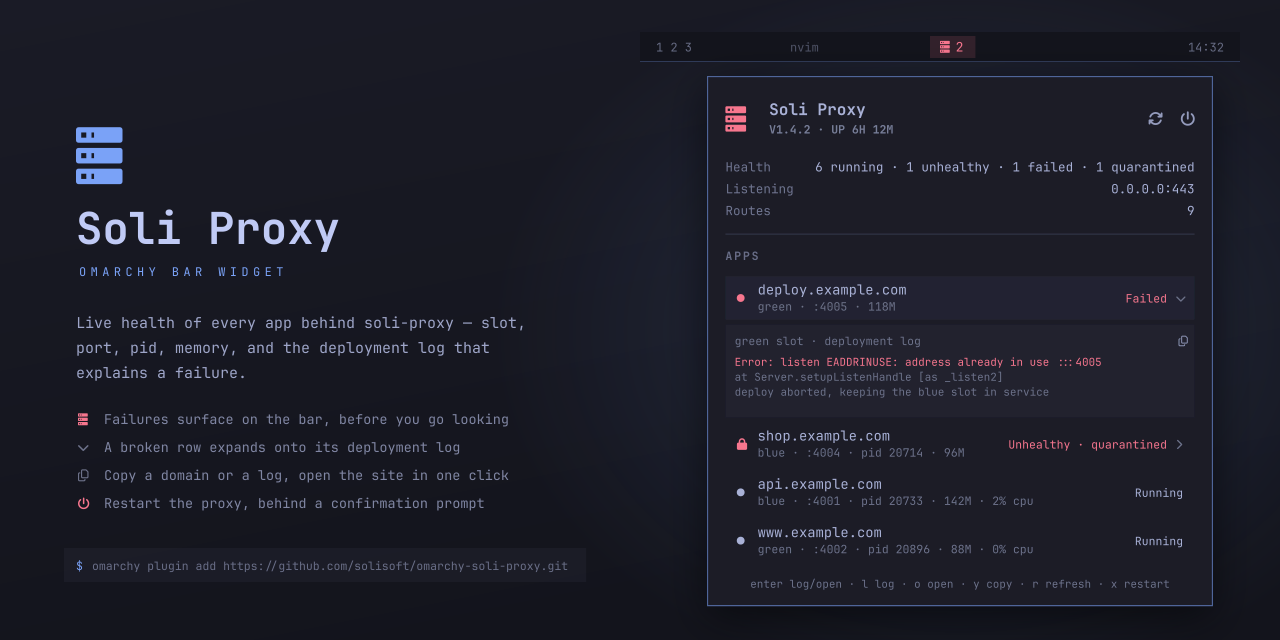
The preview is drawn, not screenshotted: tools/make-preview.py rebuilds it
from the geometry in Panel.qml, so no real deployment's domains, ports, or
pids appear in it. Pass a theme to render it in another palette
(tools/make-preview.py matte-black); it writes preview.svg and
preview.png and needs rsvg-convert plus a Nerd Font. Upload the PNG under
Settings → General → Social preview to give the repo a card in link previews
and plugin listings — the Omarchy plugin manifest itself has no image field.
Service.qmlpolls/api/v1/status,/api/v1/apps, and/api/v1/app-metrics/systemin one bash round-trip so the three views stay consistent with each other, and fetches/api/v1/apps/<name>/logson demand when a row is expanded.logtail.pytrims that log payload to a tail before it reaches QML — a single deployment log can run to a quarter of a megabyte.Model.jsflattens each app down to its active slot and sorts problems to the top.Panel.qmlis the bar button plus the popup.
Nerd Font glyphs are written as \uXXXX escapes rather than literal
characters. Basic-plane private-use characters do not survive every tool that
edits this file, and a stripped glyph leaves a silently blank icon.
Requirements
- Omarchy Quattro (tested on 4.0.1) with
omarchy-shell - A reachable soli-proxy admin REST API
bash,curl,python3, andwl-clipboard(forwl-copy) — all present on a stock Omarchy install
Installation
omarchy plugin add https://github.com/solisoft/omarchy-soli-proxy.git
The plugin lands disabled so you can read the code before it runs. Enable it once you have:
omarchy plugin enable io.github.solisoft.soli-proxy --section right
Or do both at once with omarchy plugin add ... --enable. Then point it at your
proxy by setting adminUrl (and apiKey, if [admin] api_key is configured)
on the widget's entry in ~/.config/omarchy/shell.json — see
Settings. Later updates are a fast-forward pull:
omarchy plugin update io.github.solisoft.soli-proxy
Removal
omarchy plugin remove io.github.solisoft.soli-proxy
That disables the widget, drops its entry from ~/.config/omarchy/shell.json,
and deletes ~/.config/omarchy/plugins/io.github.solisoft.soli-proxy/. Nothing
is installed outside that directory: no system packages, no services, no files
under /etc, /usr, or ~/.local, and no changes to any config other than
this widget's own entry in shell.json. Removing it leaves soli-proxy itself
untouched.
What it executes
Omarchy shell plugins run as unsandboxed code inside the long-lived
omarchy-shell process, so it is worth being explicit about what this one
spawns. Nothing here runs with elevated privileges and nothing is downloaded at
runtime.
| What | Where | Why |
|---|---|---|
bash -c running a fixed curl script against adminUrl |
Service.qml |
polls the admin API; the API key goes through the environment, not argv |
python3 logtail.py |
Service.qml |
trims a log payload to its tail, reading stdin only |
bash -lc "$restartCommand" |
Service.qml |
your own command, blank by default, behind a confirmation prompt |
$tuiCommand |
Panel.qml |
your own command, blank by default |
wl-copy |
Panel.qml |
copy a domain or a log to the clipboard |
Qt.openUrlExternally |
Panel.qml |
hands https://<domain> to your desktop's default handler |
tuiCommand and restartCommand are free-form shell commands you set
yourself; both are empty out of the box, and the restart button stays hidden
until you fill one in. Treat them the way you would any other command in your
own config.
Bar icon
on its own when everything is running, N in the urgent colour when N
apps are failed, unhealthy, stopped, or quarantined, and dimmed when the admin
API cannot be reached.
| Interaction | Effect |
|---|---|
| left click | open/close the popup |
| right click | refresh now |
| middle click | run tuiCommand (the soli-proxy TUI) |
Restarting the proxy
The power button next to the hero's refresh button runs restartCommand
behind a confirmation prompt — restarting drops every connection the proxy is
serving, so it is never one click. restartCommand ships blank, which
hides the button; you supply the command yourself. The one I use is
soli-proxy-restart, a wrapper that cds into the checkout and runs
soli-proxy -d --dev; the -d flag SIGTERMs the daemon named in proxy.pid
and waits for it to exit before forking the replacement, so that single
command is a complete restart. Afterwards the widget polls every 1.5s for
about 9s so the restart gap reads as a restart rather than an outage.
Popup
A row that is failed, unhealthy, stopped, or quarantined carries a chevron and expands in place to show the tail of its deployment log — the actual reason it is down — with a button to copy the log. Healthy rows have nothing to explain, so they open the site instead.
| Key | Effect |
|---|---|
| ↑ / ↓ | move between apps |
| enter | show the log on a broken app, open the site on a healthy one |
l |
show the deployment log for any app, healthy or not |
o |
open https://<domain> |
y |
copy the domain to the clipboard |
r |
refresh |
t |
run tuiCommand |
x |
restart the proxy (asks first) |
| esc | dismiss the prompt, then the open log, then the panel |
Left-clicking a row does what enter does; right-clicking copies its domain.
Settings
Set inline on the widget's entry in ~/.config/omarchy/shell.json.
| Key | Default | Meaning |
|---|---|---|
adminUrl |
http://127.0.0.1:9090 |
admin API base URL |
apiKey |
"" |
sent as X-Api-Key; only needed when [admin] api_key is set |
refreshIntervalSec |
15 |
poll interval |
showCount |
true |
show the problem count next to the icon |
onlyProblems |
false |
list only apps that are not running |
tuiCommand |
"" |
command for middle-click / t |
logLines |
60 |
lines of deployment log kept for an expanded row |
restartCommand |
"" |
command behind the restart button; hides it when blank |
The key is handed to the poller through the process environment rather than
argv, so it does not show up in ps.
IPC
omarchy-shell io.github.solisoft.soli-proxy status    # one-line health summary
omarchy-shell io.github.solisoft.soli-proxy refresh
omarchy-shell io.github.solisoft.soli-proxy toggle
omarchy-shell io.github.solisoft.soli-proxy log app.example.com        # open straight onto a log
omarchy-shell io.github.solisoft.soli-proxy restart                   # opens the confirm prompt
restart stops at the prompt on purpose — nothing here restarts the proxy
without a second confirmation.
Notes for editing this plugin
Saving a file hot-reloads the plugin, but two things need a full
omarchy restart shell:
- new IPC methods — a hot reload keeps the handler already registered for the target, so the new function is reported as "Function not found";
Component {}blocks assigned to a property (such as the hero'strailingControl) — a hot reload keeps the previously instantiated item, so edits inside them appear to do nothing.
License
MIT — see LICENSE.