Omahub
← All plugins
S

Peripheral Lighting

by sshbrian

Extensible peripheral lighting for Omarchy. Mouse LEDs, AIO LCDs, and community devices via lightctl.

Security review

Review recommended · 18 findings

Deterministic scan — not a security guarantee

Medium
Risk level
Medium
Analyzed commit
dd79bec
Scanned
3 weeks ago
  • medium sudo src/main.rs:173

    Command runs with sudo, elevating the process beyond the plugin environment.

    sudo rm -f /etc/udev/rules.d/99-lightctl.rules");
  • medium sudo src/main.rs:174

    Command runs with sudo, elevating the process beyond the plugin environment.

    sudo install -m644 udev/70-lightctl.rules /etc/udev/rules.d/70-lightctl.rules");
  • medium sudo src/main.rs:175

    Command runs with sudo, elevating the process beyond the plugin environment.

    sudo udevadm trigger");
  • Command runs with sudo, elevating the process beyond the plugin environment.

    sudo install -m644`, never `sudo lightctl`.
  • Docs sudo README.md:46

    Command runs with sudo, elevating the process beyond the plugin environment.

    sudo rm -f /etc/udev/rules.d/99-lightctl.rules
  • Docs sudo README.md:47

    Command runs with sudo, elevating the process beyond the plugin environment.

    sudo install -m644 udev/70-lightctl.rules /etc/udev/rules.d/70-lightctl.rules
  • Docs sudo README.md:48

    Command runs with sudo, elevating the process beyond the plugin environment.

    sudo udevadm control --reload
  • Docs sudo README.md:49

    Command runs with sudo, elevating the process beyond the plugin environment.

    sudo udevadm trigger
  • Docs sudo README.md:64

    Command runs with sudo, elevating the process beyond the plugin environment.

    sudo rm -f /etc/udev/rules.d/99-lightctl.rules
  • Docs sudo README.md:65

    Command runs with sudo, elevating the process beyond the plugin environment.

    sudo install -m644 udev/70-lightctl.rules /etc/udev/rules.d/70-lightctl.rules
  • Docs sudo README.md:66

    Command runs with sudo, elevating the process beyond the plugin environment.

    sudo udevadm control --reload
  • Docs sudo README.md:67

    Command runs with sudo, elevating the process beyond the plugin environment.

    sudo udevadm trigger
  • Docs sudo README.md:109

    Command runs with sudo, elevating the process beyond the plugin environment.

    sudo rm -f /etc/udev/rules.d/70-lightctl.rules /etc/udev/rules.d/99-lightctl.rules
  • Docs sudo README.md:110

    Command runs with sudo, elevating the process beyond the plugin environment.

    sudo udevadm control --reload
  • Command runs with sudo, elevating the process beyond the plugin environment.

    sudo rm -f /etc/udev/rules.d/99-lightctl.rules
  • Command runs with sudo, elevating the process beyond the plugin environment.

    sudo install -m644 udev/70-lightctl.rules /etc/udev/rules.d/70-lightctl.rules
  • Command runs with sudo, elevating the process beyond the plugin environment.

    sudo udevadm control --reload
  • Command runs with sudo, elevating the process beyond the plugin environment.

    sudo udevadm trigger

Automated analysis only — not a security guarantee.

AI advisory review

No obvious issues detected

Language-model assessment · ~deepseek/deepseek-v4-flash-latest — advisory only

None
AI risk level
None
Recommendation
install
Model
~deepseek/deepseek-v4-flash-latest
Analyzed commit
dd79bec
Reviewed
3 weeks ago

The flagged sudo commands appear only in documentation and in printed help text, not as executed code. The plugin itself is a QML panel that invokes the separate lightctl binary with fixed arguments, and no malicious or destructive behavior was found in the sampled source.

How this check works

This review combines the deterministic scan (the rule-based results above) with an independent look at the plugin's code by a language model. The model reads a trimmed sample of the repository's files, the manifest, and the README, then gives a plain-language risk level and a recommendation: install (no notable danger), review (look closer first), or avoid (clearly dangerous).

It runs on the same analyzed commit as the deterministic scan and is strictly advisory — it is not a security guarantee and never blocks a plugin by itself. A human moderator still reviews plugins before they are listed.

AI advisory only — automated analysis, not a security guarantee.

Install
$ omarchy plugin add https://github.com/sshbrian/lightctl --enable
Hardware #Hyprland #bar #quickshell

lightctl

Extensible peripheral lighting for Linux. One CLI, one Omarchy panel (Peripheral Lighting), and in-tree devices other people (or their agents) can PR.

Ships with:

  • logitech-pro2 — PRO 2 Lightspeed logo (HID++ 0x8071)
  • logitech-g915-tkl — G915 TKL LIGHTSPEED keys + logo (Bolt c545)
  • nzxt-kraken-elite — Kraken Elite 2023 LCD, pump, fans
  • dummy — LIGHTCTL_DUMMY=1, for tests and as the copy-paste template

No G HUB, no NZXT CAM, no network. Unofficial; not affiliated with Logitech or NZXT.

Panel

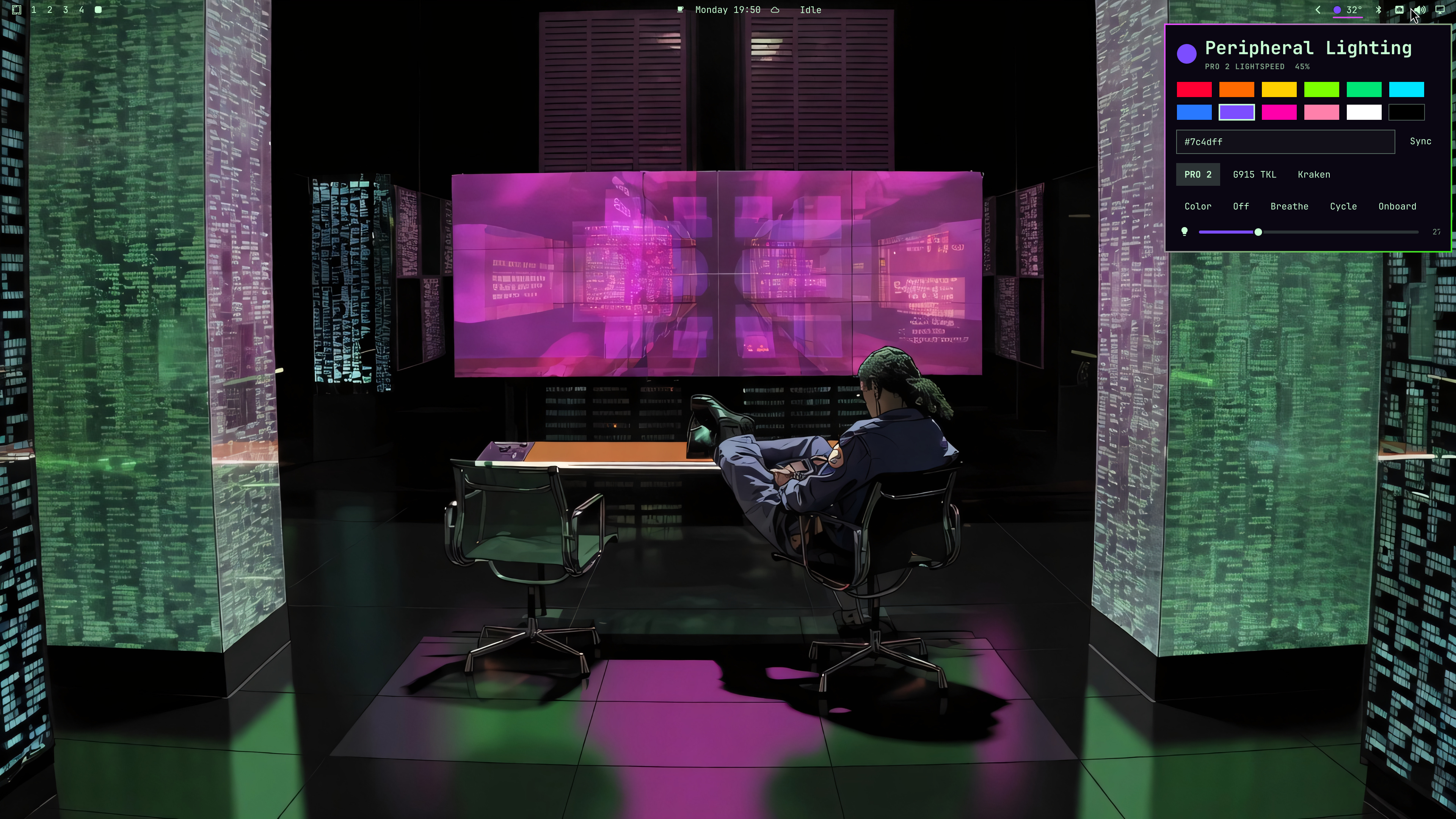
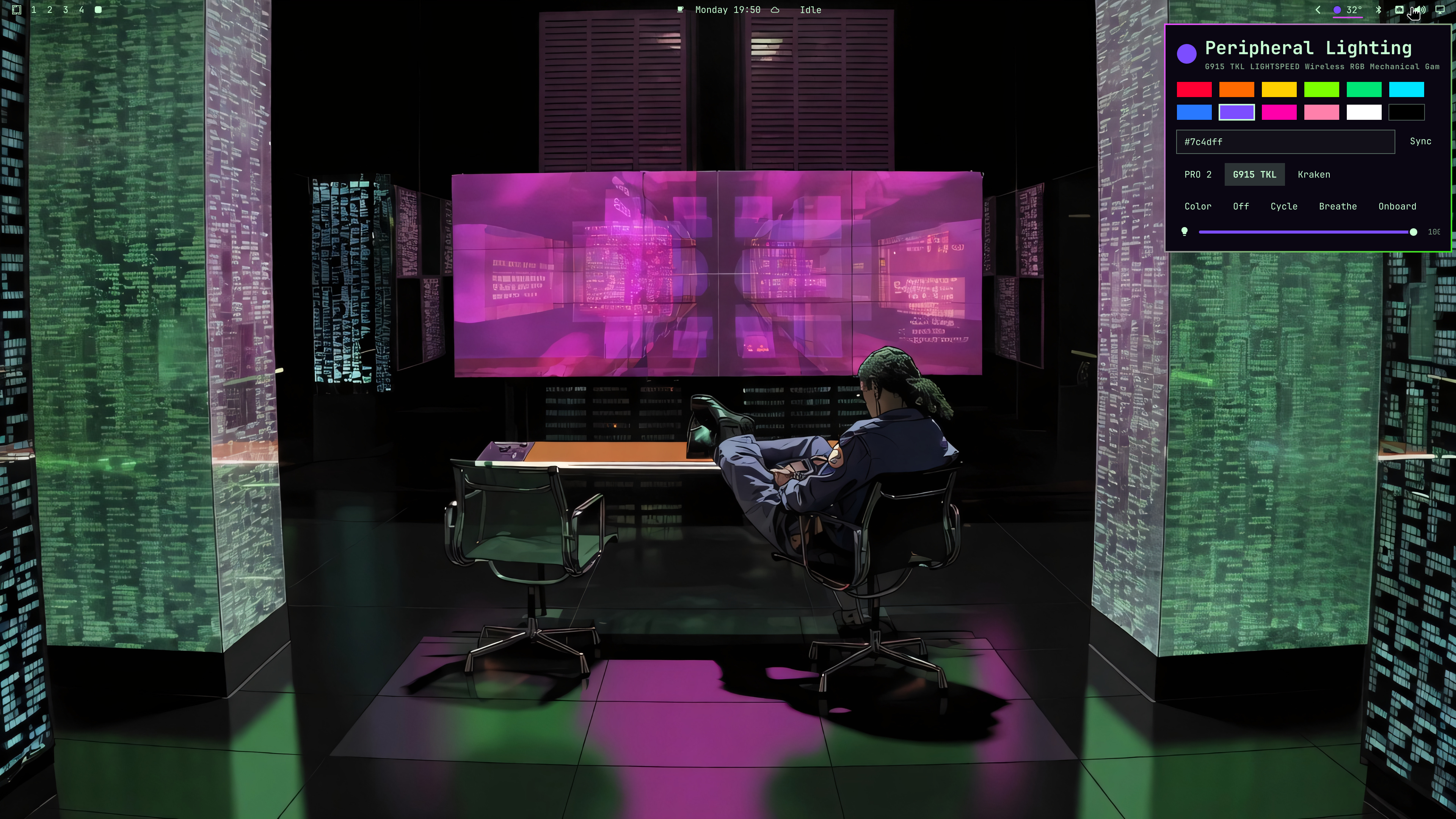
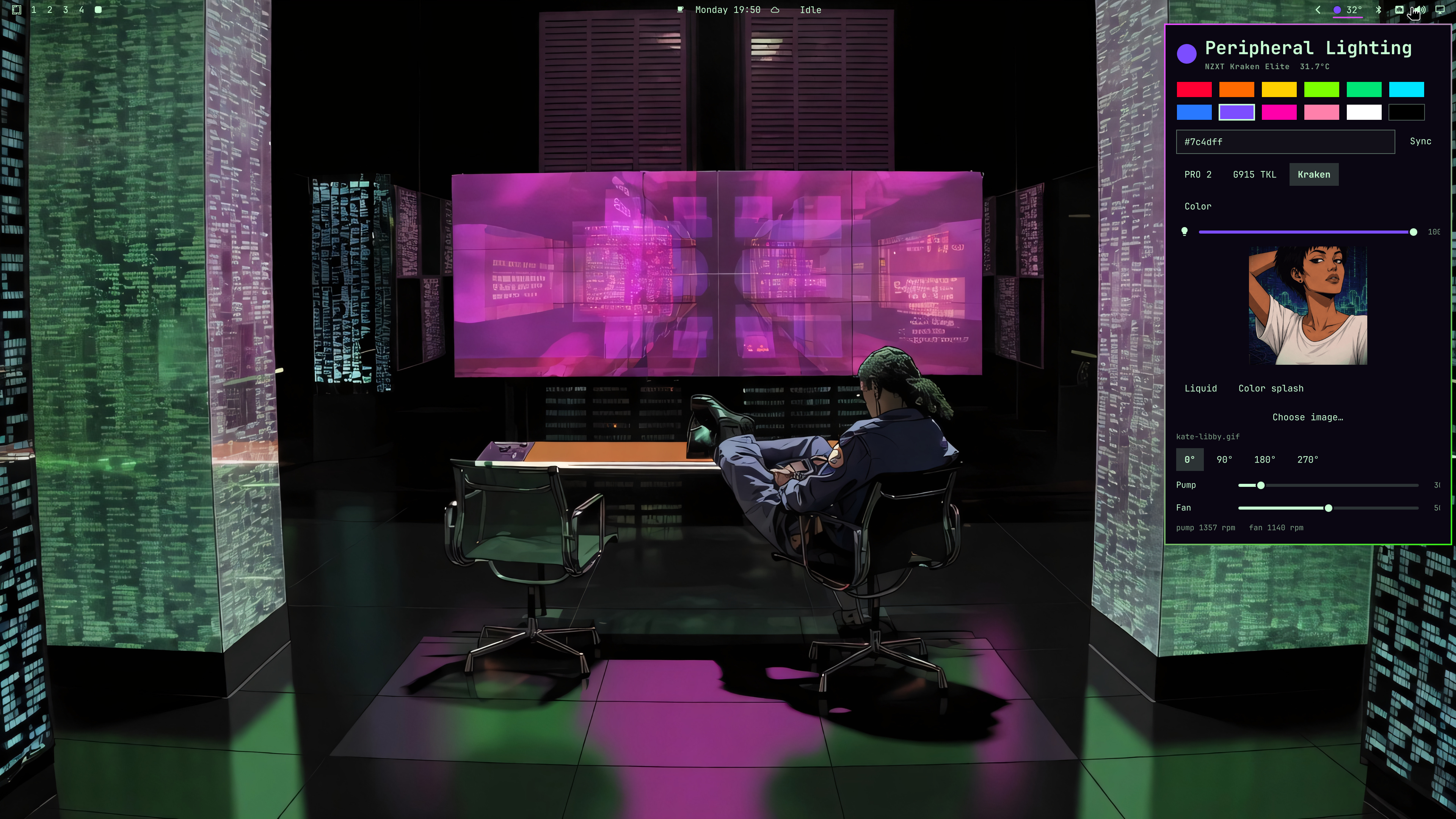
The Omarchy bar chip opens an in-widget panel. Controls follow capabilities: a mouse shows color and brightness; the Kraken also shows LCD, rotation, pump, and fans.

logitech-pro2 — PRO 2 Lightspeed logo, battery, brightness
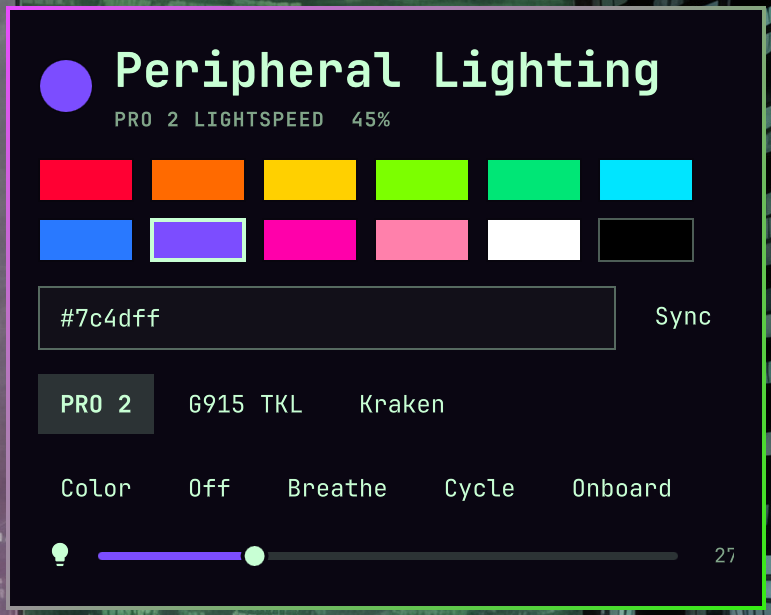
PRO 2 Lightspeed panel

PRO 2 Lightspeed on the desktop

logitech-g915-tkl — keys and logo on a Bolt receiver
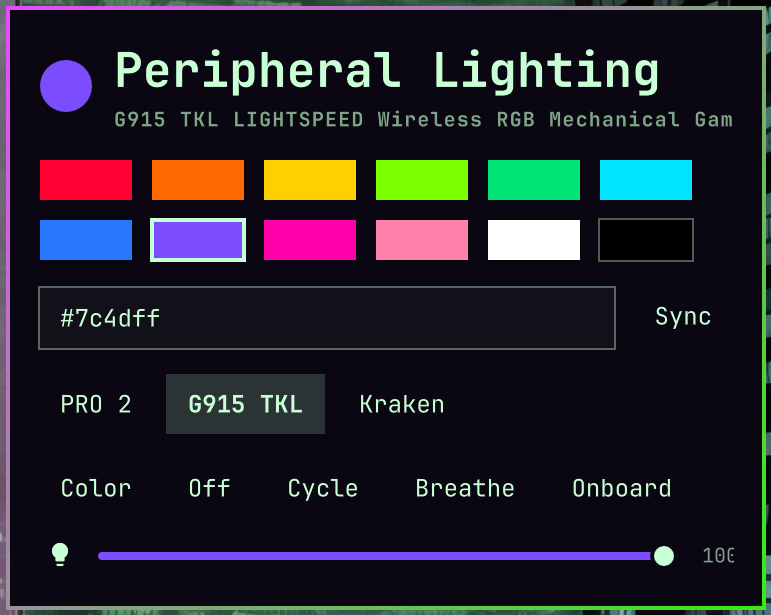
G915 TKL panel

G915 TKL on the desktop

nzxt-kraken-elite — LCD still/GIF, rotation, pump and fan duty
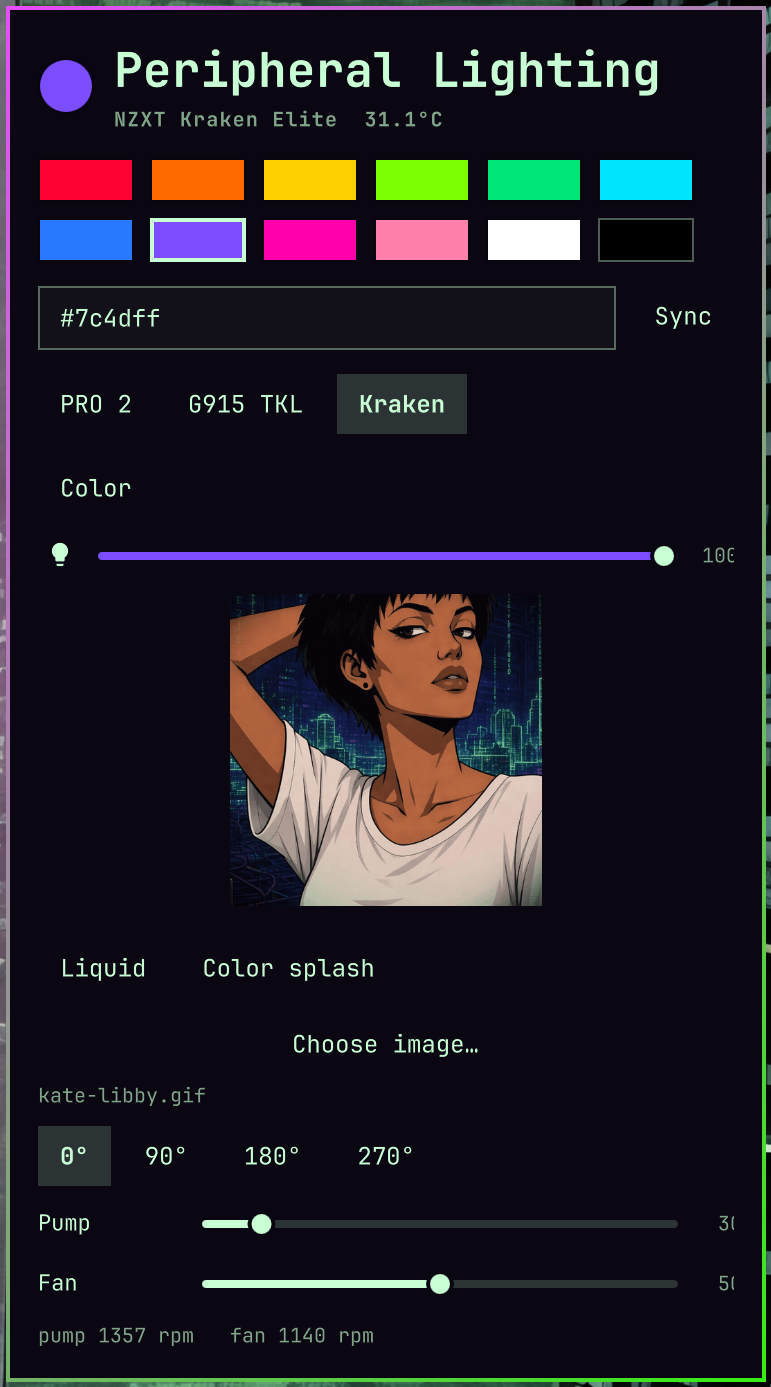
NZXT Kraken Elite panel

NZXT Kraken Elite on the desktop

Install (Omarchy)

The bar widget is this repo. The lightctl binary is a separate build step — omarchy plugin add only copies files.

omarchy plugin add https://github.com/sshbrian/lightctl.git --enable

cd ~/.config/omarchy/plugins/io.github.sshbrian.lightctl
cargo build --release
install -m755 target/release/lightctl ~/.local/bin/lightctl
sudo rm -f /etc/udev/rules.d/99-lightctl.rules
sudo install -m644 udev/70-lightctl.rules /etc/udev/rules.d/70-lightctl.rules
sudo udevadm control --reload
sudo udevadm trigger

Unplug/replug the receivers and AIO if hidraw nodes stay 0600. Then restart the shell if the chip is missing:

omarchy plugin enable io.github.sshbrian.lightctl --section right
omarchy-shell shell rescanPlugins

Build (CLI only)

cargo build --release
install -m755 target/release/lightctl ~/.local/bin/lightctl
sudo rm -f /etc/udev/rules.d/99-lightctl.rules
sudo install -m644 udev/70-lightctl.rules /etc/udev/rules.d/70-lightctl.rules
sudo udevadm control --reload
sudo udevadm trigger

Usage

lightctl list
lightctl status
lightctl status --json

lightctl apply logitech-pro2 color '#ff0033'
lightctl apply logitech-pro2 brightness 40
lightctl apply logitech-pro2 effect breathe magenta --period 3500
lightctl apply logitech-g915-tkl color '#00e5ff'
lightctl apply nzxt-kraken-elite lcd image ~/pic.png
lightctl apply nzxt-kraken-elite rotate 90
lightctl apply nzxt-kraken-elite duty pump 40

lightctl sync '#00aaff'
lightctl restore
lightctl restore logitech-pro2

Saved lighting is in ~/.local/state/omarchy/lighting.json. The bar widget runs lightctl restore at login and again when a device reappears or a wireless mouse reports battery after sleep.

lightctl mouse … and lightctl kraken … still work as aliases. New devices only get apply <id> ….

The panel is capability-driven. A device that only implements color + brightness shows those controls and nothing else.

Add a device

See AGENTS.md (short) and docs/adding-a-device.md. Copy src/devices/dummy.rs, register one line in src/devices/mod.rs, do not touch clap or QML.

Remove

omarchy plugin remove io.github.sshbrian.lightctl

The lightctl binary and udev rule are separate (~/.local/bin/lightctl, /etc/udev/rules.d/70-lightctl.rules). The rule is named 70- so TAG+="uaccess" is applied before systemd's 73-seat-late.rules. Nodes are 0660/input (not world-writable 0666). Do not run lightctl itself as root.

sudo rm -f /etc/udev/rules.d/70-lightctl.rules /etc/udev/rules.d/99-lightctl.rules
sudo udevadm control --reload