
Omarchy GoatCounter Plugin
https://github.com/user-attachments/assets/72a461a7-4653-4253-9a78-d0c52d01c37b
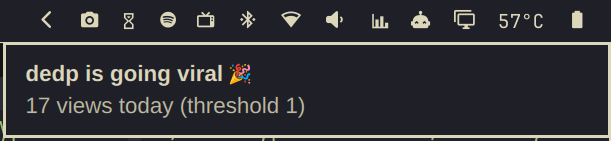
GoatCounter analytics in the Omarchy bar: a chart icon that expands to your weekly totals on hover, and a popup with a 7-day or 30-day pageview bar chart, top pages, and top referrers, locations, systems, and languages. Supports any number of sites with a tab switcher, plus optional "going viral" notifications.
Stats are fetched in the background (every 15 minutes by default) and cached on disk, so opening the panel is always instant. Views that arrived since you last opened the panel are stacked as a brighter cap on top of each bar, with a "+N since last open" summary in the header — a quick glance shows what's new.
Left Mouse Click Preview:

Hover Preview:

Viral notification:
Setup
1. Create an API token
For each site, go to https://<your-site>/user/api (Settings → API) and
create a token with the Read statistics permission.
2. Add credentials to your secrets file
Credentials stay out of the dotfiles repo. Add to your secrets file
(default: ~/.dotfiles/zsh/.secrets, override with the
GOATCOUNTER_SECRETS environment variable):
export GOATCOUNTER_URL="https://goatcounter.example.com"
export GOATCOUNTER_TOKEN="..."

# Any number of additional sites, one _<NAME> suffix pair each:
export GOATCOUNTER_URL_BLOG="https://blog.goatcounter.com"
export GOATCOUNTER_TOKEN_BLOG="..."
Sites are auto-discovered from these pairs — no plugin config needed. The
fetch script reads only the GOATCOUNTER_* assignment lines from that
file and parses them literally — values are never evaluated as shell (no
command substitution or expansion runs), and tokens are never printed.
A value is taken up to the first whitespace unless it is quoted.
3. Install
omarchy plugin add https://github.com/sspaeti/omarchy-goatcounter-plugin.git --enable
Then add it to the bar, either with
omarchy bar move io.github.sspaeti.goatcounter --section right or on the
widget entry in ~/.config/omarchy/shell.json:
{ "id": "io.github.sspaeti.goatcounter" }
Remove
omarchy plugin remove io.github.sspaeti.goatcounter
Cached stats live in ~/.local/state/omarchy/goatcounter/ — delete that
folder too for a full cleanup. Your secrets file is never touched.
Usage
- Hover the bar icon: weekly totals for all sites ("ssp.sh 14k · blog 456")
- Left click: open the stats panel; click the tabs to switch sites and
the
1d/7d/30dpills to switch the time range (1d shows today as hourly bars) - Middle click: force a refresh
- Right click: open the active site's GoatCounter dashboard in the
browser — same as the
link button in the panel's top-right corner
Keyboard shortcuts (panel open)
| Key | Action |
|---|---|
p |
Cycle through site tabs |
1 / 2 / 3 |
Switch to today (hourly) / 7 days / 30 days |
o |
Open the active site's GoatCounter dashboard |
/ |
Fuzzy-search pages with their view counts for the current range — type to filter, Enter highlights the best match in the chart, Ctrl+Enter opens it in the dashboard, Esc closes the box |
Esc |
Clear the page highlight if one is active, otherwise close the panel |
Tab / Shift+Tab |
Switch to the neighboring bar panel (shell default) |
Page highlight
Click a Top Pages row (or press Enter on a / search match) to overlay
that page's share on the chart: the total bars stay, dimmed, and the page's
views are drawn in bright accent inside each bar. Hovering a bar shows
page/total for that day. The page's per-day series is fetched on demand in
one small call per site+range and cached for the session. Click the row (or
the chip above the chart, or press Esc) to clear; switching the time range
keeps the highlight, switching sites clears it.
The / search covers the site's full page list (up to 10,000 pages,
including page titles — paged from the API in creation order, so the newest
pages are included). The list is small (~150 bytes per page), fetched only
when you first search a site, and cached on disk for 6 hours — background
refreshes stay small. Typing matches locally; view counts for the visible matches are
then fetched in one small targeted call (~15 KB) per site+range and cached,
and equal-quality matches re-rank by view count as counts arrive; pages with zero views in the selected range are hidden from the results. A page
created after the cache was built appears in search once the 6h cache
expires.
IPC: omarchy-shell shell toggle io.github.sspaeti.goatcounter — bind it in
Hyprland, e.g. o.bind("SUPER + CTRL + G", "GoatCounter stats", "omarchy-shell shell toggle io.github.sspaeti.goatcounter").
Known limitation: the last ~2 hours read low
GoatCounter's API serves aggregated stats that trail live traffic by up to ~2 hours — the most recent hourly bars (and today's tail) can show 0 even while the GoatCounter dashboard already displays those visits, because the dashboard includes not-yet-aggregated hits and the API does not. This is server-side; no client can read those numbers earlier.
The plugin compensates by refetching every not-yet-final period on each refresh, so recent bars fill in automatically as GoatCounter catches up. Practical consequences:
- The
1dview's last 1–2 bars lag reality, then self-correct. - For the freshest numbers of the current hour, use the dashboard (the
button oro). Anything older than ~2 hours matches it exactly. - The hourly viral alert reads the same lagging data, so it can fire roughly an hour or two after the spike actually started.
Settings
All optional, on the widget entry in shell.json:
| Setting | Default | Description |
|---|---|---|
icon |
|
Bar icon |
hoverExpand |
true |
Expand the pill with weekly totals on hover; false keeps it a static icon |
defaultDays |
"7" |
Range shown when the panel opens ("1", "7", or "30") |
refreshMinutes |
15 |
Background fetch cadence in minutes (minimum 2) |
siteLabels |
{} |
Display-name overrides keyed by the derived label, e.g. {"blog": "My Blog"} |
alertDailyViews |
0 (off) |
Notify when a single page passes this many views today; a number for all sites or a per-site map like {"ssp.sh": 4000} |
alertHourlyViews |
0 (off) |
Same for a single page's views in the last 60 minutes |
Example:
{
  "id": "io.github.sspaeti.goatcounter",
  "siteLabels": { "blog": "Blog" },
  "alertHourlyViews": { "ssp.sh": 300, "blog": 50 },
  "alertDailyViews": { "ssp.sh": 4000, "blog": 100 }
}
Alerts fire when a single page crosses the threshold (the viral signal —
site-wide totals would trigger on normal baseline traffic). The notification
names the page, e.g. /brain/silo — 54 views in the last hour, and clicking
it opens the GoatCounter dashboard filtered to that page. Checked on every
background refresh (15 min) and deduplicated per day / per hour, so a viral
day produces one daily notification and at most one hourly notification per
hour while the spike lasts.
How it works
fetch.sh queries the GoatCounter API: /api/v0/stats/total per day and
per hour (the endpoint has no built-in breakdown; the 7-day view is the tail
of the 30-day series), /stats/hits for top pages, and
/stats/{toprefs,locations,systems,languages} for the lists — per range.
Refreshes are incremental: past days and past hours never change, so they
are reused from the cache and only the current day/hour plus the aggregate
lists are re-fetched — a refresh transfers on the order of 100 KB. Calls are
spaced to respect the ~4 req/s rate limit, retry time is capped so a slow
Retry-After can't stall a refresh, and the API token is passed to curl via
stdin so it never appears in the process list. Date ranges are sent as full
RFC3339 timestamps because date-only ranges return partial data — and as
LOCAL wall-clock times, because GoatCounter ignores the timezone suffix and
interprets clock times in the site's own timezone (keep your site timezone
matching your machine's). The API's aggregates also trail live traffic by
up to ~2 hours, so the most recent hourly bars start low and fill in as
GoatCounter catches up; recent periods are refetched until final. The
combined JSON is cached at ~/.local/state/omarchy/goatcounter/stats.json
(mode 600); on a transient API failure a site keeps its last good data,
marked stale, instead of going blank.
The UI only uses theme colors (bar.foreground, Color.accent, Style.*),
so it follows the active Omarchy theme automatically, including live theme
switches.
License
MIT