
Timezones
A minimal world clock for the Omarchy bar, inspired by worldtimebuddy.com.
https://github.com/user-attachments/assets/a7331091-9311-4ace-9f88-e05948ee1e34
A single globe icon in the bar expands to your zones' current times on hover. Clicking it opens an hour-grid popup: one 24-hour strip per timezone, all columns aligned on the same absolute moment, with business hours highlighted, a "now" line, and day boundaries marked. Hover any column and every row's header shows that exact moment in its zone — "10am PDT is what in my time?" answered in one glance, in both directions.
No network, no API: offsets and abbreviations come straight from the system's
tzdata (TZ=<zone> date), so summer/winter time is always correct. The home
row follows the system timezone, so when you travel and update Omarchy's
timezone, the home row updates with you.
The widget draws all its colors and fonts from the active Omarchy theme
(bar foreground, accent, popup background), so it restyles instantly on
omarchy theme set <name> — see it switch live in
the showcase video.
Left Mouse Click Preview:
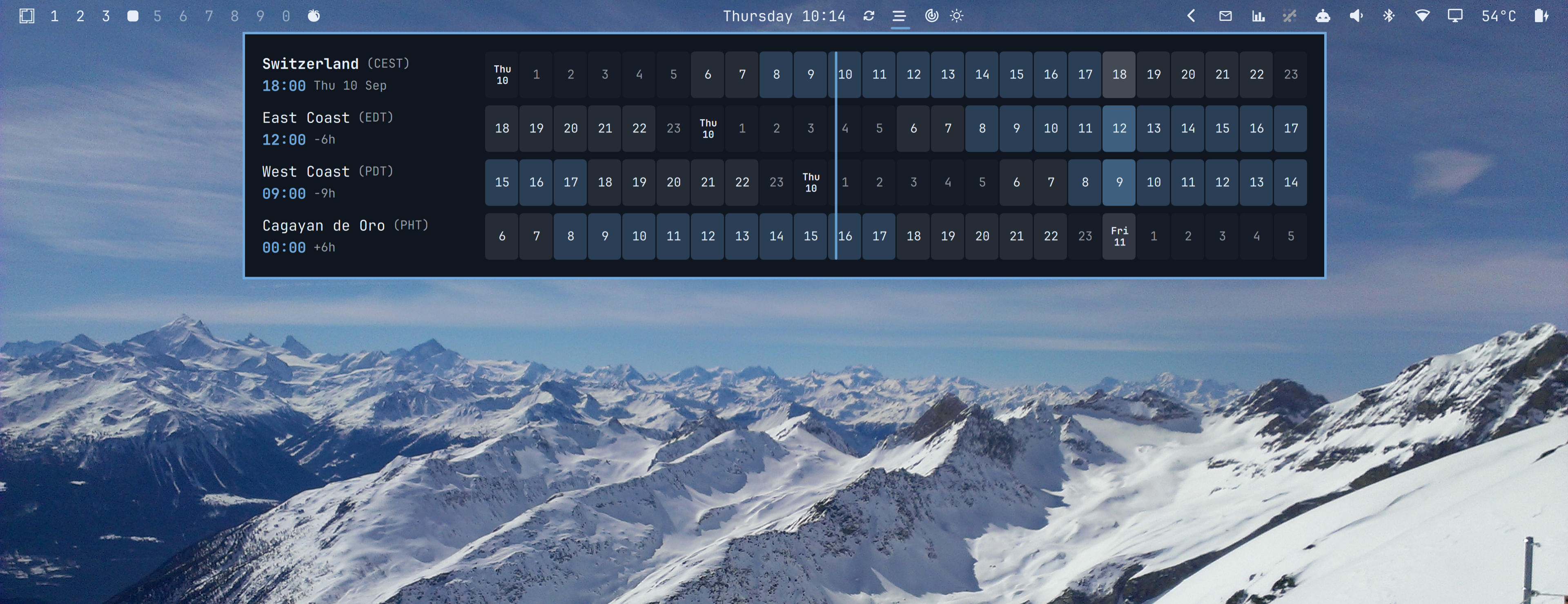
Hover Preview:

Install
omarchy plugin add https://github.com/sspaeti/omarchy-timezones-plugin.git --enable
Usage
- Hover the globe icon: compact view, e.g.
NY 07:12 · SF 04:12 - Left click: open/close the hour-grid popup (Escape also closes)
- Hover a column in the popup: converts that moment across all zones
- Middle click: refresh timezone offsets
- Right click: open worldtimebuddy.com in the browser
Keyboard, while the popup is open (also works when summoned by hotkey, no mouse needed):
| Key | Action |
|---|---|
h / l, ← / → |
Step the selected column back / forward. The first press starts from the current hour. |
n |
Back to now (clear the selection) |
t |
Cycle the display mode: 24h → AM/PM → UTC (see hourFormat) |
p / y |
Copy the popup as a PNG to the clipboard, selected column included — hover a future meeting slot, hit p, paste it to the people in it |
r |
Refresh timezone offsets |
w |
Open worldtimebuddy.com |
Esc |
Close |
The same actions are available over IPC, e.g. for a Hyprland keybind:
omarchy-shell io.github.sspaeti.timezones toggle             # open/close the popup
omarchy-shell io.github.sspaeti.timezones toggleHourFormat   # 24h → 12h → utc
omarchy-shell io.github.sspaeti.timezones screenshot         # copy the open popup to the clipboard
Configure
Works out of the box with no configuration: the home row is Omarchy's
system timezone (whatever omarchy / timedatectl is set to), labeled by
its city, plus US East Coast and West Coast as example client zones.
To pick your own zones and labels, configure the widget entry in
~/.config/omarchy/shell.json (hot-reloads on save). Example:
{
  "id": "io.github.sspaeti.timezones",
  "hourFormat": "24h",
  "homeZones": ["Europe/Zurich", "Europe/Berlin"],
  "zones": [
    { "label": "Switzerland", "shortLabel": "CH", "zone": "", "home": true },
    { "label": "East Coast", "shortLabel": "NY", "zone": "America/New_York" },
    { "label": "West Coast", "shortLabel": "SF", "zone": "America/Los_Angeles" },
    { "label": "Cagayan de Oro", "shortLabel": "CDO", "zone": "Asia/Manila", "abbr": "PHT" }
  ]
}
The bar icon can be changed with icon — see below for the default and alternatives.
-
zones— the rows of the popup, top to bottom.zone— IANA timezone name;""with"home": truetracks the system timezone.label— the location name shown in the popup.shortLabel— used in the bar's hover view.abbr— optional override for the timezone abbreviation shown in parentheses (tzdata calls the Philippines "PST", which reads wrong next to Pacific time — override with "PHT").
-
homeZones— system timezones that keep the home row's configured label. Outside this list (traveling), the home row is relabeled by where the system clock actually is. Empty (default): always label by the system timezone. -
hourFormat—"24h"(default),"12h"or"utc". One setting read by the bar's hover view, the popup's row times and the hour grid, so they never disagree."12h"reads7:12 AMin the headers and1a … 12pin the grid;"utc"keeps the 24-hour clock and pins a UTC reference row right under home, so "14:00 UTC" can be hovered like any other zone.tin the popup cycles through the three for the session;hourFormatdecides where it starts. -
icon— bar glyph. Default `` (U+EE19, fa-bars_staggered: three staggered bars, reads as stacked time strips). That glyph joined Nerd Fonts in v3.3 (Font Awesome 6), so on an older Nerd Font the widget falls back to(U+F124A, md-web_clock: globe with a small clock badge) automatically — the probe is a one-offfc-listat startup. Not plain md-earth/md-globe — those render 1-2px smaller and lower than sibling bar icons in JetBrainsMono Nerd Font at bar size, a per-glyph hinting quirk at small sizes, not a layout bug. Alternatives:Glyph Codepoint Name Notes `` U+EE19 fa-bars_staggered three staggered bars (default, Nerd Fonts ≥ 3.3) U+F124A md-web_clock globe with a small clock badge (fallback) U+F0150 md-clock_outline plain clock, simplest shape, safest alignment U+F059F md-web plain meridian globe, no continents -
hoverExpand— setfalseto keep the bar pill a static icon instead of expanding to the compact times on hover (the expansion shifts neighboring widgets, which not everyone wants). Defaulttrue. -
worldtimebuddyUrl— right-click target.
Move it in the bar:
omarchy bar move io.github.sspaeti.timezones --section center
How summer/winter time stays correct without syncing
The system's IANA tzdata (/usr/share/zoneinfo) stores the transition
rules — "EU switches on the last Sunday of March", "US on the second Sunday
of March" — not just this year's dates, so every future switch is already
computable offline. The plugin evaluates those rules for the current moment
(TZ=<zone> date) on startup, on panel open, on middle-click, at each
wall-clock hour boundary (the only instants a DST switch can occur), and
after the clock jumps (wake from suspend, timezone changed while traveling) —
so a switch is reflected the moment it happens. When a country
changes its rules, the fix arrives through the regular tzdata package in
normal system updates. Leap years are plain calendar math and need nothing
special.
Remove
omarchy plugin remove io.github.sspaeti.timezones
Previous video
https://github.com/user-attachments/assets/703ba5b8-68bd-4694-bb8f-91f41424505d