
PIA VPN — Omarchy bar widget
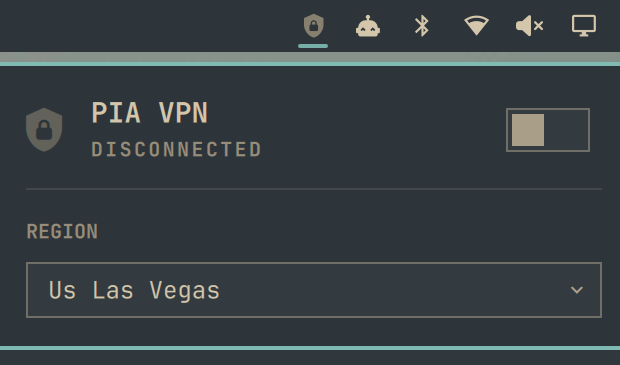
A bar-widget plugin for Omarchy that connects and disconnects Private Internet Access VPN from the top bar, with a searchable region picker in the popup.
Requirements
-
Omarchy with the Quickshell-based plugin system (
omarchy plugin/omarchy barcommands available). -
The PIA desktop client installed, providing the
piactlCLI onPATH. -
PIA background mode enabled, so the daemon stays controllable without the GUI open:
piactl background enableWithout this,
connectfrom the widget will fail with "start the PIA client to activate the daemon" until you launch the PIA app once.
This plugin only shells out to piactl (get/set/connect/disconnect);
it does not touch your PIA credentials, network configuration, or any files
outside its own polling of piactl output.
Install
omarchy plugin add https://github.com/SteveHNH/omarchy-pia-plugin.git --enable
This clones the plugin, prompts for a bar section (pick right to match the
built-in Bluetooth/Network/Audio widgets), and enables it.
To install manually instead:
git clone https://github.com/SteveHNH/omarchy-pia-plugin.git \
  ~/.config/omarchy/plugins/io.github.stevehnh.pia-vpn
omarchy plugin validate ~/.config/omarchy/plugins/io.github.stevehnh.pia-vpn
omarchy plugin enable io.github.stevehnh.pia-vpn --section right
Remove
omarchy plugin disable io.github.stevehnh.pia-vpn
rm -rf ~/.config/omarchy/plugins/io.github.stevehnh.pia-vpn
omarchy-shell shell rescanPlugins
Usage
- Left-click the bar icon: open/close the popup.
- Right-click the bar icon: force a status refresh.
- Middle-click the bar icon: connect/disconnect without opening the popup.
- In the popup: the switch connects/disconnects, and the region field is a
searchable dropdown over every region
piactl get regionsreports.
The bar icon is a shield glyph — solid/bright when connected, dimmed when
disconnected, and colored as an alert if piactl becomes unreachable (e.g.
the PIA daemon isn't running and background mode isn't enabled).
Settings
refreshIntervalSec(2–60, default 5): how often the widget pollspiactlfor connection state and region. Configurable from Omarchy's plugin settings UI.
License
MIT — see LICENSE.