
Omahub
← All plugins
S

Ollama Cloud Usage

by styles01

Adds Ollama Cloud to Omarchy's existing AI toolbar widget (the stock AI icon), not a new bar icon.

Security review

No obvious issues detected

Deterministic scan — not a security guarantee

None
Risk level
None
Analyzed commit
ca44a8e
Scanned
1 month ago

No potentially dangerous behavior detected in the analyzed commit.

Automated analysis only — not a security guarantee.

AI advisory review

Review recommended

Language-model assessment · ~deepseek/deepseek-v4-flash-latest — advisory only

Low
AI risk level
Low
Recommendation
review
Model
~deepseek/deepseek-v4-flash-latest
Analyzed commit
ca44a8e
Reviewed
1 month ago

The plugin is a headless collector that decrypts the user's browser session cookies (via the OS keyring) to scrape the user's Ollama Cloud usage from ollama.com and writes a local JSON record for the stock AI panel. It does not exfiltrate data, add persistence, or run destructive commands. The main risk is the broad access to the browser cookie store and the fact that it copies a browser profile to a temporary directory, but this behavior is disclosed and limited to fetching ollama.com settings.

  • The collector copies an entire browser profile directory (including Cookies) into a temp directory and decrypts cookie values using the desktop keyring, which is sensitive access beyond just reading the usage page.
  • It automatically searches and reuses whichever Chromium-based browser has ollama.com cookies, without per-use confirmation.
  • The script runs a headless browser against the user's authenticated session; if the page unexpectedly contains sensitive data, it could be processed, though the parser only extracts usage numbers.
  • No network destination other than ollama.com is used; no remote exfiltration is evident in the reviewed code.
How this check works

This review combines the deterministic scan (the rule-based results above) with an independent look at the plugin's code by a language model. The model reads a trimmed sample of the repository's files, the manifest, and the README, then gives a plain-language risk level and a recommendation: install (no notable danger), review (look closer first), or avoid (clearly dangerous).

It runs on the same analyzed commit as the deterministic scan and is strictly advisory — it is not a security guarantee and never blocks a plugin by itself. A human moderator still reviews plugins before they are listed.

AI advisory only — automated analysis, not a security guarantee.

Install
$ omarchy plugin add https://github.com/styles01/omarchy-ollama-cloud --enable
Developer Tools #ai

Ollama Cloud Usage

Adds Ollama Cloud to Omarchy's existing AI toolbar widget — the AI icon already on the top bar. It does not add a second icon.

After install, click that same AI button. You get an Ollama Cloud provider next to Claude Code / Codex: your plan tier, the 5-hour session and weekly limit meters, extra-usage balance, and per-model request counts as recorded from ollama.com.

Preview:
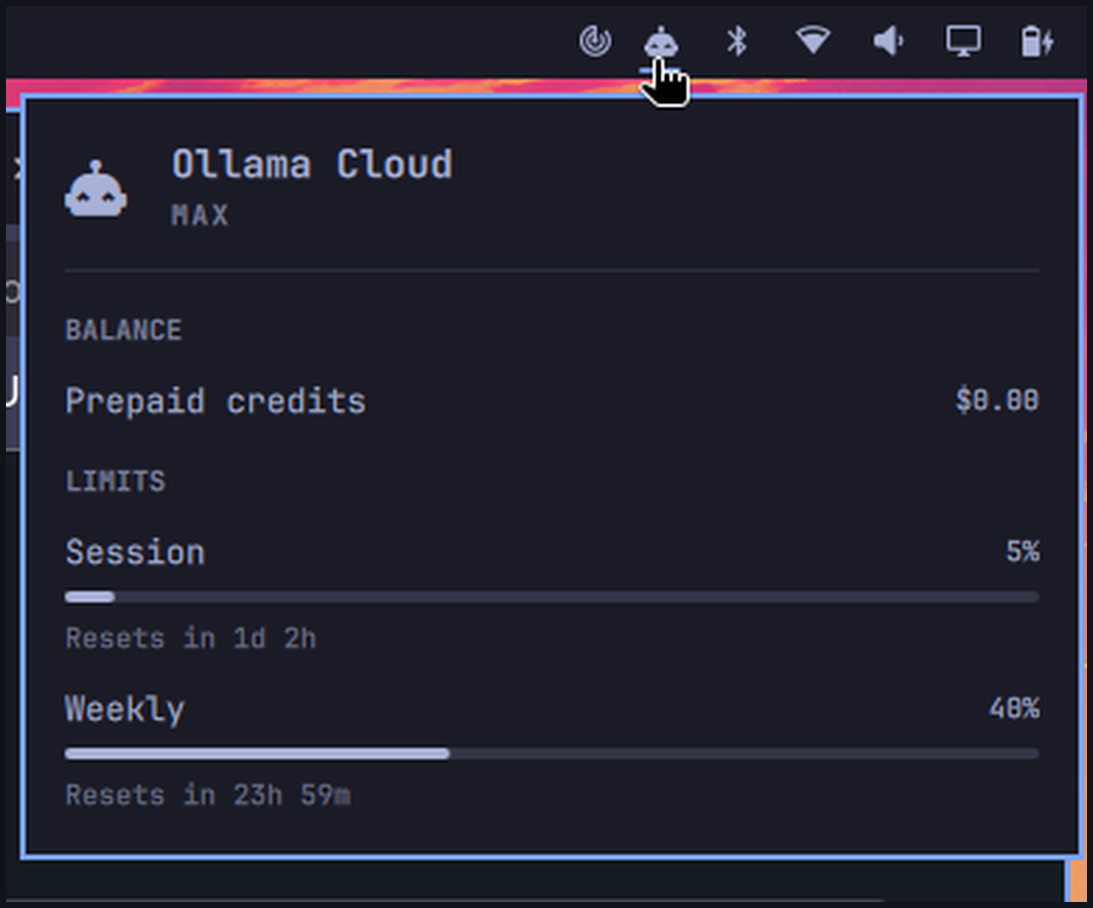
Ollama Cloud usage panel in Omarchy

Install

omarchy plugin add https://github.com/styles01/omarchy-ollama-cloud.git --enable

Requires:

  • Omarchy with the stock AI widget enabled (omarchy.agents, on by default)
  • Python 3 on PATH (stdlib only)
  • A Chromium-based browser (Google Chrome, Chromium, or Brave) signed in to ollama.com — open ollama.com once and make sure you are logged in
  • A unlocked desktop keyring session (the browser needs it to decrypt its own cookies)

Leave the built-in AI icon where it is. After the first scan (up to 15 minutes after login, or immediately after a panel refresh), click the AI icon and switch to Ollama Cloud.

Usage

  • Left click the existing AI icon: usage panel
  • Switch to Ollama Cloud with the provider in the panel
  • r or Enter in the panel: refresh (Ollama Cloud follows the stock update)
  • Ollama Cloud also refreshes about every 15 minutes

This plugin is a headless service. It only writes an Ollama Cloud usage record for the stock panel to display.

ollama.com has no usage API, so the collector renders https://ollama.com/settings with a headless copy of your desktop browser profile and reads the numbers straight off the page: tier name, "Session usage", "Weekly usage" (percent used and reset countdowns), the extra-usage balance, and per-model request segments. Manual override if auto-detection picks the wrong target:

# pick a specific browser binary
ollama_usage=chromium  # or: OLLAMA_USAGE_BROWSER=chromium
# pick a specific profile directory (e.g. ~/.config/google-chrome/Profile 2)
OLLAMA_USAGE_PROFILE="~/.config/google-chrome/Profile 2"

Remove

omarchy plugin remove io.github.styles01.ollama-cloud

Removal deletes the plugin checkout and drops ~/.local/state/omarchy/agents/usage/ollama.json, so the Ollama Cloud provider leaves the stock AI panel. It does not change browser profiles, cookies, or sessions.

Privacy

The collector renders one local page view with your existing browser session. No cookies, tokens, or page content are written anywhere — only the usage numbers land in the state file. Expired sessions are not refreshed; open ollama.com in your browser and sign in again to renew.

License

MIT. See LICENSE.