
Echo Shelf for Omarchy
A small Omarchy Quattro bar widget for the Snowsky Echo Mini: connection and storage at a glance, non-destructive music transfer, safe eject, and a guided firmware flow.
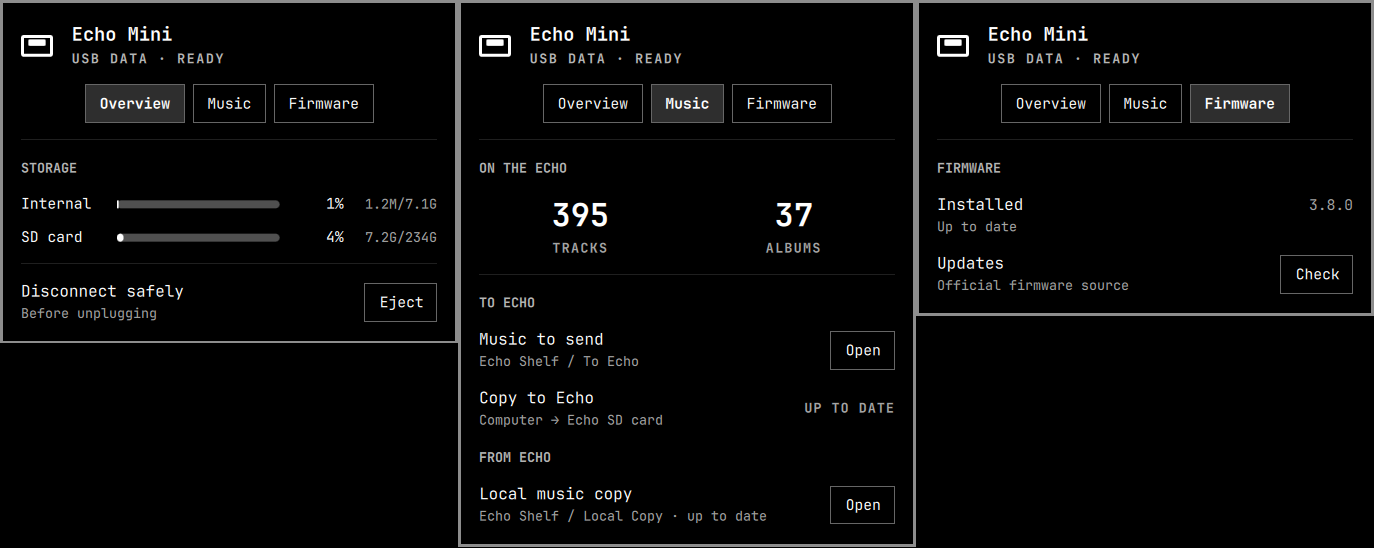
What it shows
Overview— USB Data or DAC state, independent internal/SD mount state, occupied/total storage, usage percentage, and safe eject.Music— track and album counts plus two explicit flows: music copied to the Echo and a local copy brought back from it.Firmware— the installed version, automatic and manual update checks, and controls only when action is required.- In USB DAC mode the panel collapses to audio-only status; tabs and device-management actions appear only in USB Data mode.
- The bar icon disappears when the player is disconnected.
- Cached details appear immediately while a fingerprinted background refresh runs.
Deliberately absent
- Raw USB, mount, manifest, checksum, and helper output. The panel shows the task, not the implementation.
- Audio output controls. Omarchy's stock Audio panel already owns those.
- Automatic deletion or mirroring. Music transfer only adds or updates safe targets.
- Automatic firmware-version guessing. The installed version is confirmed from the Echo's own screen.
Requirements
- Omarchy Quattro.
- A Snowsky Echo Mini connected in USB Data or USB DAC mode.
- Standard Omarchy tools used by the helper:
curl,findmnt,flock,lsblk,rsync,sha256sum,timeout,unzip,zip,udisksctl,udevadm, andxdg-open.
No install hook, package installation, background service, or elevated access is used. The library features work with supported Echo Mini storage; the firmware flow is tested and restricted to the 8 GB model/package.
Install
omarchy plugin add https://github.com/subirats345/echo-shelf --enable
omarchy bar move io.github.subirats345.echo-shelf
The Omarchy Plugins listing installs the same public repository.
Update later with:
omarchy plugin update io.github.subirats345.echo-shelf
If Omarchy updates the files but the widget does not reload cleanly, run omarchy-restart-shell once. A missing icon normally means the Echo is not enumerating; repeated kernel error -71 messages point to the USB cable or port rather than the plugin.
Music transfer
Echo Shelf groups both music folders under one directory:
~/Music/Echo Shelf/To Echo— staging area for computer → Echo. Add music here, then use Copy to Echo.~/Music/Echo Shelf/Local Copy— local safety copy for Echo → computer. Echo Shelf never sends music from this folder.
Existing Echo Shelf Inbox and Echo Shelf Library folders are moved into this grouped layout automatically when there is no destination conflict.
Firmware backups are separate from music and live in ~/.local/share/echo-shelf/firmware-backups. Echo Shelf moves the old ~/Music/Echo Shelf Firmware Backups folder there automatically when there is no destination conflict.
The expected player layout is:
01_Category/Album/track.flac
Supported audio and album covers are copied. Non-music extras are silently ignored, unsupported audio such as WavPack is reported, files outside the numbered category layout are skipped, and neither direction deletes music. Transfers check free space before writing and use delayed updates so interrupted copies do not become final files.
Local import conflicts are never overwritten or called up to date. Echo Shelf reports them, keeps the local copy, and offers to open the Library for review. Device operations are serialized so a background refresh cannot race an eject, transfer, or firmware write.
Firmware
Echo Shelf checks FiiO's official Echo Mini firmware page every six hours and caches the result. Preparing an update requires a clean Library import, an exact URL and SHA-256 allowlisted by the installed Echo Shelf release, validation of the 8 GB archive and image structure, and a completed internal-storage backup before any firmware copy. A future firmware version cannot be installed until a new Echo Shelf release pins its URL, archive hash, image name, and image hash. FiiO does not publish a signature or independent checksum, so this is maintainer-pinned trust rather than vendor-signature verification.
A daily GitHub workflow detects new official packages, validates their structure, calculates both hashes, bumps the plugin patch version, and opens a review PR. It never merges or authorizes firmware automatically: confirming the official announcement and merging that PR is the maintainer's trust decision.
Install remains a deliberate physical flow: safely eject, disconnect, remove the SD card, reconnect in USB Data, install, restart the Echo, then confirm the version shown on the player. Every write step requires explicit confirmation.
Recovery behavior
UPDATINGkeeps the last matching device snapshot visible while refreshing in the background.- Mount changes trigger a refresh even while the panel is closed.
- Failed refreshes keep the last good snapshot, disable device actions, and retry with a bound.
- Eject reports partial success when one volume unmounts and the other remains busy.
Safe to disconnectmeans Linux has confirmed that every mounted Echo volume is unmounted; the player's generic USB screen may still remain visible until the cable is removed.- Echo Shelf never runs filesystem repair automatically. If Linux reports that a FAT volume was not properly unmounted, repair it deliberately while the volume is unmounted.
Keyboard
| Key | Action |
|---|---|
o / 1 |
Overview |
m / l / 2 |
Music |
f / 3 |
Firmware |
← / → |
Previous or next tab |
Tab / Shift+Tab |
Focus available actions |
Enter / Space |
Activate the focused action |
Esc |
Close panel |
Test
./echo-mini-status --self-test
./scripts/check-firmware-update --self-test
omarchy plugin validate .
qmllint -I /usr/share/omarchy/shell -I /usr/lib/qt6/qml BarWidget.qml
Remove
omarchy plugin remove io.github.subirats345.echo-shelf
Removal leaves your Echo Shelf music folders, firmware backups, and cached/configured state untouched.
License
The plugin code is available under the MIT License.
Snowsky, Echo Mini, FiiO, and Omarchy are trademarks or projects of their respective owners. This community plugin is not affiliated with or endorsed by them.