
NEPSE Market
A Nepal Stock Exchange widget for the Omarchy shell. The bar carries a single chart icon; clicking it opens a panel that drills from the NEPSE index down through the sector sub-indices and into any individual scrip.
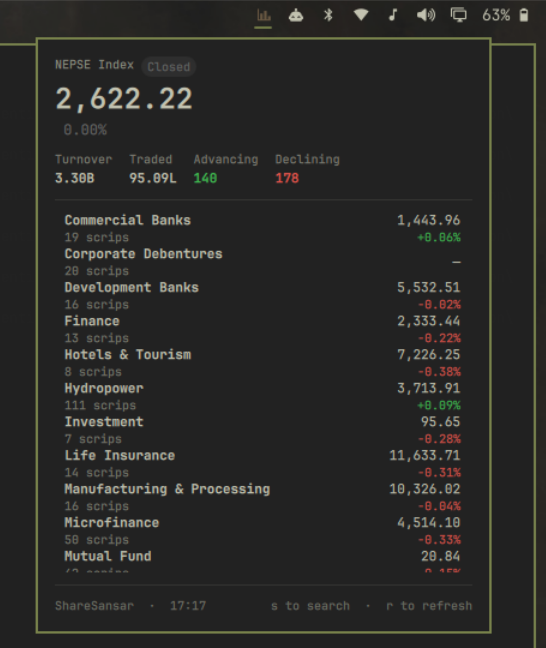
What it shows
- Headline — NEPSE index, percent change, market state (open / pre-open / closed / holiday), turnover, shares traded, advancing and declining counts.
- Sub-indices — every sector (Commercial Banks, Hydropower, Microfinance, Life Insurance, Manufacturing, Mutual Fund and the rest) with its index value, percent change and constituent count. Corporate Debentures and Promoter Shares have no published sector index, so those two rows carry a constituent count and drill down normally, but show no value.
- Sector view — drill into a sub-index for its scrips, ordered by biggest mover.
- Scrip detail — LTP, point and percent change, open, high, low, previous close and volume for every traded symbol (~350 on a normal day), plus its sector where the symbol appears in the sector map.
- Search —
ssearches all three at once: headline indices, sector sub-indices and individual scrips, grouped in the results. Selecting a sub-index drills into its constituents; selecting a scrip opens its detail. - Watchlist — pin your own symbols to the top of the panel.
- Intraday sparkline — accumulated locally from each poll, because no free NEPSE source publishes an intraday series.
Keys
| Key | Action |
|---|---|
j / k or arrows |
Move the cursor |
Enter / Space |
Open the selected sector or scrip |
s or / |
Search indices, sub-indices and scrips |
Esc |
Back one level, then close |
Backspace |
Delete a character while searching, otherwise back one level |
r |
Refresh now |
Middle-clicking the bar icon also refreshes.
Install
omarchy plugin add https://github.com/sumdahl/omarchy-plugin-nepse.git --enable
Pick a bar section when prompted (right is the default). You can move it, change its
settings, or disable it later from Omarchy menu → Setup → Bar.
Nothing else is required — no API key, no account, and no container. The plugin never edits your Hyprland or shell configuration on its own.
Remove
omarchy plugin remove io.github.sumdahl.nepse
That deletes the plugin folder and drops it from the bar. Its cache is regenerable and lives outside the plugin, so clear it too if you want nothing left behind:
rm -rf ~/.cache/omarchy/io.github.sumdahl.nepse
To keep it installed but hide it from the bar, disable it instead:
omarchy plugin disable io.github.sumdahl.nepse
Optional keybinding
Omarchy plugins never edit your Hyprland config, so a hotkey is one manual step. Add
this to ~/.config/hypr/bindings.lua, then run hyprctl reload:
o.bind("SUPER + CTRL + G", "NEPSE Market", "omarchy-shell shell toggle io.github.sumdahl.nepse")
SUPER + CTRL is crowded on a stock Omarchy install — N is night light, M is
mute, and most other letters are taken. G, J, U, Y and the digits are the ones
usually free. Check yours before binding:
grep -rhoE 'SUPER \+ CTRL \+ [A-Za-z0-9]+' /usr/share/omarchy/ ~/.config/hypr/ | sort -u
The same command works from a script or another terminal, with no hotkey at all:
omarchy-shell shell toggle io.github.sumdahl.nepse
Data sources
NEPSE publishes no free, stable JSON API — the official endpoint is token-gated and
paid. This plugin therefore keeps every bit of source-specific knowledge in one file,
bin/nepse-fetch, which prints normalized JSON. The QML never parses markup, so a
source change is a one-file fix.
Two interchangeable backends, selectable in the widget settings:
- ShareSansar (default) — reads the public live-trading page. Needs no setup at all, and covers the index, every sub-index and every traded scrip. Sector membership comes from Merolagani's listed-company pages and is cached for a day.
- NepseAPI — any NepseAPI-compatible host. Set the base URL to the public instance, or to a locally hosted one on port 8000 if you prefer to run your own. Nothing extra is required unless you choose this.
Everything either source returns is treated as untrusted text: bin/nepse-fetch
strips markup and control characters from every string it emits, and the panel
renders every label as Text.PlainText, so a crafted company name cannot become
rich text that pulls in a local file or a remote URL.
Both are unofficial. Market data is provided as-is with no guarantee of accuracy or timeliness, and is intended for personal, non-commercial use — for anything commercial you need a licence from NEPSE or an authorized data vendor.
Behaviour worth knowing
- NEPSE trades Sunday to Thursday, 11:00–15:00 Nepal time. The widget polls once a minute during those hours and backs off to every 15 minutes outside them.
- The last good payload is cached under
~/.cache/omarchy/io.github.sumdahl.nepse/, so the panel paints instantly on restart and shows the previous close during an outage, labelled with how stale it is, rather than going blank. - Market state is shown by the badge in the panel header (Open / Pre-open / Closed / Holiday) and in the bar icon's tooltip.
Settings
Available through the Omarchy settings panel for this widget:
| Setting | Default | Notes |
|---|---|---|
| Data source | ShareSansar | Or NepseAPI |
| NepseAPI base URL | http://localhost:8000 |
Only used by the NepseAPI source |
| Refresh while market is open | 60s | 30–600 |
| Refresh while market is closed | 15min | 5–120 |
| Watchlist | empty | Comma-separated, e.g. NABIL, NICA, UPPER |
| Show index value in the bar | off | On widens the widget to fit the number |
Requirements
Python 3 and curl, both already present on an Omarchy system. No other dependencies, no build step, and nothing to compile.
Licence
MIT — see LICENSE.