
Omadecode
Paste anything — JWT, base64, timestamp, hash, JSON, cron — and read it. Offline.
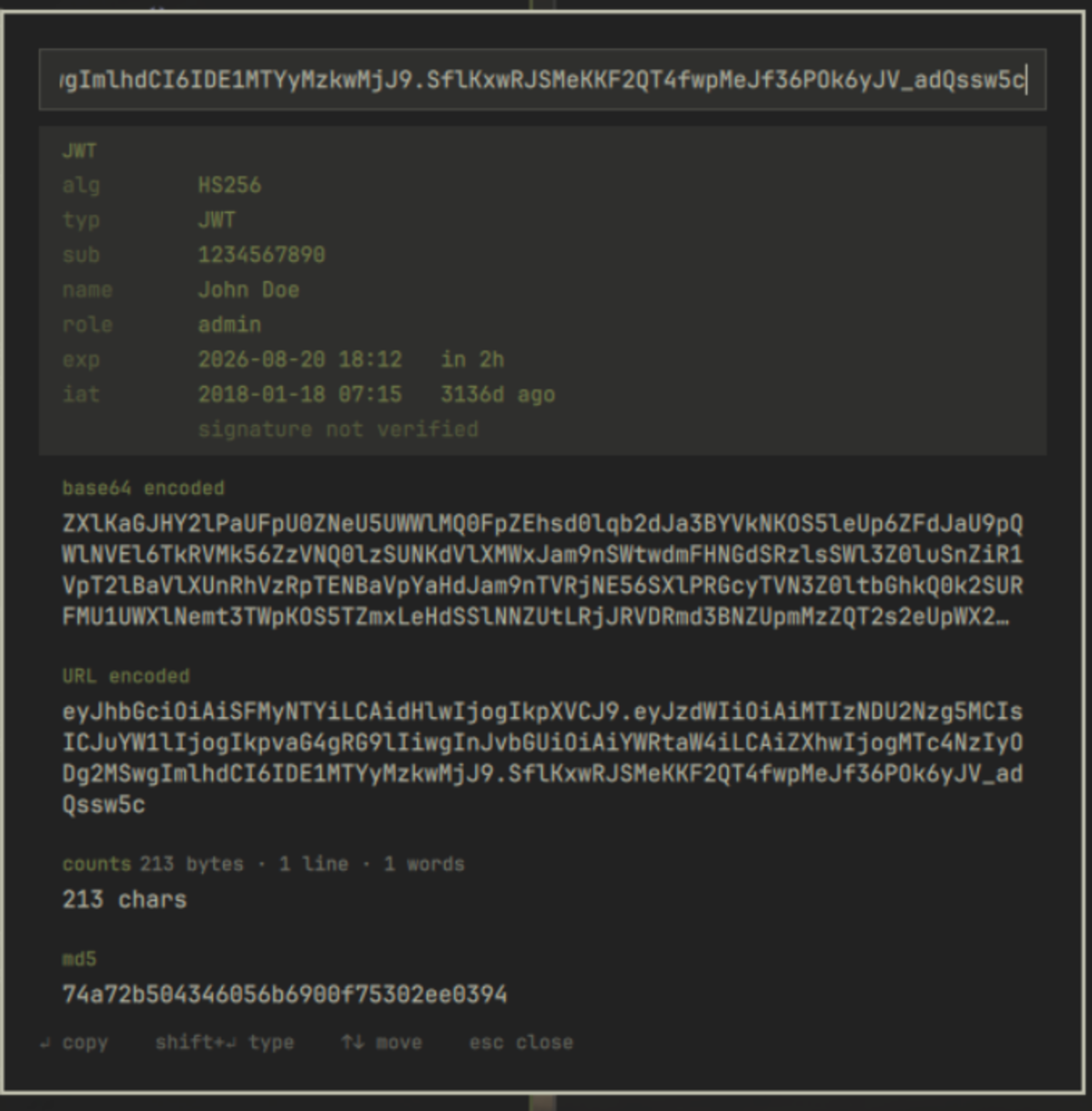
Press a key. Omadecode reads your clipboard, works out what the content is, and shows every useful reading of it at once. No mode picking, no menu diving, no website.
Why
Decoding a JWT usually means pasting it into jwt.io. Decoding base64 usually means base64decode.org. Both send a value — often a live credential — to a server you do not control.
Omadecode does the same work locally. It makes no network requests, stores no
telemetry, and writes nothing to disk. Copies use wl-copy --sensitive, so
decoded secrets are not retained by clipboard-history tools.
What it reads
Every rule that matches contributes a card, best match first.
| You paste | You get |
|---|---|
| A JWT | Header and claims as a table. exp, iat and nbf become local time plus relative age; an expired token is marked. |
| base64 / base64url | The decoded text, or binary, N bytes when it does not decode to text |
| An epoch timestamp (10 or 13 digits) | Local time, UTC, ISO 8601, and how long ago |
| An ISO 8601 date | Epoch seconds and milliseconds |
| JSON | Pretty-printed, with key count and nesting depth; the minified form as a second card |
| A hex digest (32/40/64/128 chars) | Which algorithm produces that length |
| URL-encoded text | The decoded form |
| A cron expression (5 or 6 fields) | Plain English, plus the next three times it fires |
A colour — #rgb, #rrggbb, rgb() |
hex, rgb and hsl, with a swatch |
And for any input, always: md5, sha1, sha256, sha512, the
base64-encoded form, the URL-encoded form, and character, byte, word and line
counts.
Two things it deliberately does not do:
- It never verifies a JWT signature. That needs the signing key. The panel
shows
signature not verifiedrather than implying otherwise. - It never reverses a hash. Given a digest it reports only which algorithm produces that length. There is no lookup, because there is no network.
Install
omarchy plugin add https://github.com/sumdahl/omarchy-plugin-omadecode.git --enable
Remove it
omarchy plugin remove io.github.sumdahl.omadecode
If you added the bar icon, also delete its { "id": "io.github.sumdahl.omadecode" }
entry from bar.layout in ~/.config/omarchy/shell.json, and remove any keybind
you added. The plugin writes nothing else anywhere, so that is the whole of it.
Open it
Bind a key. This is the primary way in — add to ~/.config/hypr/bindings.conf:
bindd = SUPER SHIFT, D, Decode clipboard, exec, omarchy-shell shell toggle io.github.sumdahl.omadecode
Optionally, add a </> icon to the bar that opens the same panel. This step
is manual, and worth explaining: because the plugin is both an overlay and a bar
widget, the shell treats it as overlay-owned, so omarchy bar put reports
success without changing anything. Add the entry yourself to
~/.config/omarchy/shell.json, under bar.layout.right (or left / center):
{ "id": "io.github.sumdahl.omadecode" }
The bar picks it up on save. Delete that line to remove the icon again; the keybind is unaffected either way.
Keys
| Key | Action |
|---|---|
↵ |
Copy the focused result, notify which card was copied, and close |
shift + ↵ |
Type the focused result into the window you were last in |
↓ / tab |
Next result |
↑ / shift+tab |
Previous result |
esc |
Clear the input; press again to close |
The input is selected when the panel opens, so typing replaces the clipboard value and you can inspect something else without reaching for the mouse. Clicking a card copies it; clicking outside closes.
Requirements
wl-clipboard and python3, both already on Omarchy. wtype is needed only
for shift+↵, and notify-send only for the copy confirmation. No API keys,
no accounts, no services.
Privacy
- No network access of any kind.
- Nothing is written to disk. The input is cleared when the panel closes.
- Payloads reach the bundled helpers on stdin, never as command-line
arguments, which any other user on the machine could otherwise read through
/proc/<pid>/cmdline. - The copy notification names the card (
Copied sha256) and never shows the value. A notification body is itself a command-line argument, is drawn over a locked screen, and is kept in notification history — three ways a decoded secret could escape the--sensitiveclipboard path. - Every value renders as
Text.PlainText, so markup inside a decoded payload is displayed as text and never interpreted. - Input is capped at 1 MB, and long values are truncated for display.
Development
Detect.js holds the detection ladder as pure functions with no I/O, so it runs
outside the shell:
node test/detect_test.js
Plugin code under ~/.config/omarchy/plugins/ hot-reloads on save, but the
shell can serve a stale cached build — run omarchy restart shell before
trusting a result.
Licence
MIT © Sumiran Dahal