
Omahub
← All plugins
S

ClamAV Monitor

by szenti

Shows ClamAV on-access scan status: last database update and recent detections.

Security review

Potentially dangerous behavior detected · 14 findings

Deterministic scan — not a security guarantee

High
Risk level
High
Analyzed commit
cd26cd4
Scanned
1 month ago
  • high destructive_filesystem bin/watch-detections.sh:28

    Low-level disk manipulation or write command.

    dd if=/dev/null of="$OUT_LOG" oflag=nofollow conv=notrunc status=none 2>/dev/null || true
  • high destructive_filesystem bin/watch-detections.sh:32

    Low-level disk manipulation or write command.

    dd of="$OUT_LOG" oflag=append,nofollow conv=notrunc status=none 2>/dev/null
  • Bundles a systemd unit file.

    [Unit]
  • Registers scheduled or boot-time system tasks.

    systemctl enable --now clamav-clamonacc.service
  • Command runs with sudo, elevating the process beyond the plugin environment.

    sudo tee -a /etc/clamav/clamd.conf < setup/clamd-onaccess.conf
  • Command runs with sudo, elevating the process beyond the plugin environment.

    sudo systemctl enable --now clamav-clamonacc.service
  • Docs persistence README.md:46

    Registers scheduled or boot-time system tasks.

    systemctl enable --now clamav-freshclam.service clamav-daemon.service
  • Docs persistence README.md:58

    Registers scheduled or boot-time system tasks.

    systemctl enable --now clamav-clamonacc.service
  • Docs sudo README.md:44

    Command runs with sudo, elevating the process beyond the plugin environment.

    sudo pacman -S --needed clamav
  • Docs sudo README.md:45

    Command runs with sudo, elevating the process beyond the plugin environment.

    sudo freshclam                                                       # first signature download
  • Docs sudo README.md:46

    Command runs with sudo, elevating the process beyond the plugin environment.

    sudo systemctl enable --now clamav-freshclam.service clamav-daemon.service
  • Docs sudo README.md:58

    Command runs with sudo, elevating the process beyond the plugin environment.

    sudo systemctl enable --now clamav-clamonacc.service
  • Docs sudo README.md:72

    Command runs with sudo, elevating the process beyond the plugin environment.

    sudo setfacl -d -m u:"$(whoami)":r /var/log/clamav
  • Docs sudo README.md:73

    Command runs with sudo, elevating the process beyond the plugin environment.

    sudo setfacl -m u:"$(whoami)":r /var/log/clamav/clamonacc.log

Automated analysis only — not a security guarantee.

AI advisory review

No obvious issues detected

Language-model assessment · ~deepseek/deepseek-v4-flash-latest — advisory only

Low
AI risk level
Low
Recommendation
install
Model
~deepseek/deepseek-v4-flash-latest
Analyzed commit
cd26cd4
Reviewed
1 month ago

This is a display-only ClamAV monitoring widget. It reads system state and logs, and includes a user-level systemd service that safely appends timestamps to a user-owned log. The flagged `dd` commands are used with safe flags (nofollow, append) to prevent symlink attacks, and the `sudo` commands appear only in the README as manual setup instructions, not executed by the plugin itself.

  • The companion service writes to a user-writable path but uses O_NOFOLLOW and atomic rename to mitigate symlink attacks.
  • The README instructs users to run sudo commands for ClamAV setup, but these are manual steps and not part of the plugin's runtime behavior.
  • The plugin reads systemd service states and log files, which is normal for a monitoring widget.
How this check works

This review combines the deterministic scan (the rule-based results above) with an independent look at the plugin's code by a language model. The model reads a trimmed sample of the repository's files, the manifest, and the README, then gives a plain-language risk level and a recommendation: install (no notable danger), review (look closer first), or avoid (clearly dangerous).

It runs on the same analyzed commit as the deterministic scan and is strictly advisory — it is not a security guarantee and never blocks a plugin by itself. A human moderator still reviews plugins before they are listed.

AI advisory only — automated analysis, not a security guarantee.

Install
$ omarchy plugin add https://github.com/szentesg/omarchy-clamav-monitor --enable
System #security

ClamAV Monitor

An Omarchy bar widget that shows ClamAV's on-access scan status: when the virus database last updated, whether on-access monitoring and auto-update are running, and the most recent detections.

The bar icon switches to the theme's urgent color while a recent detection's file is still present on disk, and stays that color until you open the panel after every one of them is gone (quarantined or deleted) — a still-present threat is never dismissed just by opening the panel. Click it to open:

  • Last updated — age of the local virus database
  • On-access monitoring / Auto-update — live status of clamd, clamonacc, and freshclam
  • Recent detections — the last 10 hits, each with its signature name, timestamp (rendered in your OS's configured date/time format), and file path. Entries whose file no longer exists are kept for history and marked "Quarantined or removed"
  • An Open log button appears once more than 10 detections are on record, opening the full log in your default editor
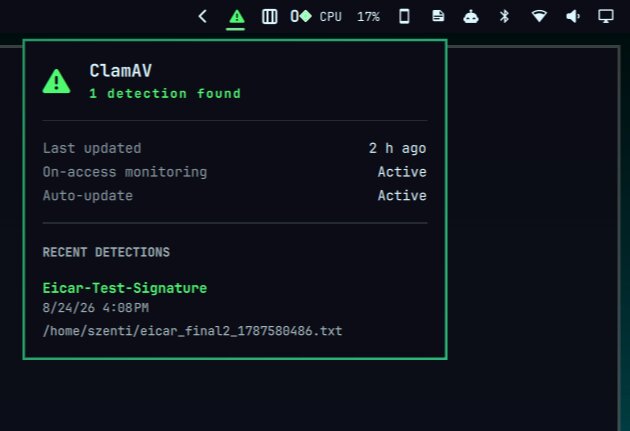
ClamAV Monitor panel preview

This plugin is display only — it reads ClamAV's own state and does not install, configure, remove, or quarantine anything on your system. The plugin binary itself never invokes sudo; every privileged command below is a one-time, manual host setup step you run yourself before installing the widget, not something the plugin executes on your behalf.

Prerequisites

You need ClamAV's on-access scanner running and writing to its usual log, plus a small companion service (included here) that adds a timestamp to each detection, since clamonacc's own log has none.

1. Install and run ClamAV

sudo is required here because ClamAV is a system package installed outside your home directory, and clamd/freshclam/clamonacc are system-wide services that need to run continuously (including before any user logs in) — both are root-only operations on Arch.

sudo pacman -S --needed clamav
sudo freshclam                                                       # first signature download
sudo systemctl enable --now clamav-freshclam.service clamav-daemon.service

Append the on-access settings from setup/clamd-onaccess.conf to /etc/clamav/clamd.conf, adjusting the paths for your setup — in particular, add an OnAccessExcludePath for any directory a background app rewrites constantly (a sync client's own database, a browser cache, etc.). Skipping this is the single most common cause of clamonacc pinning a CPU core: every rewrite of an un-excluded file is picked up as a fresh scan request.

sudo systemctl enable --now clamav-clamonacc.service

(This step also needs sudo — clamav-clamonacc.service is a system service and only root can enable/start it.)

2. Let your user account read the log

clamonacc's log is root-owned, and setfacl needs sudo to modify permissions on a file it doesn't own. Grant read access with an ACL rather than loosening the file's real permissions (e.g. chmod-ing it world- or group-readable):

sudo setfacl -d -m u:"$(whoami)":r /var/log/clamav
sudo setfacl -m u:"$(whoami)":r /var/log/clamav/clamonacc.log

3. Install the detection-timestamp service

No sudo needed here — this is a systemctl --user service, scoped to your account, reading a log you were just given ACL access to.

mkdir -p ~/.config/systemd/user
cp ~/.config/omarchy/plugins/io.github.szentesg.clamav-monitor/systemd/omarchy-clamav-detection-log.service \
   ~/.config/systemd/user/
systemctl --user daemon-reload
systemctl --user enable --now omarchy-clamav-detection-log.service

This tails /var/log/clamav/clamonacc.log, and for every detection line it appends a timestamped copy to ~/.local/state/omarchy/clamav-detections.log — the file the widget actually reads.

Install the widget

omarchy plugin clone io.github.szentesg.clamav-monitor    # or: omarchy plugin add <repo-url> --enable
omarchy plugin enable io.github.szentesg.clamav-monitor --section right

Configure

The only setting is the background refresh interval (seconds):

omarchy bar set io.github.szentesg.clamav-monitor refreshIntervalSec 30 --json

Remove

omarchy plugin disable io.github.szentesg.clamav-monitor
systemctl --user disable --now omarchy-clamav-detection-log.service
rm ~/.config/systemd/user/omarchy-clamav-detection-log.service

(This does not touch ClamAV itself — clamd/clamonacc/freshclam keep running until you stop them separately.)

License

MIT — see LICENSE.