
Navbar Cat

A cat that walks along the Omarchy bar.
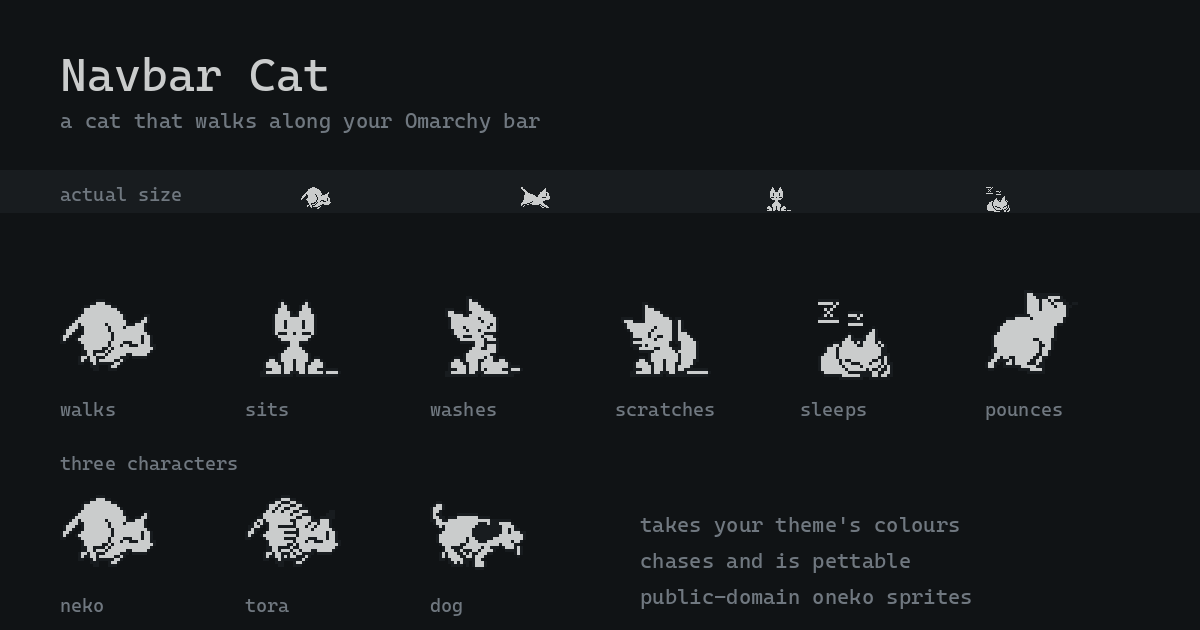
It roams the full width of the bar, reacts to what your machine is doing, takes your theme's colours, and can be petted. The sprites are the original oneko cat, and so is the behaviour: left alone, it sits, washes its face, scratches its head, yawns, and only then falls asleep.
What it does
| When | The cat |
|---|---|
| You move the pointer onto the bar | runs to it, then pounces at it |
| A notification appears | trots over to it and sits watching until it goes |
| You switch workspace | scampers in the direction you switched |
| You change theme | startles, bolts a little way, recolours to match |
| You plug in the charger | gets drowsy and naps where it is |
| Something is playing | dances on the spot |
| You leave for a few minutes | settles down and falls asleep |
| It has been asleep a while | gets up, potters about, and settles again |
| Nothing in particular | wanders, with pauses |
| You click it | looks up at you, then grooms |
It walks the long way round on vertical bars too, and claws at the ends of the bar when it wants to keep going and can't.
Those reactions are a priority order, not a list — the first one that applies wins. Anything that wakes the cat beats anything that puts it to sleep:
petted > pointer > startled > notification > music > charging > idle > wander
└─────────────── awake ──────────────────┘   └────── asleep ──────┘
So music still gets the cat bobbing while you are on mains power, but moving your pointer to the bar interrupts it — the cat would rather come to you.
The shape of a day
Cats are crepuscular, and so is this one. The rhythm changes how readily it settles and how briskly it moves, using the same frames throughout:
| 23:00–06:00 | sleeps sooner, and rarely gets up |
| 06:00–09:00 | dawn — wanders more, at a run |
| 09:00–17:00 | ordinary |
| 17:00–20:00 | dusk — frisky again |
| 20:00–23:00 | winding down |
Set rhythm: false for a cat that behaves the same at 4am as at 4pm.
Right-click menu
Right-click a settled cat to change its character, or toggle pouncing and cursor-chasing. A walking cat has no input region to click, which is the same rule that governs petting.
Menu choices are written to this plugin's own entry in shell.json through the
shell's own config mechanism, so they survive a restart.
Characters
Three sprite sets ship, all from oneko and all with the same 32 frames:
character |
|
|---|---|
neko (default) |
the original cat |
tora |
tiger-striped cat — the stripes take your theme's ink colour |
dog |
a dog, for people who are wrong about cats |
Install
Listed in the community plugin directory: omarchyplugins.com › Navbar Cat
omarchy plugin add https://github.com/tallsam/omarchy-navbar-cat.git --enable --yes
Or by hand:
git clone https://github.com/tallsam/omarchy-navbar-cat.git \
  ~/.config/omarchy/plugins/io.github.tallsam.navbar-cat
omarchy-shell shell rescanPlugins
omarchy plugin enable io.github.tallsam.navbar-cat
Requirements
Omarchy 4 (Quattro) or newer, and python3 — which Omarchy already installs.
Nothing else: no system packages, no build step, no network access, and nothing
outside the plugin's own directory.
Removal
omarchy plugin remove io.github.tallsam.navbar-cat
Or by hand:
omarchy plugin disable io.github.tallsam.navbar-cat
rm -rf ~/.config/omarchy/plugins/io.github.tallsam.navbar-cat
omarchy-shell shell rescanPlugins
Disabling removes the plugin's entry from ~/.config/omarchy/shell.json, which
takes your settings with it. The cat leaves nothing else behind: it creates no
files of its own, keeps no state or cache anywhere, and its helper process
exits with the shell.
The one thing it ever writes is its own entry in shell.json, and only when
you pick something from the right-click menu. It goes through the shell's own
config mechanism and touches no other plugin's settings.
Configuration
Settings go inline on the plugin's entry in ~/.config/omarchy/shell.json:
{
  "plugins": [
    {
      "id": "io.github.tallsam.navbar-cat",
      "character": "neko",
      "speed": 1.0,
      "size": 16,
      "pettable": true,
      "chaseCursor": true,
      "pounce": true,
      "rhythm": true,
      "avoidCenter": 0.2,
      "sleepAfter": 180,
      "stirEvery": 150,
      "stirFor": 25,
      "monitor": "focused",
      "reactions": {
        "music": true, "charging": true, "workspace": true,
        "notification": true, "theme": true
      }
    }
  ]
}
| Key | Default | Meaning |
|---|---|---|
character |
"neko" |
neko, tora, or dog |
speed |
1.0 |
Multiplier on walking and running pace |
size |
16 |
Cat height in logical pixels |
pettable |
true |
Whether the cat can be clicked |
chaseCursor |
true |
Whether the cat comes when you visit the bar |
pounce |
true |
Whether it leaps at the pointer (see below) |
rhythm |
true |
Whether the cat follows a day/night rhythm |
avoidCenter |
0.2 |
Fraction of the bar's middle to keep clear of the clock; 0 disables |
sleepAfter |
180 |
Seconds of pointer stillness before it sleeps |
stirEvery |
150 |
Roughly how often a sleeping cat gets up, in seconds |
stirFor |
25 |
How long it potters about before settling again |
monitor |
"focused" |
"focused" to follow you, or an output name to pin it |
reactions |
all on | Individually disable the music, charging, workspace, notification, or theme reactions |
About the pounce
When the cat catches up with your pointer it leaps at it, arcing out of the bar and back. This is the one behaviour that draws outside the bar: the overlay is grown by half a cat's height so there is somewhere to leap into, and for those 600ms the cat is painted over whatever is behind the bar.
The extra strip is transparent and carries no input region, so it changes
nothing else — but if you want the cat strictly confined to the bar, set
pounce: false and the window shrinks back to exactly the bar's height.
It leaps into the screen whichever edge your bar is docked to, so on a bottom bar it jumps up rather than off the screen.
Does it get in the way?
No. The overlay is click-through everywhere the cat is not, and while the cat
is moving it is click-through everywhere at all — the small clickable box
only exists once the cat has settled somewhere, and disappears the moment it
sets off again. Set pettable: false to remove even that.
It costs almost nothing at rest, either: a sleeping cat stops its own render timer, and the pointer sampler slows down to match.
How it is put together
| File | Role |
|---|---|
Cat.qml |
The panel: window, monitor tracking, event sources, tick loop |
CatSprite.qml |
Frame selection, sheet choice, two-tone theming |
CatMenu.qml |
The right-click menu surface |
Brain.js |
All the behaviour, as a pure function — the tested part |
bin/navbar-cat-cursor |
Pointer sampler |
tools/build-sprites.py |
XBM → spritesheets (only needed to change the art) |
tools/build-preview.py |
Renders preview.png from the shipped sheets |
Brain.js takes a snapshot of the world and returns what the cat should be
doing. It holds no QML and reads no clock of its own, so the whole priority
ladder is testable with a fake clock:
node --test "test/*.test.mjs"
Two things worth knowing
The pointer is sampled, not subscribed to. Hyprland has no cursor-move
event and Quickshell exposes no pointer position, so something has to ask.
Asking via hyprctl costs ~8ms per sample — 8% of a core at 10Hz, which is an
absurd price for a cat. bin/navbar-cat-cursor makes the same request straight
to the Hyprland socket for ~0.03ms, which is 285× cheaper and the reason this
feature exists at all.
It watches notifications without owning them. The shell runs the
notification server, so a plugin cannot run a second one — but it does not need
to. shell.serviceFor("omarchy.notifications") hands back the running service,
whose popup list is deliberately exposed for outside consumers. A happy
side-effect: because that list respects Do Not Disturb, a silenced machine gets
a silent cat, without a line of code spent on it.
The cat does not know where your widgets are. Nothing in the bar exposes
widget geometry, so the cat cannot see your clock — it only assumes one is
there. Omarchy centres the clock by default, so the spots the cat chooses
for itself keep clear of the middle fifth of the bar. It still walks straight
through the middle, and it will still come to the middle if that is where you
put your pointer; it just will not settle down or fall asleep on top of your
clock. If your clock lives somewhere else, set avoidCenter: 0.
Sprites and licence
The plugin's own code is MIT. The sprites are the public-domain neko,
tora, and dog sets from oneko 1.2.sakura.5 — see
vendor/oneko/PROVENANCE.md for the exact source
and checksum.
oneko's tarball also ships character sets that are not free — the BSD Daemon is Marshall Kirk McKusick's, and Sakura and Tomoyo are CLAMP characters. None of those are vendored here.