
OmaLab

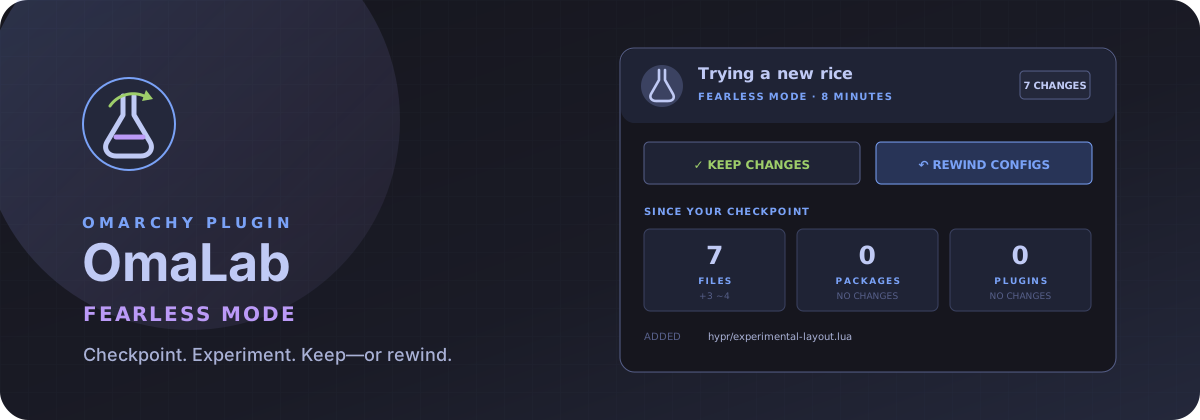
Fearless Mode for Omarchy. Capture your desktop configuration, experiment freely, then keep the result or rewind to exactly where you started.
OmaLab is an Omarchy 4 bar plugin built for the moment before you install a wild theme, replace your keybindings, or try an unfamiliar plugin and think: I hope I can get back from this.
Watch it work
Narrated one-minute demo
https://github.com/user-attachments/assets/aa20b615-706a-4402-ace1-e58f4e6e79c3
See the real checkpoint, theme experiment, configuration diff, rewind, and reversible undo.
What it does
- Creates a local checkpoint of Omarchy, Hyprland, supported terminal, and common shell-tool configuration without requiring root.
- Watches the experiment and reports added, changed, and removed files.
- Tracks explicit package and enabled-plugin changes.
- Restores checkpointed configuration after an explicit two-step confirmation.
- Preserves the experiment before every rewind, so the last rewind can itself be undone from the panel.
- Restores the starting Omarchy theme when it changed.
- Preserves OmaLab's own installed plugin directory during a rewind.
- Archives kept and rewound experiments under
~/.local/state/omalab/history/. - Opens Omarchy's official
omarchy snapshot createflow for an optional root snapshot before package or kernel experiments.
Package changes are reported but never automatically installed or removed. A configuration rewind is predictable; silently changing the system package set is not.
The experience
When idle, OmaLab is a small flask icon in the bar. Give the experiment an optional name, start Fearless Mode, and it becomes a live badge:
FEARLESS · 7
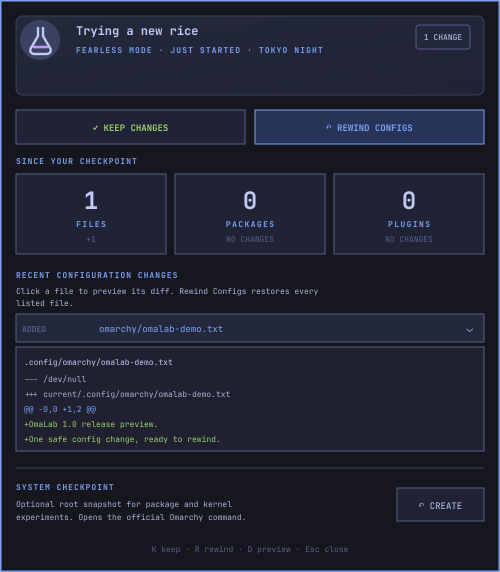
The panel separates file, package, and plugin changes, shows recent modified paths, and opens a bounded unified diff when a path is clicked. It offers two intentional exits:
- Keep Changes archives the checkpoint and leaves the experiment in place.
- Rewind Configs restores the checkpoint and archives a record of what was rewound.
Changed files appear as clickable rows beneath Configuration Changes.
Click a row to inspect its diff; Rewind Configs restores the entire
checkpoint, including files not shown in the panel. If the panel shows
0 changes, there is nothing to rewind yet—make a theme, bar, keybinding, or
terminal change and wait a few seconds for the live scan.
Both actions require a second click within five seconds. The same flow is fully
keyboard accessible with S, K, R, U, and Esc.
Active and idle scan intervals can be tuned from Omarchy's bar-widget settings; the defaults are five and thirty seconds respectively.
After a rewind, the idle panel offers Undo Last Rewind. OmaLab can do that because it captures the experiment into the owner-only local state directory before restoring anything. Undo also uses a two-step confirmation and preserves the post-rewind state before it acts.
The idle panel keeps the three newest experiments visible as a compact timeline of what was kept, rewound, or restored. The CLI retains the complete history.
Requirements
OmaLab targets Omarchy 4 and its Quickshell plugin system. Runtime dependencies
are Bash, jq, rsync, and standard GNU/Linux utilities supplied by a normal
Omarchy installation (coreutils, findutils, diffutils, util-linux,
gawk, grep, and glibc for iconv). OmaLab downloads no dependencies and
installs no background service. Run bin/omalab doctor to verify the required
commands and local state permissions.
Theme restoration, shell refresh, desktop notifications, and optional root snapshots use Omarchy's existing commands when available; OmaLab does not replace or install those integrations.
Install
Review the source, then let Omarchy clone, validate, and enable the plugin:
omarchy plugin add https://github.com/thebenwalther/omalab.git --enable
Omarchy displays its standard unsandboxed-plugin warning and asks for confirmation before cloning. Future releases can be installed with:
omarchy plugin update io.github.thebenwalther.omalab
Remove the plugin with omarchy plugin remove io.github.thebenwalther.omalab. Checkpoint
history remains under ~/.local/state/omalab/ unless the user deliberately
removes it.
Development install
The repository root is the plugin root. Link it into the user plugin directory so QML changes hot-reload while developing:
ln -s "$HOME/Work/omalab" \
  "$HOME/.config/omarchy/plugins/io.github.thebenwalther.omalab"
omarchy shell shell rescanPlugins
omarchy plugin enable io.github.thebenwalther.omalab --section right
Remove the development link with:
omarchy plugin disable io.github.thebenwalther.omalab
rm "$HOME/.config/omarchy/plugins/io.github.thebenwalther.omalab"
omarchy shell shell rescanPlugins
No user configuration is modified merely by cloning this repository or running the tests.
Command-line interface
The QML interface uses the same auditable command available to users:
bin/omalab start "Trying a new rice"
bin/omalab status
bin/omalab preview ".config/hypr/bindings.lua"
bin/omalab keep --yes
bin/omalab rewind --yes
bin/omalab undo --yes
bin/omalab history
bin/omalab doctor
status is stable JSON so the bar, tests, and future integrations all observe
the same state.
Protected configuration
OmaLab checkpoints these targets when they exist:
~/.config/hypr/~/.config/omarchy/- Alacritty, Foot, Kitty, and Ghostty configuration
- Starship, Fastfetch, btop, Lazygit, and Git configuration
Git metadata is excluded. OmaLab's own plugin directory is also excluded from both checkpoint and deletion passes, preventing the restore engine from replacing itself while it is running.
This is a local configuration safety net, not a backup of personal files. Documents, projects, photos, and other user data are intentionally out of scope. Root snapshots are delegated to Omarchy's existing Snapper integration.
Safety model
- Restore targets are a fixed allowlist below
~/.config/. - Checkpoint files are integrity-checked before any restore begins.
- A tracked directory replaced by a symlink is unlinked before restore, so
rsync --deletecannot follow it outside the configuration tree. - Checkpoints record the original
~/.configroot (directory or symlink). Restore safely realigns a swapped symlink or fails closed when doing so could discard untracked files, so a relocated~/.configcannot retarget deletion into another tree. - Shared/exclusive file locks serialize status scans and destructive actions.
- Failed scans clean their temporary state and never replace the last-good UI state with a false “inactive” result.
- The backend refuses a rewind without
--yes. - The UI requires a second confirmation within five seconds for keep, rewind, and undo.
- No network access, telemetry, root daemon, or credential storage.
- State is created with owner-only permissions (
0700directories and a0600lock file). - Package changes are observational only.
- Checkpoint creation is atomic: an incomplete checkpoint never becomes active.
- Rewinds, their experiments, and pre-undo safety copies are archived rather than silently discarded.
The complete trust boundary and failure behavior are documented in
SECURITY.md. The backend invariants and state layout are in
ARCHITECTURE.md.
Test
test/all
The test suite uses an isolated fake home directory. It verifies change detection, confirmation enforcement, restoration, rewind undo, checkpoint integrity, concurrent starts, locale independence, symlink-escape resistance, temporary-state cleanup, owner-only permissions, history, self-preservation, manifest validity, packaged-archive integrity, strict ShellCheck analysis, QML linting, and Qt-native presentation-model behavior without touching the live desktop configuration.
The privacy-safe prize recording sequence is documented in
docs/DEMO.md.
Roadmap
- Search and filtering across the complete experiment timeline.
- Selective per-file rewind directly from the diff preview.
- Package reconciliation plans that open in a terminal for explicit review.
- Snapper checkpoint detection and pairing without maintaining a privileged daemon.
- Disk-usage and snapshot-health warnings.
- Exportable, privacy-safe experiment reports for support requests.
License
MIT