
Switchboard
Every window on every workspace, live, one keystroke away.
Hyprland has no window overview. To reach a window you either remember which workspace it is on, or you cycle blindly until it turns up. Switchboard is a full-screen overview for Omarchy 4 that shows you every window as a live image — not an icon, not a title, the actual window — and gets you into one in a keystroke or two.
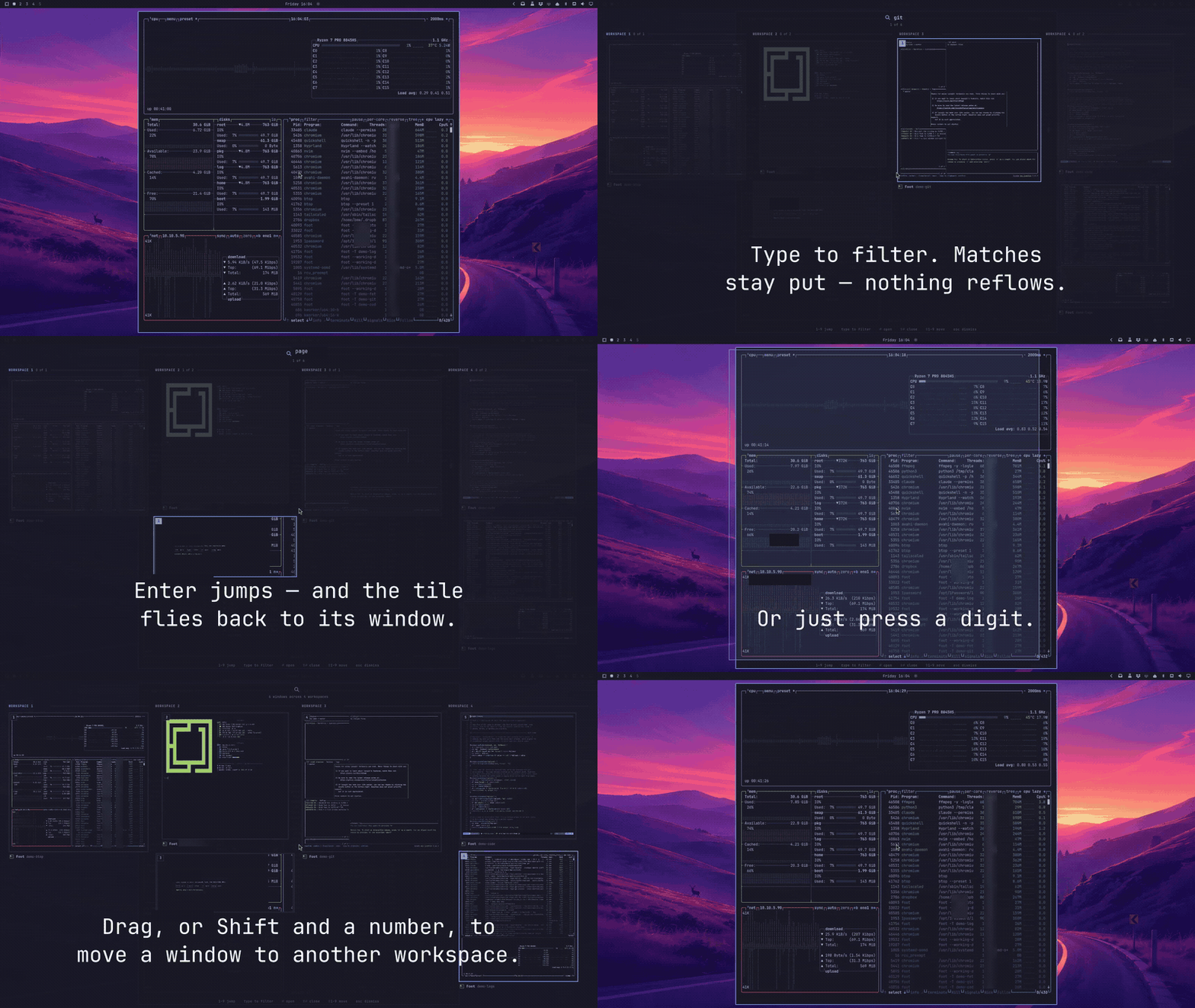
Full-resolution captioned recording.
Why it feels different
Every other exposé — Mission Control, GNOME Activities, hyprexpo — drops your
windows into a grid and makes you aim at one with the mouse. Switchboard is
built the other way round: it is a search field that happens to show you live
windows.
Two consequences shape everything else:
Filtering dims, it never reflows. Type fir and the non-matches fade and
recede where they already are. Nothing moves. Your memory of where things sit
on screen survives every keystroke, which is exactly what makes the second
keystroke fast. Switchers that re-sort on every character throw that away.
Digits jump, letters filter. No modes, no prefix key, nothing to remember.
1–9 badge the tiles in reading order and teleport you. Everything else goes
to the search field.
And the tiles are the real shape of your windows. A tall terminal stays tall, an ultrawide browser stays wide, and each workspace fills its column — so the overview reads as your desktop, not a wall of identical rectangles.
Install
omarchy plugin add https://github.com/thebenwalther/omarchy-switchboard.git --enable
Then bind it in ~/.config/hypr/bindings.lua:
o.bind("SUPER + SHIFT + code:51", "Switchboard: window overview", "omarchy-shell -q switchboard toggle")
That is SUPER + SHIFT + backslash — the combination your keyboard prints
as SUPER + |. Nothing in a stock Omarchy uses it, so nothing needs
unbinding.
It is bound by keycode rather than by the bar keysym. code:51 is the
backslash key's physical position, which is how Omarchy binds its own
punctuation keys, and it avoids depending on how a shifted keysym resolves.
There is a copy in examples/bindings.lua.
Uninstall
Remove the Switchboard line from ~/.config/hypr/bindings.lua, then remove the
plugin:
omarchy plugin remove io.github.thebenwalther.switchboard
If you created ~/.config/omarchy/switchboard.json, you can remove that file as
well.
Keys
| Key | What it does |
|---|---|
1–9 |
Jump to that tile |
| any letter | Filter by app name or window title |
← ↑ ↓ →, Tab, ⇧Tab |
Move the cursor, skipping filtered-out tiles |
⏎ |
Jump to the tile under the cursor |
⇧⏎ / Delete |
Close that window |
⇧1–⇧9 |
Send the cursor's window to workspace 1–9 |
Backspace |
Delete a character; on an empty query, dismiss |
Esc |
Dismiss |
With the mouse: hover moves the cursor, click jumps, middle-click closes, and dragging a tile onto another workspace column moves the window there — the view stays where it is, so you can keep rearranging.
Configuration
Switchboard needs no configuration. If you want some, create
~/.config/omarchy/switchboard.json; changes are picked up within a second.
Configuration files larger than 12 KiB are ignored.
{
  "maxTileHeight": 0,
  "liveCaptures": 8,
  "showScratchpad": true,
  "heroReturn": true,
  "dimOpacity": 0.25
}
| Key | Default | Meaning |
|---|---|---|
maxTileHeight |
0 |
Ceiling on tile height in pixels. 0 lets a tile grow until it fills its column or the screen, whichever comes first. |
liveCaptures |
8 |
How many tiles stream live at once. Everything else paints one frame and freezes. 0 freezes all of them. |
showScratchpad |
true |
Include special/scratchpad workspaces, which sort to the end. |
heroReturn |
true |
Fly the chosen tile to its window on jump. |
dimOpacity |
0.25 |
How far a filtered-out tile recedes. |
Switchboard follows your Omarchy theme automatically, including a live
omarchy theme set while it is open. Its corner radius tracks Hyprland's
decoration:rounding, so it is square when your desktop is square.
Want the desktop behind it blurred? The layer is named omarchy-switchboard:
layerrule = blur, omarchy-switchboard
Scripting
omarchy-shell switchboard toggle     # what the keybinding calls
omarchy-shell switchboard open
omarchy-shell switchboard close
omarchy-shell switchboard status     # JSON: open state, window count, config
Requirements
- Omarchy 4 (
omarchy-shell, Quickshell 0.3+) - Hyprland with
hyprland-toplevel-export-v1— this is what makes live captures of windows on other workspaces possible, and it has shipped for a long time. Without it Switchboard still works, showing app icons instead of live images.
How it works
Three files do the work. Switchboard.js holds every decision that does not
need a compositor — the fuzzy matcher, the column packer, window naming — and is
covered by test/switchboard.test.js. Overlay.qml
is the surface and the keyboard. Tile.qml is one window.
ARCHITECTURE.md has the details worth knowing before
changing anything.
node --test 'test/*.test.js'
omarchy plugin validate .
License
MIT — see LICENSE.