
Omahub
← All plugins
B

Wiretap

by Ben Walther

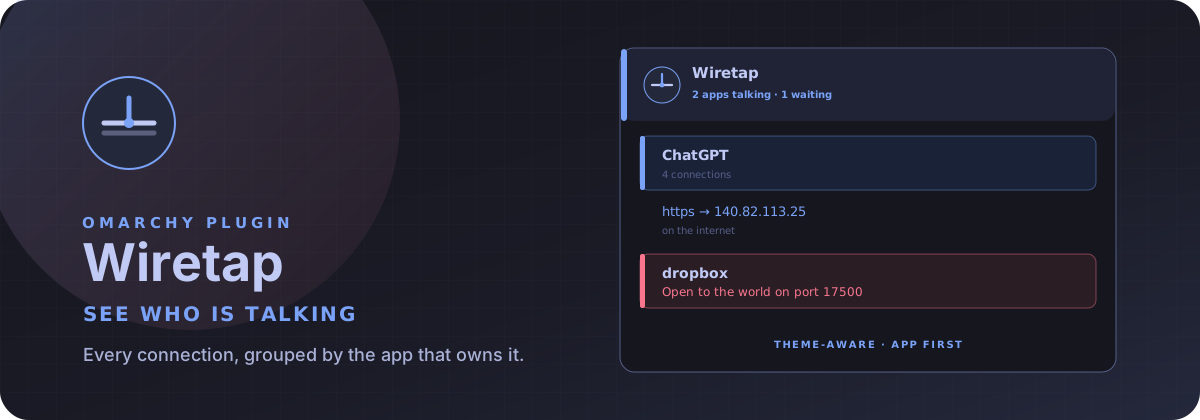
See who is talking. Connections grouped by the app that owns them.

Security review

Potentially dangerous behavior detected · 6 findings

Deterministic scan — not a security guarantee

High
Risk level
High
Analyzed commit
0f3c2cd
Scanned
1 month ago
  • high destructive_filesystem tests/test_snapshot.py:144

    Destructive operation on the root filesystem or a block device.

    rm -rf /`",pid=1,fd=3)) uid:1000 ino:1 sk:1 '
  • high destructive_filesystem tests/test_snapshot.py:148

    Destructive operation on the root filesystem or a block device.

    rm -rf /`")
  • Docs sudo README.md:84

    Command runs with sudo, elevating the process beyond the plugin environment.

    sudo or pkexec is required.
  • Augments a command with octal/hex escape sequences.

    \x2dlaunch-c3344855.scope <->
  • Augments a command with octal/hex escape sequences.

    \x2dlaunch-c3344855.scope <->
  • Augments a command with octal/hex escape sequences.

    \x2dlaunch-c3344855.scope v6only:1 <->

Automated analysis only — not a security guarantee.

AI advisory review

No obvious issues detected

Language-model assessment · ~deepseek/deepseek-v4-flash-latest — advisory only

Low
AI risk level
Low
Recommendation
install
Model
~deepseek/deepseek-v4-flash-latest
Analyzed commit
0f3c2cd
Reviewed
1 month ago

Wiretap is a read-only network socket observer: it runs `ss`, parses the output, and renders sockets grouped by process; file export and clipboard actions are user-triggered and documented. The deterministic scan's high finding is a false positive from a unit-test fixture where the string `rm -rf /` is parsed as a process name, not executed. The obfuscation and sudo findings are also artifacts of `ss` fixture data and the README's statement that no sudo/pkexec is required, leaving no real destructive or privileged behavior.

  • The `rm -rf /` finding is confined to tests/test_snapshot.py as quoted test input; it is never executed by the plugin.
  • The `\x2d` escapes in tests/fixtures/ss-tunep.txt are ordinary `ss` cgroup output, not obfuscated code.
  • The README line mentioning sudo is actually a negative statement: 'No sudo or pkexec is required.'
  • No hidden persistence, credential theft, exfiltration, or install-time destructive command was found.
How this check works

This review combines the deterministic scan (the rule-based results above) with an independent look at the plugin's code by a language model. The model reads a trimmed sample of the repository's files, the manifest, and the README, then gives a plain-language risk level and a recommendation: install (no notable danger), review (look closer first), or avoid (clearly dangerous).

It runs on the same analyzed commit as the deterministic scan and is strictly advisory — it is not a security guarantee and never blocks a plugin by itself. A human moderator still reviews plugins before they are listed.

AI advisory only — automated analysis, not a security guarantee.

Install
$ omarchy plugin add https://github.com/thebenwalther/omarchy-wiretap --enable
System #bar #system #security

Wiretap

Wiretap — See who is talking

See who is talking. Wiretap groups every connection on this machine by the app that owns it.

Network associates you to an AP. Wiretap shows who is on the wire.

Watch it work

https://github.com/user-attachments/assets/e72e82a6-91ad-4764-b880-9928f9c20f6a

A 14-second soundtracked loop of the mark, the live panel, and the verbs. Its distinct cyber-electronic score rides a restrained 100 BPM pulse, with the synth layer opening as the end card arrives. Rebuild the stills and video with docs/demo/record; the one-minute live-take plan is in docs/DEMO.md.

Install

omarchy plugin add https://github.com/thebenwalther/omarchy-wiretap.git --enable

Usage

Click the bar mark to open or close the inspector. Press Escape to close it.

The bar stays quiet until something is talking on the internet — then a count appears next to the mark. A new outbound conversation flashes the contact on the glyph.

  • Left-click: open or close the inspector
  • Right-click: cycle All → Talking → Waiting → Internet → This computer
  • Middle-click: refresh now

Inside the panel, apps are the parents. Open one to see who it is talking to, waiting for, or finishing with. Type to search. j/k move. Enter opens an app or copies a row.

Colors follow the current Omarchy theme: accent for talking, urgent for open-to-the-world.

Key Action
/ Find an app, site, or port
j k Move
h l Hide / show details
Enter Open an app or copy a row
c Copy the cursor row
e Copy the list
E Write ~/Downloads/wiretap-<unix>.json
a / A Show all / hide details
1–5 All, Talking, Waiting, Internet, This computer
r Refresh
s Show or hide system apps
Esc Close

Shell open and close use the bar-widget id, the same route Quattro uses for panel hotkeys:

omarchy-shell shell summon io.github.thebenwalther.wiretap '{}'
omarchy-shell shell hide io.github.thebenwalther.wiretap

CLI, if you want a machine-readable snapshot without the bar:

bin/wiretap snapshot --pretty
bin/wiretap snapshot --include-system --include-unconnected-udp

Local sockets stay hidden unless you pass --include-unix. Reverse DNS is not on the poll path. Wiretap does not overwrite configuration except the bar-widget settings you change yourself.

Configure

omarchy bar move io.github.thebenwalther.wiretap --section right

Place it beside omarchy.network. The interface widget and the conversation inspector are a pair.

Refresh speed, hidden classes, and the default view are bar-widget settings on that layout entry.

Requirements

  • Omarchy Quattro with shell plugin support
  • iproute2 (ss) — already on Omarchy
  • wl-copy for clipboard actions
  • No additional packages. No sudo or pkexec is required.

Remove

omarchy plugin remove io.github.thebenwalther.wiretap

Development

ln -sfn "$HOME/Work/wiretap" \
  "$HOME/.config/omarchy/plugins/io.github.thebenwalther.wiretap"
omarchy plugin enable io.github.thebenwalther.wiretap --section right
omarchy plugin validate "$HOME/Work/wiretap"
tests/all
docs/demo/record

License

MIT