Omahub
← All plugins
T

NetBird

by thebub

NetBird status, connection toggle, peer browsing, and quick copy actions in the Omarchy bar.

Security review

No obvious issues detected

Deterministic scan — not a security guarantee

None
Risk level
None
Analyzed commit
41673b3
Scanned
1 month ago

No potentially dangerous behavior detected in the analyzed commit.

Automated analysis only — not a security guarantee.

AI advisory review

No obvious issues detected

Language-model assessment · ~deepseek/deepseek-v4-flash-latest — advisory only

Low
AI risk level
Low
Recommendation
install
Model
~deepseek/deepseek-v4-flash-latest
Analyzed commit
41673b3
Reviewed
1 month ago

The plugin is a straightforward NetBird status/toggle bar widget. It runs the netbird and wl-copy CLIs with fixed arguments and properly shell-quotes clipboard text, with no obfuscation, persistence, or destructive actions. The only mild caution is that it executes external commands based on user interaction, which is expected behavior for this kind of widget.

  • Executes `netbird status --json`, `netbird networks list --json`, and toggles via `netbird up`/`down` as the user; this is normal for the plugin's purpose but carries the same privilege as the user.
  • Uses `bash -c` for clipboard copy, but input is passed through `Util.shellQuote` to prevent injection.
  • No network exfiltration or credential handling; all data stays local.
How this check works

This review combines the deterministic scan (the rule-based results above) with an independent look at the plugin's code by a language model. The model reads a trimmed sample of the repository's files, the manifest, and the README, then gives a plain-language risk level and a recommendation: install (no notable danger), review (look closer first), or avoid (clearly dangerous).

It runs on the same analyzed commit as the deterministic scan and is strictly advisory — it is not a security guarantee and never blocks a plugin by itself. A human moderator still reviews plugins before they are listed.

AI advisory only — automated analysis, not a security guarantee.

Install
$ omarchy plugin add https://github.com/thebub/omarchy-netbird --enable
Widgets #bar #system

NetBird for Omarchy

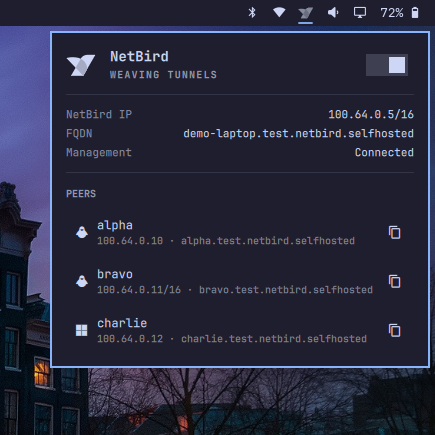
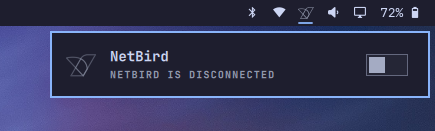
NetBird status in the Omarchy bar — toggle the connection, see your NetBird IP/FQDN, browse peers and copy IPs/FQDNs. Theme-aware bird icon (outline when disconnected, solid when connected) matching the Wi-Fi menu.

Preview

Connected Disconnected

Dummy data: 100.64.0.5/16, demo-laptop.test…, 3 peers — panel 435×435.

Install

omarchy plugin add https://github.com/thebub/omarchy-netbird.git --enable

The widget is placed to the right section after omarchy.network (like omarchy.tailscale).

Usage

  • Left click the bird → open/close panel.
  • Right click → toggle netbird up / netbird down.
  • Middle click → refresh status.
  • Inside panel: j/k navigate, Enter copy, n toggle, c copy peer IP, Escape close, Tab switch panel.
  • Panel shows NetBird IP (full CIDR, e.g. 100.64.0.5/16), FQDN, Management, and PEERS (IP · FQDN) with copy popup.

Configure

# Move / position
omarchy bar move io.github.thebub.netbird --section right --after omarchy.network

# Refresh interval (seconds, 5–3600, default 30)
# via Omarchy bar settings UI or shell.json barWidget settings

shell.json example:

{ "id": "io.github.thebub.netbird", "refreshIntervalSec": 30 }

Remove

omarchy plugin remove io.github.thebub.netbird

Requirements

  • netbird CLI on PATH (netbird status --json)
  • wl-copy (wl-clipboard) for copy actions
  • netbird.service systemd daemon (optional autostart: systemctl is-enabled netbird shows whether it restores last Connected state on boot)

License

MIT — see LICENSE. Bird SVG is the official NetBird logo, tinted to bar.foreground for theme parity.