
SABarchy
The visual SABnzbd dashboard for Omarchy.
A keyboard-first SABnzbd queue dashboard for Omarchy 4 Quattro. It keeps active downloads, post-processing, failures, and recent history visible in a compact theme-aware panel.
Screenshots
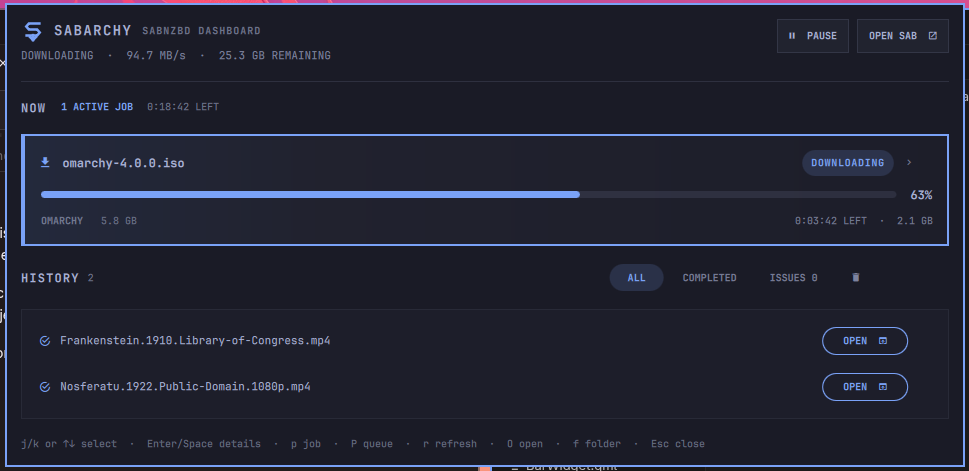
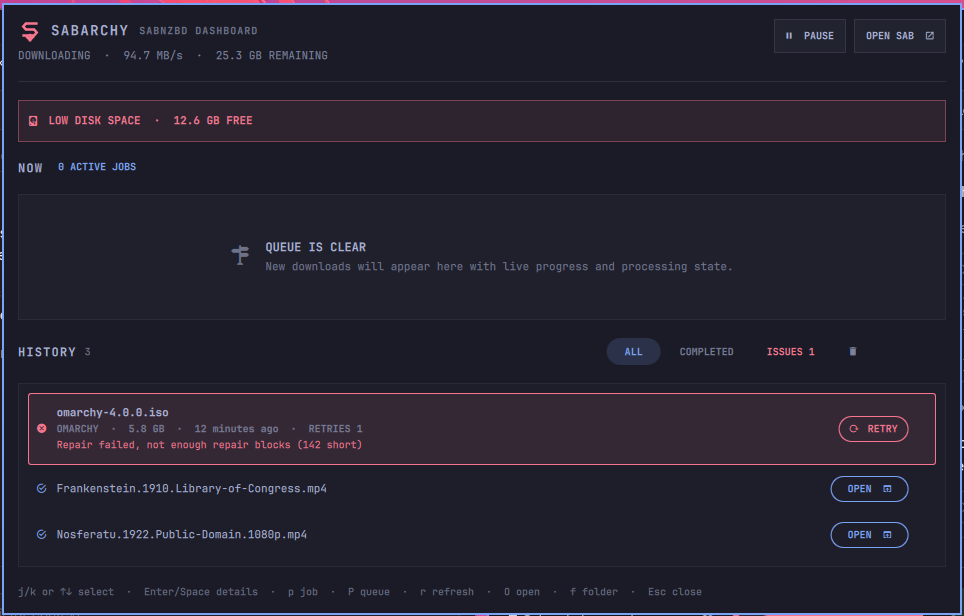
Failure recovery and low-disk warning
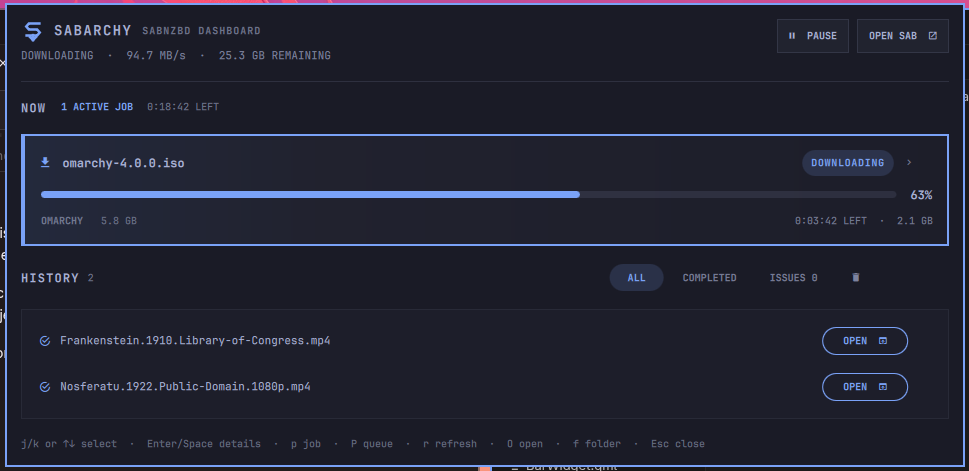
Tokyo Night
Features
- Live queue speed, ETA, state, and job progress
- Stage-aware colors as a job moves through download, verify, unpack, and failure
- Bar failure indicator when history issues need attention
- Desktop notifications for finished and failed downloads, with an optional sound
- Click a notification to open the SABarchy panel
- Open a completed job's folder straight from the history
- Responsive 620–960px layout with virtualized, bounded queue and history lists
- Incremental loading for large queues and histories
- Pause and resume from the bar or panel
- Expand active jobs for category, priority, labels, size, and individual pause/resume
- Keyboard navigation for selecting, expanding, pausing, and collapsing jobs
- A guided first-run state when SABnzbd has not been configured yet
- Preserve the last good snapshot during temporary disconnects and show its age
- Warn when SABnzbd reports less free disk space than the configured threshold
- Filter completed jobs and issues, retry failures, and archive completed history after confirmation
- Opens the SABnzbd web interface directly
- Reads the API key from the local SABnzbd configuration; credentials never appear in QML, shell configuration, or process arguments
- Local-only by design
Requirements
- Omarchy Quattro with
omarchy-shell - SABnzbd running locally
- Python 3 (standard library only)
Start SABnzbd once before enabling the widget so it creates
~/.sabnzbd/sabnzbd.ini.
Install
omarchy plugin add https://github.com/thecdrz/omarchy-sabarchy.git --enable
For local development:
cp -a . ~/.config/omarchy/plugins/io.github.thecdrz.sabarchy
omarchy-shell shell rescanPlugins
omarchy plugin enable io.github.thecdrz.sabarchy
Usage
- Left click the bar widget to open the pipeline
- Right click the widget to pause or resume the queue
rrefreshes the panelOopens SABnzbdfopens the selected completed job's folderUp/Downorj/kmove through the active queue and recent historyEnterorSpaceexpands or collapses the selected jobppauses or resumes the selected active jobPpauses or resumes the entire queueRretries a selected failed history itemXcollapses open job detailsEsccloses the panel
Configuration
The widget auto-detects ~/.sabnzbd/sabnzbd.ini and
~/.config/sabnzbd/sabnzbd.ini. If SABnzbd uses another location, set
SABnzbd config path in the Omarchy bar settings. The refresh interval
defaults to three seconds.
Notifications fire for downloads that finish or fail while the panel is closed; the first snapshot after a reload only builds a baseline, so existing history never triggers a burst. Failures arrive as critical notifications, and more than five finished jobs collapse into one summary. Play a sound with notifications uses the freedesktop sound theme through PipeWire.
Low disk warning (GB) defaults to 20 and accepts 0 to disable the warning
entirely. Open folder actions launch xdg-open on the absolute local path
SABnzbd reports for a completed job.
Security
The bundled helper reads only SABnzbd's local configuration and contacts only
127.0.0.1 on SABnzbd's configured port. The API key is used inside the Python
process and is never passed on the command line.
Local HTTPS is supported, including SABnzbd installations using a self-signed certificate. Certificate verification is relaxed only for the loopback address; the helper will not contact a remote host.
“Clear completed” uses SABnzbd's normal history archive operation. It does not delete downloaded files and does not clear failed history items.
Development previews
The helper includes deterministic snapshots for visual regression testing without live downloads:
bin/sabnzbd-pipeline-api snapshot --demo downloading
bin/sabnzbd-pipeline-api snapshot --demo clean
bin/sabnzbd-pipeline-api snapshot --demo processing
bin/sabnzbd-pipeline-api snapshot --demo multiple
bin/sabnzbd-pipeline-api snapshot --demo paused
bin/sabnzbd-pipeline-api snapshot --demo failed
bin/sabnzbd-pipeline-api snapshot --demo large
bin/sabnzbd-pipeline-api snapshot --demo not-configured
bin/sabnzbd-pipeline-api snapshot --demo offline
To load one in the installed widget, temporarily add "_demoState": "downloading" to its entry in ~/.config/omarchy/shell.json. This private key is intentionally absent from the public settings schema.
Add "_demoCompact": true alongside it to force the 620px compact layout. Fixture retry actions are simulated and never sent to SABnzbd.
"_demoExpandFirst": true expands the first active job. "_demoStale": true
previews the retained-data state. The failed fixture also exercises the
low-disk warning. "_demoExpandHistory": true expands the first history item.
"_demoNotify": "completed", "failed", or "both" sends sample notifications
once the demo snapshot loads, so notification appearance can be checked without
a live download. Fixture retry and open-folder actions are simulated and never
sent to SABnzbd or passed to xdg-open.
Run the helper tests with python -m unittest discover -s tests -v.
License
MIT
Remove
omarchy plugin remove io.github.thecdrz.sabarchy