
GoXLR
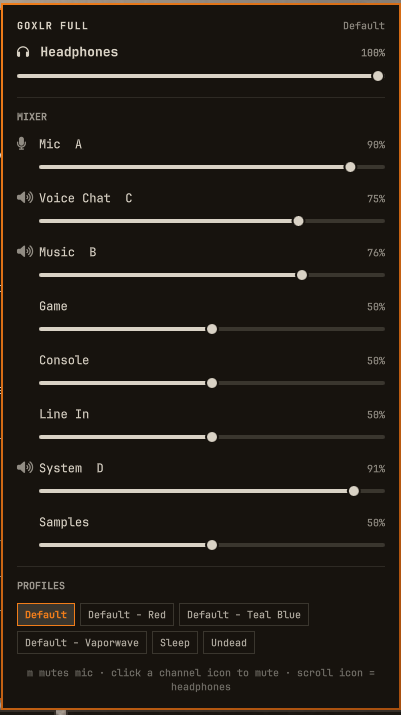
Mixer control for a TC-Helicon GoXLR, in the Omarchy bar.
TC-Helicon never shipped Linux software for these. goxlr-utility does the hard part — it talks to the device and exposes a daemon — but its UI is a web page, and opening a browser tab to mute your microphone mid-call is not a good arrangement. This puts the controls you actually reach for during a call one click away, and shows mic state in the bar so you can see you are muted without opening anything at all.
Requirements
- Omarchy 4 (Quattro shell)
- goxlr-utility 1.x, with
goxlr-daemonrunning (yay -S goxlr-utility, thensystemctl --user enable --now goxlr-daemon) - A GoXLR or GoXLR Mini
The widget reports the specific reason when any of that is missing rather than drawing a dead mixer, so it is safe to install before the hardware arrives.
Install
omarchy plugin add https://github.com/thedarkcr0w/omarchy-goxlr --enable
Using it
| Interaction | Result |
|---|---|
| Left click | Open the mixer panel |
| Right click | Mute / unmute the mic |
| Middle click | Force a refresh |
| Scroll on icon | Headphone volume ±4% |
m (panel open) |
Mute / unmute the mic |
Esc |
Close |
The bar icon is a set of mixer faders normally, and a struck-through microphone in the theme's urgent colour while the mic is muted — so mic state is readable at a glance without opening anything.
Panel
- Headphones master at the top.
- Mixer — every channel the device reports. Channels bound to a physical fader show their fader letter (A–D) and a mute toggle; unassigned channels are volume-only, because the device has no mute for them.
- Profiles — every profile the daemon knows about; the active one is outlined in the theme accent. Clicking one loads it.
How it works
bin/goxlr-state wraps goxlr-client --status-json (a local IPC call to the
daemon, ~4ms) and reshapes its very large payload into just what the panel
draws. Writes go out as ordinary goxlr-client calls:
goxlr-client volume <channel> <0-100>
goxlr-client faders mute-state <a|b|c|d> <unmuted|muted-to-x|muted-to-all>
goxlr-client profiles device load "<name>"
The device reports volumes as 0–255 but goxlr-client volume takes a
percentage, so the helper normalises everything to percent.
Slider drags are applied optimistically and pushed to the device on a 60ms
throttle, so a fast drag doesn't spawn a goxlr-client per pixel. The poll
(700ms while open, 4s while closed) skips overwriting a slider mid-drag, so
the panel also tracks the physical faders when you move them by hand.
Muted channels
Muting a fader to All makes the device report that channel's volume as 0 and restore it on unmute. The panel shows that honestly, and disables the slider while muted — otherwise you would be dragging a real level against a reading that isn't the real one. Unmute from the channel icon.
If the device is unplugged
The panel says so rather than showing a dead mixer, and the helper reports the
specific reason (goxlr-client not installed, goxlr-daemon not responding,
no GoXLR connected). The widget recovers on its own when the device returns.
Configuration
None. Everything the widget shows is read from the device through the daemon, including which channels exist and which faders they are bound to, so a GoXLR and a GoXLR Mini both come up correct with no setup.
Removing it
omarchy plugin remove io.github.thedarkcr0w.goxlr --yes
Nothing is written outside the plugin folder — the device keeps its own state, so your volumes and profiles are exactly where you left them.
License
MIT. See LICENSE.