
Trofeo Vision
Drives the LCD on a Thermalright Trofeo Vision cooler from Linux, and lights the rest of the machine to match.
Thermalright ships a Windows app for these screens and nothing at all for Linux, so the panel sits there dark on an otherwise finished build. This runs it properly: animated GIFs, video, and a live readout of what the machine is actually doing, at the panel's native 1920x462. The same daemon drives every RGB controller OpenRGB can see, so the case and the screen are one thing rather than two apps that disagree.
Roughly what InfoPanel does on Windows, except the panel is a systemd user
service and everything it can do is one trofeo command away.
Hardware
Built for and tested on a Trofeo Vision 9.16 (0416:5408, 1920x462,
reporting PM 65 / SUB 5). The 0416:5409 variant is handled by the same code
path but I have not had one to try.
The panel is a vendor-class USB device with two bulk endpoints; it is not a
display the compositor knows about, and nothing here touches your monitors.
If lsusb shows 0416:5408 or 0416:5409, this should drive it. Other
Thermalright screens speak different protocols and will not work —
thermalright-trcc-linux covers far more of them.
Requirements
- Omarchy 4 (Quattro shell)
python-pyusb,python-pillow,python-psutil,openrgb,ffmpeg- Optional:
zenityfor the file picker,nvidia-smifor GPU telemetry
The installer pulls the packages in for you; nothing needs to be set up first.
Install
omarchy plugin add https://github.com/thedarkcr0w/omarchy-trofeo --enable
trofeo install
trofeo install is the part that needs your password, once. It installs the
packages, writes a udev rule so the panel is reachable without root, loads
i2c-dev so SMBus lighting has its character devices, registers the daemon
and the OpenRGB server as user services, and links the trofeo command into
~/.local/bin.
Privileges
Nothing this plugin installs keeps running as root. The password buys a udev rule, a module and the packages; after that everything is your own session.
The elevated half is handed to bash as an argument rather than written to a
file and run by path. A script sitting in /tmp — or anywhere else this
account can write — can be rewritten between the moment the password prompt
goes up and the moment root reaches the shebang, which turns "may I install a
udev rule" into "may I run whatever is in that file as root". Read exactly
what runs with:
trofeo install --print-root-script
The panel and the RGB controllers are reachable because udev hands them to
whoever is logged in at the seat — the same uaccess tag that hands over
webcams and joysticks. That is why the OpenRGB server is a user service and
not a root one: /dev/i2c-*, hidraw and /dev/port already belong to the
logged-in user through openrgb's own udev rules, so SMBus never needed root,
and a bug in that server's protocol parser is a bug in a process holding
nothing your session does not already hold.
What that leaves: the OpenRGB SDK is a TCP server with no authentication, so
anything on the machine that can open a socket can drive your lighting while
trofeo runs. It is bound to 127.0.0.1 — openrgb's own default is 0.0.0.0,
which would put it on every interface — it starts and stops with the daemon,
and it holds no privileges. It is still not access-controlled, because the
protocol has nothing to control access with. If that is not a trade you want,
systemctl --user mask trofeo-openrgb: the panel and its telemetry carry on,
and only the lighting goes.
Using it
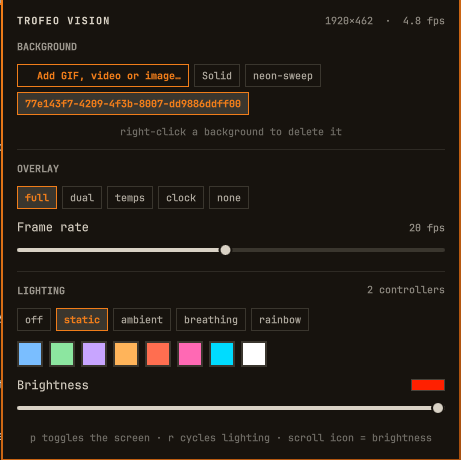
| Interaction | Result |
|---|---|
| Left click | Open the control panel |
| Right click | Screen on / off |
| Middle click | Force a refresh |
| Scroll on icon | RGB brightness ±5% |
p (panel open) |
Screen on / off |
r (panel open) |
Cycle lighting mode |
Esc |
Close |
SUPER + SHIFT + T |
Open the control panel |
The bar icon is a display normally and a power symbol when the screen is off or the daemon cannot reach it, so panel state reads at a glance.
Backgrounds
Animations — .gif, .webp, .apng, played at their own frame timing.
Video — .mp4, .mkv, .webm, .mov, .avi, .m4v, decoded once
through ffmpeg and looped. Stills — .png, .jpg, .bmp.
Video is decoded at import, not played live: ffmpeg scales it and emits an
MJPEG stream that goes straight into the frame cache, so playback costs the
same as a GIF and nothing shells out per frame. The first 30 seconds are kept
(rgb-style knobs panel.background.video_fps and video_max_frames), then
the clip loops. A 4K source is scaled by ffmpeg, so it is never decoded at
full size in Python.
The quickest route is the bar widget: click the panel icon, then “Add GIF or
image…” at the top of the BACKGROUND row. Right-click a stored background to
delete it. The same picker is at Omarchy menu → Trofeo Vision → Add
background…, and files dropped into ~/.config/trofeo/gifs/ are picked up
too.
trofeo gif add ~/Pictures/loop.gif --use   # import and show it
trofeo gif list                            # what is stored
trofeo bg loop --fit contain               # switch, and letterbox it
trofeo bg solid                            # back to a flat colour
Or use Omarchy menu → Trofeo Vision → Add background…, which opens a file
picker, or just drop files into ~/.config/trofeo/gifs/.
--fit is cover (fill and crop, the default), contain (letterbox) or
stretch. The panel is 4.16:1, so a square GIF loses a lot of its height
under cover — contain is usually the better answer for one of those.
Overlays
trofeo layout          # list them, marking the active one
trofeo layout dual
| Layout | Shows |
|---|---|
full |
CPU, GPU, memory, disk and network |
dual |
CPU and GPU, at the largest type the panel carries |
temps |
Thermals and VRAM |
clock |
A big clock, letting the GIF have the panel |
none |
Background only |
Temperature readings shift from their metric's accent through amber to red as they climb, so a hot part is visible from across the room without reading the number.
Tune the look with trofeo scrim 60 (how dark the backdrop behind text is,
0–100) and trofeo accent '#ff6e50'.
Tiles lay themselves out along whichever axis is longer, so trofeo orientation 90 (a panel mounted on its side) stacks them into a column
instead of crushing five of them into 76px slivers. Composing the transposed
1920-tall canvas costs about twice as much, so expect roughly half the frame
rate at 90° and 270°.
Lighting
Every controller OpenRGB can see — motherboard, DRAM, GPU, coolers, peripherals.
trofeo rgb devices          # what OpenRGB found
trofeo rgb modes            # effects, and which are common to all controllers
trofeo rgb color orange     # or '#ff6e50', or '255,110,0'
trofeo rgb mode breathing
trofeo rgb brightness 60
trofeo rgb ambient          # follow the panel background
trofeo rgb off
Addressable headers (fans, strips)
An ARGB header is write-only — the board cannot tell whether three fans or nothing at all is plugged into it, so OpenRGB reports the zone as 0 LEDs and silently displays nothing you send. This is the usual reason fans stay dark while the GPU changes colour fine.
The daemon therefore gives every resizable zone a length on connect,
rgb.default_argb_leds (24) unless you say otherwise:
trofeo rgb zone                  # what each header is set to
trofeo rgb zone ARGB_V2_1 36     # this header has 36 LEDs on it
Over-provisioning is the safe direction: a shorter strip ignores the extra pixels, so 24 on an 8-LED fan lights all 8. A count that is too low leaves the rest of the strip dark. Raise it until the whole chain lights.
DRAM lighting
DDR5 RGB sits behind the AMD SMBus, and ACPI claims that IO range by default:
ACPI Warning: SystemIO range 0x0B00-0x0B08 conflicts with OpRegion (\GSA1.SMBI)
ACPI: OSL: Resource conflict; ACPI support missing from driver?
i2c_piix4 then never registers an adapter and the DIMMs are invisible to
every lighting tool. The fix is a kernel parameter, installed here as
/etc/limine-entry-tool.d/98-smbus-rgb.conf:
KERNEL_CMDLINE[default]+=" acpi_enforce_resources=lax"
It needs a reboot. To undo it, delete that file and run limine-update.
Ambient is the one worth trying: the daemon samples the GIF frame it just drew and pushes that colour to the whole machine, so the case tracks whatever is on the screen. The sample is weighted toward vivid pixels rather than a flat mean — a dark GIF with one neon element lights the room that colour instead of muddy grey — then eased so it glides rather than strobes.
Command reference
trofeo status                    panel and lighting state
trofeo on | off | toggle         screen power
trofeo bg <name|path|solid>      background        [--fit cover|contain|stretch]
trofeo layout [name]             stats overlay
trofeo fps <n>                   target frame rate (1-60)
trofeo orientation <0|90|180|270>
trofeo quality <30-97>           JPEG quality
trofeo scrim <0-100>             overlay backdrop opacity
trofeo accent <colour>           overlay accent
trofeo gif add|list|rm           manage backgrounds
trofeo rgb zone [name] [count]   LEDs on an addressable header
trofeo rgb ...                   see above
trofeo preview [file.png]        render a frame to a file, no hardware needed
trofeo probe                     handshake the panel directly
trofeo get|set <path> [value]    raw config access
trofeo start|stop|restart|logs   the user service
trofeo install                   udev rule and services
How it works
trofeod ── render loop ── USB bulk ──> panel        (main thread)
   ├───── sensors ─────────────────────────────      (background thread)
   ├───── OpenRGB ────── TCP 6742 ──> controllers    (background thread)
   └───── unix socket <── trofeo / Panel.qml
The daemon owns all state. The CLI and the bar widget only ask it for things
over $XDG_RUNTIME_DIR/trofeo.sock, so there is one writer and no way for the
widget and a shell command to disagree about what is on screen.
The wire protocol. The panel is a vendor-class USB device with two bulk endpoints. A fixed 2048-byte handshake returns the geometry (this unit answers PM 65 / SUB 5 → 1920×462); frames are JPEG, sliced into 512-byte chunks behind a 16-byte header, with the chunk count padded to a multiple of four. Two things that are easy to get wrong:
- The OUT endpoint is 0x09 on this unit, not the
0x01the protocol notes imply, so endpoints are read off the descriptor. - At orientation 0 the frame is rotated 180° before encoding — the panel is mounted upside down relative to its framebuffer. An unrotated image shows up inverted on the cooler.
The protocol is a port of thermalright-trcc-linux (GPL-3.0), which
reverse-engineered it from TRCC 2.1.2's USBLCDNEW.dll. This plugin carries
the same licence.
Frame cost. Animated backgrounds are scaled once at import and held as
JPEG bytes, one decoded per tick — a 120-frame GIF is ~14 MB in RAM instead of
320 MB raw. When neither the background nor the overlay text has changed the
cached frame is resent as-is rather than recomposed, which is why a static
background at full costs almost nothing between the once-a-second stat
updates. The panel blanks if the USB link goes idle, so frames never stop
entirely; they drop to 4/s.
If something is wrong
trofeo status          # first stop
trofeo logs -f         # what the daemon is doing
trofeo probe           # talk to the panel without the daemon
trofeo preview             # is it the render or the link?
"permission denied on the USB device" — the udev rule is missing, or you
are not the logged-in user at the seat. The rule hands the panel to the active
session rather than to everyone; run trofeo install and replug the panel.
"panel is busy" — something else holds it. The vendor app under Wine, or a second copy of the daemon.
"cannot reach the OpenRGB server" — systemctl --user status trofeo-openrgb. It starts with the daemon and stops with it, as you rather
than as root. If it will not bind, something else already holds 6742: usually
a system-wide openrgb.service or the OpenRGB GUI. Motherboard and DRAM
lighting also want the i2c-dev module, which the installer loads and pins at
boot.
The picture is upside down — the encode base is keyed on the handshake SUB
byte, and a different SKU reports a different one. trofeo orientation 180
corrects it.
Fans or strips stay dark while the GPU works — the header is sized 0.
See "Addressable headers" above; trofeo rgb zone is the knob.
RAM stays dark — check i2cdetect -l for an SMBus adapter. If there is
none, the ACPI conflict above is why; that needs the kernel parameter and a
reboot.
Files
~/.config/omarchy/plugins/io.github.thedarkcr0w.trofeo/   this plugin
~/.config/trofeo/config.json                     settings (the daemon owns this)
~/.config/trofeo/gifs/                           backgrounds
~/.config/systemd/user/trofeo.service            the daemon
~/.config/systemd/user/trofeo-openrgb.service    the lighting server
/etc/udev/rules.d/60-trofeo.rules                panel permissions
/etc/modules-load.d/trofeo-openrgb.conf          i2c-dev at boot
Removing it
trofeo stop
systemctl --user disable trofeo.service
omarchy plugin remove io.github.thedarkcr0w.trofeo --yes
rm ~/.local/bin/trofeo ~/.config/systemd/user/trofeo.service \
   ~/.config/systemd/user/trofeo-openrgb.service
That leaves two root-owned files the installer put down, if you want them gone too:
sudo rm /etc/udev/rules.d/60-trofeo.rules /etc/modules-load.d/trofeo-openrgb.conf
Your settings and backgrounds are in ~/.config/trofeo/; delete that as well
for a clean sweep. The kernel parameter, if you added one for DRAM lighting,
is /etc/limine-entry-tool.d/98-smbus-rgb.conf or your bootloader's
equivalent.
Credits
The USB wire protocol is a port of thermalright-trcc-linux, which did
the reverse engineering against TRCC 2.1.2's USBLCDNEW.dll. Without that
work this would not exist. That project is GPL-3.0, so this one is too.
License
GPL-3.0-or-later. See LICENSE for the licence text and COPYRIGHT for the copyright and upstream attribution.