
Omahub
← All plugins
T

Thermals

by thepeterkovacs

Shows CPU and GPU temperatures on the Omarchy bar, with a detailed thermal panel on click. Reads lm_sensors (AMD, Intel, and other sensors).

Security review

Review recommended · 1 finding

Deterministic scan — not a security guarantee

Low
Risk level
Low
Analyzed commit
5178893
Scanned
1 month ago

Flagged patterns appear only in documentation files (README / docs) — descriptive examples, not executable code.

  • Docs external_hosts README.md:41

    Downloads or connects to an external HTTP(S) host.

    git clone https://github.com/thepeterkovacs/omarchy-thermals \

Automated analysis only — not a security guarantee.

AI advisory review

No obvious issues detected

Language-model assessment · ~deepseek/deepseek-v4-flash-latest — advisory only

Low
AI risk level
Low
Recommendation
install
Model
~deepseek/deepseek-v4-flash-latest
Analyzed commit
5178893
Reviewed
1 month ago

The plugin reads CPU/GPU temperatures via lm_sensors and displays them in a bar widget. No dangerous operations, network access, or credential handling. The only flagged item is a documentation link in the README, which is not executable code.

How this check works

This review combines the deterministic scan (the rule-based results above) with an independent look at the plugin's code by a language model. The model reads a trimmed sample of the repository's files, the manifest, and the README, then gives a plain-language risk level and a recommendation: install (no notable danger), review (look closer first), or avoid (clearly dangerous).

It runs on the same analyzed commit as the deterministic scan and is strictly advisory — it is not a security guarantee and never blocks a plugin by itself. A human moderator still reviews plugins before they are listed.

AI advisory only — automated analysis, not a security guarantee.

Install
$ omarchy plugin add https://github.com/thepeterkovacs/omarchy-thermals --enable
System #system

Thermals

An Omarchy bar widget that shows your CPU and GPU temperatures at a glance, with a detailed thermal panel on click.

  • Bar — CPU package temperature and GPU hotspot, side by side. Turns the bar's urgent color when things get too hot.
  • Panel (click the widget) — a full breakdown of every thermal sensor the machine reports: CPU package and per-core/CCD channels, GPU hotspot / edge / memory, plus storage (NVMe/SATA), RAM, motherboard, and network sensors. Readings approaching their critical threshold are highlighted.

Reads temperatures from lm_sensors (sensors -j) and works with AMD and Intel CPUs and GPUs out of the box.

Screenshots

The widget sits on the bar; clicking it opens the full thermal panel.
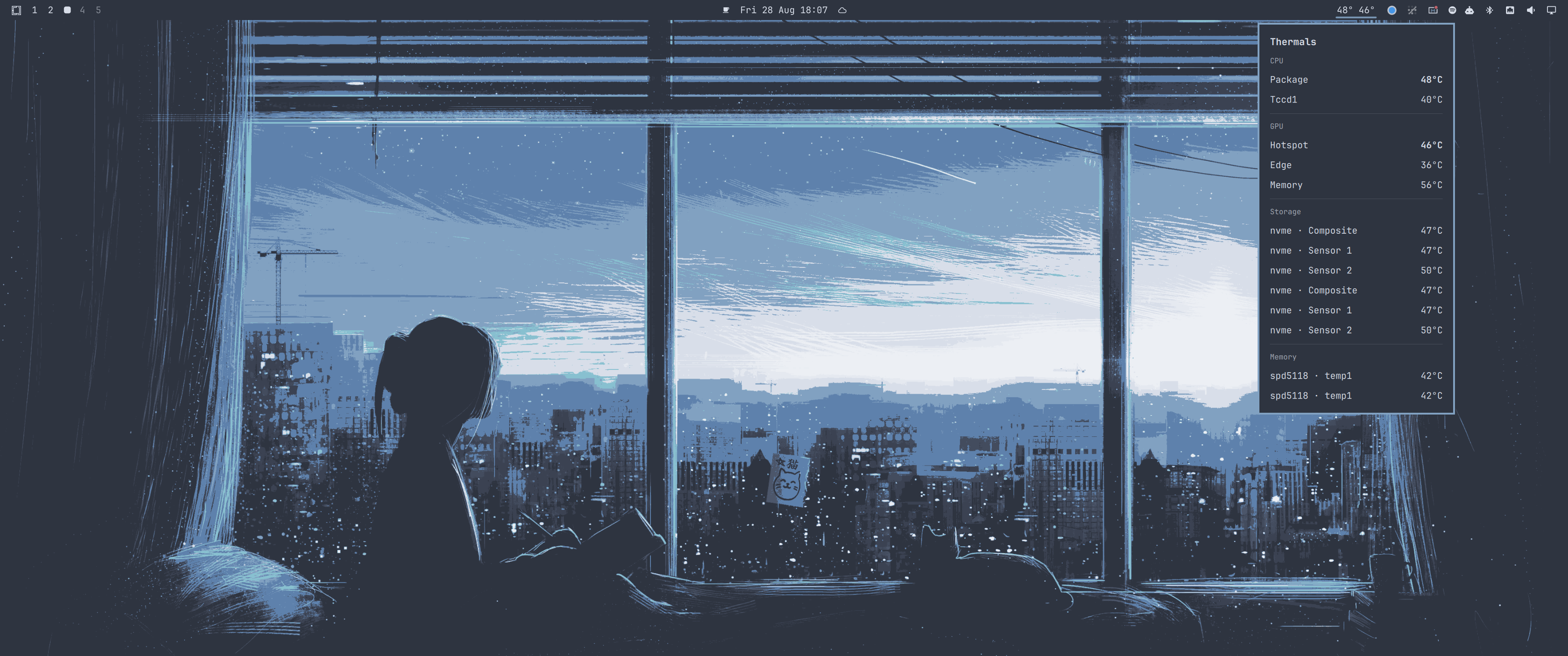
Thermals on the Omarchy bar with the panel open

Requirements

  • Omarchy (Quickshell-based shell)
  • lm_sensors installed and configured (sudo sensors-detect, then verify with sensors)

Note on NVIDIA GPUs: discrete NVIDIA cards do not expose temperatures through lm_sensors, so their GPU reading will show --. AMD and Intel GPUs are fully supported.

Install

omarchy plugin add https://github.com/thepeterkovacs/omarchy-thermals --enable

Or clone it into your plugins directory manually:

git clone https://github.com/thepeterkovacs/omarchy-thermals \
  ~/.config/omarchy/plugins/io.github.thepeterkovacs.thermals
omarchy restart shell

Then place it on the bar (if it isn't already):

omarchy plugin enable io.github.thepeterkovacs.thermals right

Configuration

The refresh interval and "too hot" thresholds are near the top of BarWidget.qml:

readonly property int refreshMs: 3000   // how often to read sensors, in ms
readonly property int cpuHot: 90        // CPU °C that turns the bar urgent
readonly property int gpuHot: 95        // GPU °C that turns the bar urgent

License

MIT